

The message that follows the phone call
mCallz: Auto WhatsApp Message After Call for Missed, Incoming and Outgoing Calls
An auto WhatsApp message after call is a text that goes out on WhatsApp by itself once a phone call ends, so the caller gets your details, link or apology without anyone typing it. mCallz writes a different message for a missed, an incoming and an outgoing call, and logs whether each one was sent.
- Three call types, three separate messages, each with its own attachment
- Send silently through the API, or open WhatsApp with the text filled in
- Quiet hours, a cooldown per number and a list of contacts to leave out
Calls go out on each phone's own SIM. Dialer, CRM and WhatsApp for ₹4,000 per user a year (₹333/month), down to ₹208/month for bigger teams. GST extra.
- Works on the SIM in each phone
- Android, iPhone and web
- Free trial at app.mcallz.com
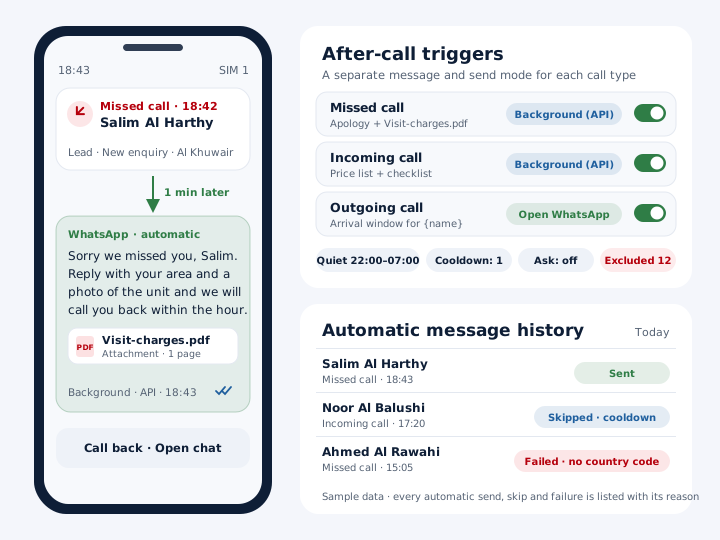
The short answer
What is an auto WhatsApp message after call?
An auto WhatsApp message after call is a text sent by itself when a call ends, worded for a missed, answered or outgoing call.
mCallz sends an automatic WhatsApp message after phone calls on the team's own SIM, and it treats the three kinds of call separately. A missed call can get an apology and a booking link, an incoming call a thank-you with the price list, and an outgoing call a short recap of what was agreed. For each trigger you decide how it leaves the phone: quietly in the background through a WhatsApp Business API provider, or by opening WhatsApp with the text already typed so the employee only taps send. Guard rails stop it from turning into spam: quiet hours, a cooldown for each number, an ask-before-send option and a list of excluded contacts. A history screen marks each automatic message sent, skipped or failed, with the reason beside it. All of this is taken from the app's 14 October 2026 feature record.
- The wording changes with the call: missed, incoming or outgoing.
- Each trigger picks its own route, background API or WhatsApp opened and ready.
- Every automatic send, skip and failure is logged with a reason.
Benefits
Auto WhatsApp message after call benefits for busy phone lines
Missed callers hear back at once
Someone whose call you could not take gets a reply on WhatsApp while they are still deciding whom to try next.
No typing between calls
The text that used to be copied from a notes app goes out on its own after the call ends.
Wording that fits the call
An apology for a missed call and a recap after a sales call never get mixed up.
Control over timing
Quiet hours and a per-number cooldown keep regular callers from receiving the same text again and again.
Proof of what went out
The send log answers "did the customer get the location pin?" without guessing.
One setup for the team
The same triggers run on every employee's phone, so customers get the same message whoever took the call.
The three call triggers
Auto WhatsApp after call: one message per call type
A single message for every call sounds simple but reads badly. The person you failed to answer, the customer who rang you and the lead you just phoned are in different situations, so mCallz keeps a separate message for each.
A brochure, photo, short video or voice note can ride along as an attachment on any of the three. Personalised variables such as {name}, {city} and {company} pull details from the lead record, which turns "Dear customer" into a greeting with the person's actual name.
Missed call
Sent when a call rings out unanswered. Typical use: "Sorry we missed you, here is our booking link", plus opening hours or a location pin.
Incoming call
Sent after a call the customer made to you and you answered. Typical use: the price list, a catalogue PDF or your payment details.
Outgoing call
Sent after a call you placed. Typical use: a short recap of the offer, the meeting time or the documents the lead should prepare.
Send mode
WhatsApp message after call: background or ready to send
Every trigger has its own send mode, and the choice matters more than it first appears.
Background through the WhatsApp Business API. The message leaves through the API provider you connected, and the phone screen does not change. Nobody has to touch anything, which suits a busy front desk. Under WhatsApp's rules a business message to someone who has not written to you recently generally has to use an approved template, so check with your provider; mCallz can sync your approved templates from it.
Open WhatsApp with the message ready. When the call ends, WhatsApp or WhatsApp Business opens on that contact with the text already typed. The employee glances at it, edits if needed and taps send. No API account is involved, so a one-person business can start the same day.
Teams often mix the two: missed calls go out in the background around the clock, while recaps after outgoing calls open WhatsApp so the salesperson can add a personal line.
Guard rails
Auto message after call settings that prevent spam
An automatic message is only welcome when it is rare and relevant. Four settings keep it that way:
- Quiet hours: no automatic messages during the hours you block out, for example late at night.
- Per-number cooldown: a customer who rings three times in an afternoon receives one message, not three.
- Ask before send: the app asks for a confirmation first, for teams that want a person to approve every message.
- Excluded contacts: family, suppliers or staff numbers that should never get an automatic text; excluded numbers are also left out of backup.
Message history
Auto WhatsApp message after call history: sent, skipped, failed
A screen of automatic messages lists every one the app tried to send. Each row is marked sent, skipped or failed, and a reason is shown next to it, so "skipped because of quiet hours" and "failed at the provider" no longer look the same.
This is the screen to open when a customer says the message never arrived, or when an owner wants to confirm that the new missed-call text is really going out on all phones.
Beyond calls
Auto WhatsApp after call and three more triggers
The engine that sends a message after a call also reacts to other moments in a customer's journey:
- Status change: any lead status, including ones you created, can send its own text, such as directions when a lead moves to "Visit booked".
- Sale: recording a sale can send a thank-you or an invoice note.
- Reminder: when a follow-up reminder fires, the customer can receive a message at the same moment.
Not the same thing
Auto message after call vs WhatsApp auto reply
Many people searching for this are really asking about WhatsApp's own auto reply, so here is the difference in plain words.
The WhatsApp Business app has a greeting message and an away message. They answer people who send you a chat. Ordinary WhatsApp has no automatic reply at all. Neither one knows anything about your phone calls.
mCallz works from the other direction: it watches the calls on your SIM and sends a WhatsApp message after a call ends, even to someone who has never written to you. Many businesses use both: the away message for chats at night, and an after-call message for the calls they miss.
At a glance
Auto WhatsApp message after call triggers compared
| Trigger | What it does | Best for |
|---|---|---|
| Missed call | Sends your chosen text and file after an unanswered call | Shops and clinics that cannot pick up every ring |
| Incoming call | Sends a follow-up after a call the customer made to you | Price lists, catalogues and payment details |
| Outgoing call | Sends a message after a call your employee placed | Recaps of offers and meeting times |
| Status change | Sends a message when a lead moves to any status, custom ones too | Visit confirmations and document checklists |
| Sale | Sends a message when a sale is recorded | Thank-you notes and receipts |
| Reminder | Sends a message as a follow-up reminder fires | Appointment and payment nudges |
| Send log | Lists each automatic message as sent, skipped or failed, with a reason | Owners checking that automation works |
Honest limits
Auto WhatsApp message after call limits
The after-call message is built around phone calls on your own SIM. Look elsewhere in these situations:
- You want a bot to answer chats. mCallz sends messages after calls and other events; it does not hold a conversation by itself. For chat greetings, the away message in the WhatsApp Business app is the simpler tool.
- You need calls answered automatically. Nothing here picks up a call for you, and phone-system extras such as an IVR, virtual lines and queueing are planned but not shipped yet.
- You want SMS instead of WhatsApp. The automatic messages described here are WhatsApp messages; text-message automation is not part of this feature.
- Your team only uses iPhones. iPhones keep their call history private from third-party apps, so test the after-call trigger on an iPhone during the trial before committing; Android phones are the safe choice.
Worked example
Auto WhatsApp message after call example: an AC repair firm in Muscat
An air-conditioning repair company in Muscat, Oman. The business is an illustration, not a named customer.
In the hottest months the firm's three dispatchers cannot answer every ring, and a household with a broken unit simply calls the next company. The owner set up three messages. A missed call gets "Sorry we missed you, {name}. Reply with your area and a photo of the unit and we will call you back within the hour", sent in the background through the firm's API provider. An answered incoming call gets the visit charge and a short checklist as a PDF. An outgoing call opens WhatsApp with the technician's arrival window typed in, so the dispatcher can adjust the time before sending.
Quiet hours run from 22:00 to 07:00, and a one-message cooldown stops repeat callers from getting the same text three times. Each Saturday the owner opens the message history, checks the skipped and failed rows, and fixes the two numbers that were saved without a country code. This firm is invented to show the setup, and its numbers are rounded.
Price
Auto WhatsApp message after call price
Billed yearly, per user, GST extra. Every user on a team pays that team's band price, so 12 users pay ₹3,000 each. See full plan details, or ask us on WhatsApp.
Questions
Auto whatsapp message after call FAQ
Which app sends an auto WhatsApp message after every call?
mCallz does, with a separate message for missed, incoming and outgoing calls. It suits businesses that take sales or service calls on ordinary mobile numbers and want each caller to receive details on WhatsApp.
Is mCallz an auto WhatsApp message after call app?
Yes. mCallz is an auto WhatsApp message after call app that also runs the phone dialer, lead CRM and reminders, so the message can use the caller's lead details. Its history screen records the outcome of each automatic send, with a reason for any skip or failure.
How much does an auto WhatsApp message after call cost with mCallz?
It comes inside the standard mCallz licence, which is sold by the year. A seat starts at ₹4,000 (US$44.08) when the team has four users or fewer, and bigger teams pay less per seat, down to ₹2,500 (US$28.30) at 20 users; past that, ask for a quote. GST extra. If you use background sending, your WhatsApp API provider bills its own charges separately.
Does WhatsApp have auto reply?
Only the WhatsApp Business app does, through its greeting and away messages, and they reply to chats rather than calls. Standard WhatsApp has no automatic reply, which is why businesses add a separate tool for messages after phone calls.
What is auto reply message in WhatsApp?
It is a preset text the WhatsApp Business app sends when someone messages you, such as a greeting for new chats or an away note outside working hours. It is triggered by an incoming chat, not by a phone call.
How do I set up auto reply on WhatsApp?
In the WhatsApp Business app, open the business tools in settings and switch on the away or greeting message, then write the text and choose when it applies. For a message after phone calls, set the call triggers in mCallz instead.
How to automate WhatsApp message after a call?
Install mCallz, write a message for missed, incoming and outgoing calls, and pick a send mode for each one. After that, every call that ends on the phone produces the matching WhatsApp message, subject to quiet hours and cooldown.
How to auto answer WhatsApp call?
mCallz does not answer calls automatically, on WhatsApp or the SIM. What it automates is the step after the call: a WhatsApp message whose wording depends on whether the call was missed, incoming or outgoing.
Can I send a different message for missed and answered calls?
Yes. Missed, incoming and outgoing calls each have their own message and attachment, so an apology never goes to a customer you just spoke to.
Is an API account required for a WhatsApp message after every call?
Only for the background mode. The other mode opens WhatsApp or WhatsApp Business with the text ready and works without any API account; the employee just taps send.
Will a customer who calls three times get three messages?
Not if you set a per-number cooldown. During the cooldown, further calls from the same number do not trigger another automatic message, and the history shows those as skipped.
How do I stop automatic WhatsApp messages to certain numbers?
Add them to excluded contacts. Those numbers never receive automatic messages, and they are also kept out of backup, which suits family, supplier and staff numbers.
Why was my automatic WhatsApp message not sent?
Open the history of automatic messages in mCallz. Each entry shows sent, skipped or failed with a reason, such as a quiet-hours skip or an error from the API provider.
Can the message after a call include a PDF or photo?
Yes. Attach a PDF, a photo, a short video or an audio clip, and the menu, brochure or location card arrives together with the words.
Does the auto WhatsApp after call work on iPhone?
Test it on the free trial first. The mCallz iPhone app has every feature except reading the phone's call log, and the call trigger depends on seeing calls, so Android is the dependable choice for this feature.
Write your first auto WhatsApp message after call
Start with the missed-call message: two sentences and a booking link. Let one day of calls run, then read the send log.