

Own mobile numbers or rented virtual lines
mCallz: SIM Based CRM vs Cloud Telephony, and Where Each One Fits
A SIM based CRM is a phone app that turns the mobile number an employee already carries into a tracked business line, with every call tied to a lead and a next step. mCallz works this way, and this guide sets it fairly against cloud telephony, including the jobs where cloud is the better buy.
- How each model carries one call, step by step
- Cost structure, side by side, without invented prices
- A five-question test for deciding which one your team needs
Calls go out on each phone's own SIM. Dialer, CRM and WhatsApp for ₹4,000 per user a year (₹333/month), down to ₹208/month for bigger teams. GST extra.
- Works on the SIM in each phone
- Android, iPhone and web
- Free trial at app.mcallz.com
The short answer
What is a SIM based CRM?
A SIM based CRM logs, dials and follows up calls placed from each employee's own mobile SIM, instead of routing them through rented virtual numbers.
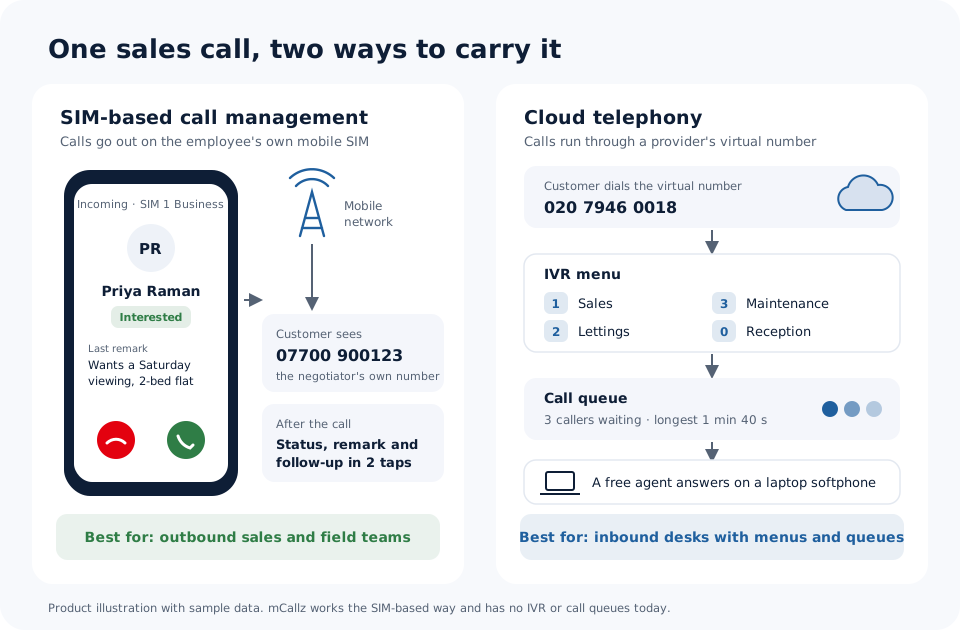
mCallz is a SIM based CRM for Android and iPhone that sits on the phone itself rather than in a call centre. On Android it replaces the default dialer, so a call placed or received on the employee's own SIM opens the lead's status and last remark, and ends with a two-tap sheet for the outcome, a remark and a follow-up. On a dual-SIM handset each call can use a chosen SIM, or a default business SIM. Cloud telephony works differently: the provider rents the business virtual numbers, answers inbound calls with an IVR menu, holds callers in a queue and usually rings agents on laptop softphones. IVR menus, rented numbers and queues are not part of mCallz yet; all three are on its roadmap, not live. The product facts here come from the mCallz feature list dated 14 October 2026, and the comparison was checked on 20 October 2026.
- SIM-based tools suit teams whose calls mostly go out, from phones, away from a desk.
- Cloud telephony suits teams where one public number must reach many agents in turn.
- Many businesses run one of each: a cloud reception line and SIM-based sales phones.
Benefits
SIM based CRM benefits for outbound and field teams
A number customers recognise
The person on the other end sees the salesperson's normal mobile number, the same one they may have saved last month.
No number rental
Calls ride on the mobile plan each phone already has, and the software is priced per user rather than per minute.
Calling from anywhere with signal
A negotiator at a viewing or a rep between shops calls from the handset in their pocket, with no headset or laptop.
Lead record on the same handset
Status, remarks, reminders and WhatsApp messages live in the app that placed the call, not in a second system.
Work and personal calls kept apart
On a dual-SIM phone, business calls can default to the work SIM while the personal SIM stays separate.
Records that outlast the employee
Calls, leads, remarks and chats are backed up to the business account and restore on a replacement phone.
SIM-based
SIM-based call management: what happens on one call
Five moments in a single call on an Android phone running mCallz. On iPhone the app works too, but iOS keeps the call log closed, so automatic logging of SIM calls needs Android.
The call starts on the SIM
mCallz is the phone's dialer, so the call goes out (or comes in) over the mobile network on the SIM chosen for business.
The caller card appears
While it rings, a full-screen card names the lead and shows where they stand and what was said last time, lock screen or not.
Two taps when it ends
An after-call sheet takes the outcome, a short remark and the follow-up time, then closes.
A WhatsApp goes out if set
Separate messages can be sent after missed, outgoing and incoming calls, so the brochure or apology is never typed by hand.
The owner sees it
The call joins the team call log in the owner's account, beside every other employee's calls for the day.
Cloud telephony
Cloud telephony: how virtual numbers, IVR and queues handle a call
Cloud telephony providers sell the phone line itself as an internet service. The business rents one or more virtual numbers, often a local landline-style number or a toll-free one, and publishes them on its website and adverts. Calls to those numbers reach the provider's servers first, not anyone's mobile phone.
From there the provider's software decides what happens. An IVR menu greets the caller ("press 1 for sales"), routing rules pick a team, and a queue holds the caller until an agent is free. Agents usually answer on a softphone in a laptop browser with a headset, on a desk phone, or in the provider's own app, and calls are commonly recorded on the provider's side.
Billing is usually built from several parts: a rental for each number, a seat or licence per agent, and call minutes or a minutes bundle. The exact mix varies a lot, so read each provider's own price page before comparing. The model shines when one public number has to reach whichever of many agents is free.
Cost
SIM based calling CRM cost against cloud telephony bills
A SIM-based setup has three cost lines: the phones the team already owns, the mobile plans already paying for their calls, and the software. For mCallz that last line is a yearly per-user fee set by team size: ₹4,000 for each user (US$44.08) in a team of up to 4, down to ₹2,500 each (US$28.30) at 20 users, with GST added and a custom quote for larger teams. Where a mobile plan already includes the calls, a busier month does not raise the software bill.
A cloud telephony bill grows on different levers: how many numbers you rent, how many agents need seats, and how many minutes flow through the system. That can be cheaper for a desk that takes short inbound calls and dearer for a team making hundreds of long outbound calls, which is why no single figure fits every business.
The fair test is a twelve-month estimate built from your own numbers: users, typical minutes per user per month, and how many public numbers you really need. Put both models through the same sheet before deciding.
Fit test
SIM based telecalling CRM or cloud telephony: a five-question fit test
Answer each question for your own team. Mostly "SIM" answers point one way, mostly "cloud" the other; a split often means running both.
- Do most calls go out rather than come in? Telecalling, follow-ups and renewals lean SIM. A support line that waits for customers to ring leans cloud.
- Must one advertised number ring many people in turn? That is a queue, so cloud. If each customer simply calls their own salesperson, SIM is enough.
- Are people at desks or on the move? Laptops and headsets suit cloud; site visits, viewings and shop rounds suit a phone with its own SIM.
- Do you need a spoken menu or out-of-hours greeting? Only cloud does that today; mCallz offers neither yet.
- Does the customer relationship belong to one named person? When buyers expect to hear from "their" agent on a known mobile number, SIM-based calling keeps that familiar.
Both at once
SIM based call management CRM beside a cloud line
Choosing one model is not compulsory. A common split is a cloud number on the website for general enquiries, answered by a small desk, while the sales staff work their own leads from SIM-based phones. Each system does the job it was built for.
mCallz does not plug into a cloud telephony product, so treat the two as separate tools. What it can do is push call and CRM data to another CRM through an API connection, which helps when both systems must feed one central record. Ask your cloud provider what their side can receive.
At a glance
SIM based CRM vs cloud telephony, factor by factor
| Factor | SIM-based (mCallz) | Cloud telephony |
|---|---|---|
| Number the customer sees | The employee's own mobile number | A virtual number rented from the provider |
| Where calls are made | On the Android or iPhone handset | Usually a laptop softphone with a headset, a desk phone or the provider's app |
| What carries the call | The mobile network; data is needed only to sync records | An internet connection to the provider |
| How calls are paid for | The existing mobile plan, plus a per-user software price | Commonly number rental, agent seats and minutes or bundles |
| IVR menu | Not offered today (planned) | A core feature |
| Call queues and routing | Not offered today (planned) | A core feature |
| Outbound list dialling | Auto dialer, one number at a time, with 1 to 3 redials | Varies; some providers add predictive dialling |
| Lead CRM | Built in: statuses, remarks, reminders, WhatsApp | Often a separate CRM linked by an integration |
| Call recording | Imports the phone's own recordings | Commonly recorded on the provider's servers |
| Set-up | Install the app and make it the phone's dialer | Rent numbers, then build menus and routing rules |
| Best for | Outbound sales, telecalling and field staff | Inbound desks and call centres with queues |
Honest limits
SIM based CRM limits: when cloud telephony wins
A SIM-based tool is the wrong purchase in these situations, and mCallz says so plainly:
- An inbound centre behind one published number. Today mCallz has no virtual numbers, no IVR menus and no call queues. They are planned, but until they ship, pick a cloud telephony provider for that line.
- A large floor that needs predictive dialling. mCallz rings one number at a time with a person on the call, and it never plays recorded robocalls.
- Staff who only ever work from laptops. The mCallz web dashboard is for reading reports and dialling through the phone, not a headset softphone of its own.
- All-iPhone teams that need automatic call logs. Apple keeps the iPhone call log away from apps, so automatic logging of SIM calls needs Android handsets.
- A rule that every call must be recorded centrally. mCallz relies on recordings the phone itself makes; where that is not guaranteed on every handset, provider-side recording is more predictable.
Worked example
SIM based CRM example: a London lettings team picking its setup
A lettings and sales agency in London, United Kingdom. The business is an illustration, not a named customer.
The agency's website shows one reception number. Tenants ring it about maintenance and viewings, and a small office desk answers them in turn. That line needs a menu and a queue, so the agency keeps it with a cloud telephony provider, because mCallz has neither today.
The eight negotiators are a different story. They spend half the day at viewings and valuations, and landlords know them by their mobile numbers. Each negotiator runs mCallz on an Android phone, sees the landlord's last remark before answering, and sets a follow-up after every call. Missed calls get an automatic WhatsApp with a callback promise, and the branch manager reads the whole team's call log each evening.
The decision took one afternoon with the fit test above: inbound and shared, cloud; outbound and personal, SIM. With eight users in the 5 to 9 users band, the negotiators' software comes to ₹28,000 a year. All names, numbers and volumes here are invented.
Price
SIM based CRM price
Billed yearly, per user, GST extra. Every user on a team pays that team's band price, so 12 users pay ₹3,000 each. See full plan details, or ask us on WhatsApp.
Questions
SIM based CRM FAQ
Is SIM based calling better than cloud telephony?
Neither is better for every team. SIM-based calling suits outbound sales from phones on the move, while cloud telephony suits inbound lines where one number must reach many agents through a menu and a queue.
Which SIM based CRM works on dual SIM phones?
mCallz works on dual SIM phones. Each call can use the SIM you pick, or a default business SIM, and the call history shows the correct SIM name on every call.
Is mCallz a SIM based CRM or cloud telephony?
mCallz is a SIM based CRM that places and receives calls on the SIM inside each employee's phone. It does not rent virtual numbers or run IVR menus today; those are planned.
How much does a SIM based CRM cost with mCallz?
mCallz licences run for a year, and the per-user rate depends on how many people you add: one to four users pay ₹4,000 each (US$44.08), while a 20-user team pays ₹2,500 each (US$28.30). GST extra, bigger teams get a quote, and the calls themselves stay on each phone's existing mobile plan.
What is a SIM based telecalling CRM used for?
It is used by teams that phone leads all day from their own mobiles. The app dials lists, shows each lead's history on the call screen, and records the outcome and next follow-up after every call.
Does a SIM based calling CRM need a virtual number?
No. The calls use the mobile number already on the SIM, so there is no number to rent and nothing to port.
Can a SIM based CRM handle incoming calls?
Yes, for calls to each person's own number. In mCallz an incoming call shows the caller card and can trigger a WhatsApp if it is missed, but there is no menu or queue to share calls across a team.
Does SIM based call tracking work on iPhone?
Partly. The mCallz iPhone app has the CRM, reminders and WhatsApp tools, but iOS does not let apps read the call log, so automatic tracking of SIM calls needs Android.
Can calls in a SIM based CRM be recorded?
Yes, where the phone records calls itself. mCallz imports the phone's own recordings automatically, or a recording can be shared into the app by hand.
When should a business choose cloud telephony?
Choose it when customers ring one advertised number and need a menu, a queue or an out-of-hours greeting. Large seated teams that need predictive dialling also belong on cloud systems.
Can I use cloud telephony and a SIM based CRM together?
Yes. Many teams keep a cloud number for reception and give sales staff a SIM-based app. In mCallz's case the two run as separate tools, since it does not connect to cloud telephony products.
What happens to SIM call records when an employee leaves?
They stay with the business. mCallz backs up calls, leads, remarks, follow-ups and WhatsApp CRM chats to the company account, and signing in on a new phone restores them.
Do customers see my personal number on SIM based calls?
They see the number of whichever SIM placed the call. Putting a work SIM in a dual-SIM phone and setting it as the default for business keeps a personal number private.
Test a SIM based CRM on your own team's phones
Install mCallz on two or three handsets for a week of real calls. If your work turns out to need a queue, you will know before paying for a year.