

Campaigns to people who already know you
mCallz: Bulk WhatsApp Sender for Leads, Callers and Paid Clients
A bulk WhatsApp sender is a tool that delivers one message, personalised per person, to a long list of WhatsApp numbers, so an offer or notice reaches hundreds of customers without being typed hundreds of times. mCallz builds that list from your own leads, call log and clients, and reports the result for every recipient.
- Pick recipients from leads, callers, paid clients, a Google Sheet or pasted numbers
- Send from your own phone with no API, or as a server campaign
- Test on one number first, then read sent, delivered, read, replied and failed
Calls go out on each phone's own SIM. Dialer, CRM and WhatsApp for ₹4,000 per user a year (₹333/month), down to ₹208/month for bigger teams. GST extra.
- Works on the SIM in each phone
- Android, iPhone and web
- Free trial at app.mcallz.com
The short answer
What is a bulk WhatsApp sender?
A bulk WhatsApp sender sends the same message, with personal details filled in, to many WhatsApp numbers in one campaign instead of chat by chat.
mCallz includes a bulk WhatsApp sender inside its calling and CRM app, so the recipient list comes from people the business already deals with: its leads, its paying customers, contacts from the WhatsApp chat list, anyone in the call log, rows of a connected Google Sheet or API feed, or a pasted batch of numbers. There are two routes. Small lists can go one by one from WhatsApp on your own phone with no API account; larger ones run as a server campaign through a WhatsApp API provider you connect. Variables such as {name}, {city} and {interest} personalise each message, one trial message to a single phone exposes mistakes early, and the campaign report lists sent, delivered, read, replied and failed for each recipient. Contacts and callers can also be split automatically into batches of 240, with a never-again list. Each capability named here appears in the product's feature record dated 14 October 2026.
- Recipients come from your own records, not a bought list.
- Choose the phone route for small lists and the API route for large ones.
- Results are reported person by person, not just as a total.
Benefits
Bulk WhatsApp sender benefits for small sales teams
Lists you already own
Leads, callers and clients are filtered inside the app, so there is no export and re-import before each campaign.
Start without an API
A shop with a few hundred customers can send one by one from its own WhatsApp before paying any provider.
Personal, not generic
Each message greets the person by name and can mention their city, company or interest.
Mistakes caught early
A test send to your own number shows exactly what customers will see, attachment included.
Follow-up list ready
The per-recipient report shows who read but did not reply, which is your call list for tomorrow.
Who receives it
Bulk WhatsApp sender recipient sources
Most standalone senders begin with a spreadsheet you paste in. mCallz starts from the records your team already keeps, and still accepts a pasted list when you need one.
Leads
Any lead filter: status, tag, source, product, imported list or custom field, combined as you like.
Call log
Numbers that called or were called, for example everyone who rang during last week's promotion.
WhatsApp CRM contacts
Contact segments built from tags and custom fields in the WhatsApp chat list.
Paid clients
Existing customers, useful for renewal notices, new packages and service updates.
Google Sheet or API
A connected sheet or REST source, such as a form that collects sign-ups for your price list.
Pasted numbers
A quick list typed or pasted in, for a one-off notice to a small group.
Two routes
Bulk WhatsApp sender app: from your phone or through the API
One by one from your own phone. Messages go out from the WhatsApp account on the phone, one at a time, with no API account and no provider fee. It suits a small list of customers who know your number. Keep the volume modest: a personal or business number that suddenly messages hundreds of people is exactly what tends to get blocked and reported.
Server campaign through the API. The campaign runs from the server through the WhatsApp API provider you connected in mCallz, and the phone is free for calls. This is the route for large or regular campaigns. Messages that start a conversation through the API normally use templates that WhatsApp reviews first; mCallz syncs your approved templates with their category, language and a live preview, and lets you fill the blanks before sending.
On both routes a saved template may include a file (picture, document, video or audio), which is how a catalogue PDF or a short product clip reaches every recipient.
Running a campaign
How to use bulk WhatsApp sender software in mCallz
Choose the audience
Pick a source and narrow it with filters, for example paid clients whose package ends this month.
Write with variables
Insert {name}, {city}, {company}, {interest}, {email} or {phone} where the personal detail should appear.
Attach and pick the route
Add a file if needed, then choose the phone route or a server campaign through your API provider.
Send a test
Send the message to one number, check the wording, variables and attachment, and fix anything odd.
Launch and read the report
Start the campaign, then open its report for sent, delivered, read, replied and failed, with each recipient listed.
Batches of 240
WhatsApp bulk sender groups and the never-again list
Long contact lists are hard to work through in one go. mCallz sorts contacts and callers into batches of 240 automatically, so a list of 1,000 becomes five manageable groups that can be sent on different days.
A never-again list sits beside the batches. A number placed on it stays out of later groups, which is the place for anyone who asked you to stop. Numbers on the app's excluded list are also kept out of every automation.
Bans and consent
Bulk WhatsApp sender without ban: what really protects a number
No bulk WhatsApp sender can promise that a number will never be banned, and a tool that claims it is not being straight with you. WhatsApp decides, mainly from how recipients react: if many people block or report your messages, the number can be restricted or banned. Using unofficial or modified WhatsApp apps to send in bulk breaks WhatsApp's terms on its own.
What lowers the risk is the same thing that makes a campaign work. Message people who agreed to hear from you, such as customers, enquirers and people who asked for your price list. Make the message useful, send it at sensible times, honour every "stop" by moving the number to the never-again list, and use the API route with approved templates for large audiences.
Privacy and marketing laws add their own rules, for example the EU's GDPR, India's Digital Personal Data Protection Act and Brazil's LGPD, and many other countries have similar laws. This is general information, not legal advice; check the rules where your customers live.
At a glance
Bulk WhatsApp sender software features at a glance
| Feature | What it does | Best for |
|---|---|---|
| Six recipient sources | Leads, paid clients, call log, WhatsApp CRM contacts, Google Sheet or API, pasted numbers | Campaigns built from people you already know |
| Phone route | Sends one by one from WhatsApp on your own phone, with no API account | Small lists and first campaigns |
| Server campaign | Runs the send through your connected WhatsApp API provider | Large or recurring campaigns |
| Variables | {name}, {city}, {company}, {interest}, {email} and {phone} filled per person | Offers that should read as personal |
| Test send | Sends the message to one number before the real campaign | Catching typos and broken attachments |
| Campaign report | Sent, delivered, read, replied and failed, with every recipient listed | Choosing whom to call next |
| Batches of 240 | Splits contacts and callers into groups, with a never-again list | Working through long lists over several days |
| Templates with files | Approved template sync, fill-in blanks and saved templates with attachments | Catalogues, price lists and notices |
Honest limits
Bulk WhatsApp sender limits and when to choose another tool
mCallz sends to the people a business already works with. It is the wrong choice for these jobs:
- Blasting bought or scraped number lists. That is the fastest route to a banned number, and the page above explains why mCallz is built around your own records instead.
- Browser extensions and PC software. mCallz is a phone app with a web account, not a Chrome extension or a desktop program with a licence key.
- Virtual numbers for sending. mCallz does not sell virtual numbers today; API campaigns go from the business number set up with your WhatsApp API provider.
- SMS, email or voice broadcasts. The bulk sender covers WhatsApp only, and the dialer always needs a person on the line, so there are no recorded-voice blasts.
Worked example
Bulk WhatsApp sender example: a building supplies firm in Addis Ababa
A building materials distributor in Addis Ababa, Ethiopia. The business is an illustration, not a named customer.
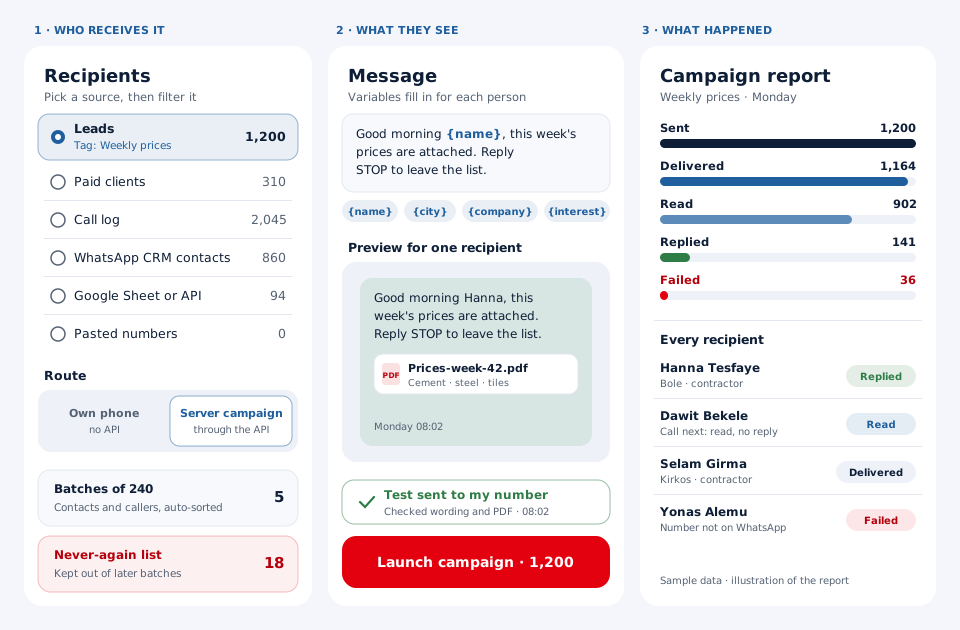
The distributor sells cement, steel and tiles to small contractors. Prices change every week, and the sales reps used to forward the new list by hand to each contractor who rang asking for it. Now, whenever a contractor asks to receive prices, the rep tags the lead "Weekly prices", and that tag becomes the campaign's audience.
Every Monday the owner writes a short message, "Good morning {name}, this week's prices are attached", attaches the PDF and sends a test to his own phone. With 1,200 recipients the firm uses the server route, so the campaign goes out through the API provider it connected while the phones stay free for calls. Anyone who replies "stop" goes on the never-again list. On Tuesday the reps open the report and phone the contractors who read the list but did not reply. No real customer is described: the distributor is made up and its figures are round.
Price
Bulk WhatsApp sender price
Billed yearly, per user, GST extra. Every user on a team pays that team's band price, so 12 users pay ₹3,000 each. See full plan details, or ask us on WhatsApp.
Questions
Bulk whatsapp sender FAQ
Which bulk WhatsApp sender can message leads straight from a calling CRM?
mCallz can, because its bulk sender reads from the same leads, call log and paid clients your team calls every day. That saves the export and import step that standalone senders need.
Is mCallz a bulk WhatsApp sender?
Yes. mCallz is a bulk WhatsApp sender that runs inside a calling and CRM app, sending either from your own phone or as an API campaign. Each campaign ends with a report that names every recipient.
How much does a bulk WhatsApp sender cost with mCallz?
Bulk sending comes with every mCallz seat. Seats are paid annually: ₹4,000 (US$44.08) each in a team of up to 4, with cheaper bands for larger teams that bottom out at ₹2,500 (US$28.30) each for 20 users. GST extra, and more than 20 users means a custom quote. Server campaigns also carry whatever your WhatsApp API provider charges.
What is WhatsApp bulk sender?
It is software that sends one message to many WhatsApp numbers in a single campaign, usually with each person's name filled in. Good ones also report who received, read and replied.
Is bulk WhatsApp sender free?
Not forever: mCallz lets you try it on a free trial and then charges per seat. Free extensions and APK files exist, but tools that push bulk messages through unofficial or modified WhatsApp apps break WhatsApp's terms and put your number at risk.
Is there a bulk WhatsApp sender without ban?
No tool can guarantee that. WhatsApp restricts numbers that many people block or report, so the real protection is messaging people who opted in, honouring stop requests and using the API with approved templates for large lists.
Is WhatsApp bulk sender legal?
Sending to people who agreed to hear from you is generally allowed, but WhatsApp's own policies and privacy laws such as the GDPR in the EU, India's DPDP Act and Brazil's LGPD still apply. This is general information, not legal advice.
How to use bulk WhatsApp sender?
Choose the recipients, write the message with variables such as {name}, attach a file if needed, pick the phone or API route and send a test to yourself. Then launch the campaign and read the report.
Is there a bulk WhatsApp sender app for Android?
Yes, mCallz runs on Android, and it also has an iPhone app and a web account. On Android it doubles as the phone's dialer, so the call log becomes a campaign source.
Do bulk WhatsApp template messages need approval?
Through the WhatsApp Business API, generally yes: business-started messages use templates that WhatsApp reviews before they can be sent. mCallz syncs your approved templates from the provider, with category, language and preview.
Can I send bulk WhatsApp messages from a Google Sheet?
Yes. A connected Google Sheet or REST API source can be the recipient list, and mCallz re-reads that sheet automatically at intervals, so rows added later are there for your next campaign.
Can I use a bulk WhatsApp sender with a virtual number?
mCallz does not provide virtual numbers. The phone route sends from the WhatsApp number on your phone, and API campaigns send from the business number registered with your API provider.
What are bulk WhatsApp groups of 240?
They are batches that mCallz builds automatically from your contacts and callers, 240 numbers each, so a long list can be worked through in parts. A never-again list keeps chosen numbers out of later batches.
Can I see who replied to a bulk WhatsApp message?
Yes. The campaign report shows sent, delivered, read, replied and failed, and lists each recipient with their result, so replies and silent readers are easy to separate.
Send your first bulk WhatsApp sender campaign to ten customers
Filter ten paid clients, write two lines with {name}, send a test to yourself, and read the report tomorrow morning.