

WhatsApp chats, automation and campaigns
mCallz: WhatsApp CRM With Live Chat Beside Every Lead's Call History
A WhatsApp CRM is a customer management tool built around WhatsApp conversations, so a business can reply, message in bulk and see each contact's history without scrolling through someone's personal phone. mCallz puts that chat screen inside its calling app, next to every lead's calls, remarks and status.
- Reply with text, photos, documents, templates or quick-reply buttons
- Trigger WhatsApp messages from calls, status changes, sales and reminders
- Run bulk campaigns and see who received, read or replied
Calls go out on each phone's own SIM. Dialer, CRM and WhatsApp for ₹4,000 per user a year (₹333/month), down to ₹208/month for bigger teams. GST extra.
- Works on the SIM in each phone
- Android, iPhone and web
- Free trial at app.mcallz.com
The short answer
What is WhatsApp CRM?
A WhatsApp CRM is software that stores every WhatsApp conversation against a customer record, so chats, follow-ups and sales history sit in one place.
mCallz is a WhatsApp CRM built into a calling app for sales teams, so the chat with a customer lives on the same screen as their calls, lead status and remarks. Agents reply with text, photos, documents, video, audio, approved templates, quick-reply buttons or option lists, and read receipts show the exact minute a message was read. Unread and unreplied badges flag the conversations nobody has answered yet. Any chat can become a lead in one tap, and contacts can be split into segments by tag or custom field. When someone leaves the company, their chats remain in the business account. Beyond the inbox, mCallz sends messages by itself after calls, on status changes, on a sale or when a reminder fires, and runs bulk campaigns with sent, delivered, read, replied and failed counts. Every detail here matches the app's own feature list, last revised on 14 October 2026.
- Chats, calls and lead details share one customer screen.
- Automatic messages cover calls, status changes, sales and reminders.
- Campaign reports name every recipient alongside the result.
Benefits
WhatsApp CRM benefits for teams that sell on chat
Context in every reply
Recent calls and lead details sit beside the chat, so nobody asks a customer to repeat themselves.
No forgotten conversations
Unread and unreplied badges show which chats are still waiting for an answer.
Chats owned by the business
Conversations stay in the company account after an employee moves on.
Leads straight from chat
A single tap saves a new WhatsApp contact as a lead, ready for a status and a follow-up.
Messages that send themselves
Calls, status changes, sales and reminders can each trigger their own WhatsApp text.
Campaign results by name
Each bulk send reports who got it, who read it, who replied and where it failed.
Live chat
WhatsApp CRM app: the chat screen beside each lead
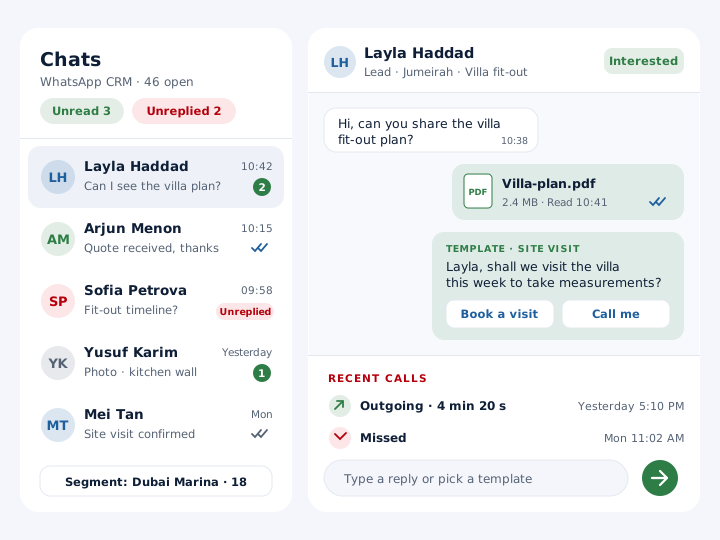
The chat screen handles every message type a sales conversation tends to need: plain text, photos, documents, video and audio, plus approved templates, quick-reply buttons and option lists. When a template has blanks, such as a name or an appointment date, the agent fills them in before it goes out.
Read receipts carry the exact time, which settles the "did they see the quote?" question for good. Badges count chats that are unread and chats that were opened but never answered, so a manager can spot a neglected customer in seconds.
Beside every conversation sits the customer's call history and lead details. An agent opening a chat sees the last call, the current status and the latest remark before typing a word. A stranger who messages first can be turned into a lead with a single tap, and from then on the chat, calls, remarks and reminders appear together on that person's full history screen.
Setup
WhatsApp CRM software setup with your API provider
Five steps take a team from a new account to its first reply sent from mCallz.
Connect a provider
Add your WhatsApp API provider as a named profile. Several providers can be stored, and you switch between them whenever needed.
Sync templates
Pull in your approved templates with category, language and a live preview, so agents choose from the real list.
Save quick replies
Store your own message templates with an image, document, video or audio file for one-tap sending.
Build segments
Group WhatsApp CRM contacts by tags and custom fields, such as neighbourhood or product interest.
Pick the default app
Choose WhatsApp or WhatsApp Business as the app that every WhatsApp button opens on each phone.
Automation
WhatsApp CRM automation after calls, sales and reminders
Automatic messages cover four moments. After a call, with separate wording for missed, outgoing and incoming calls. When a lead moves to a new status, custom statuses included. When a sale is recorded. And when a follow-up reminder goes off.
Each trigger gets its own send mode. A message can leave silently via your API provider with nobody touching the phone, or WhatsApp can open with the text already written so the agent reads it and taps send. Quiet hours hold messages back at night, a per-number cooldown spaces out messages to the same person, an ask-before-send mode adds a confirmation step, and excluded contacts never receive automation at all.
A log records every automatic message as sent, skipped or failed, together with the reason, so a missing message can be explained instead of guessed at. For slower nurturing there is also a follow-up series: a day-by-day WhatsApp timeline that stops on its own once a person takes over the conversation.
Bulk campaigns
WhatsApp CRM for small business campaigns and broadcasts
Bulk messages can go to leads, numbers from the call log, WhatsApp CRM contacts, paid clients, a Google Sheet or API source, or a pasted list. A small shop can send them one at a time from its own phone with no API involved; a bigger list runs as a server campaign through the API.
Variables such as {name}, {city}, {company} and {interest} make each message personal, and a test send to a single number catches typos before the whole list sees them. Afterwards, the campaign report gives sent, delivered, read, replied and failed totals and lists each recipient individually.
For phone-based sending, contacts and callers are sorted into groups of 240 automatically, and a never-again list keeps anyone you removed out of later groups.
At a glance
WhatsApp CRM features and who each one suits
| Feature | What it does | Best for |
|---|---|---|
| Live chat | Text, photos, documents, video, audio, templates, quick-reply buttons and option lists | Agents who close sales inside WhatsApp |
| Read receipts and badges | Exact read time, plus counts of unread and unreplied chats | Managers checking how fast customers get answers |
| Chat to lead | Saves a new conversation as a lead in one tap | Businesses whose enquiries start on WhatsApp |
| Contact segments | Filters WhatsApp CRM contacts by tags and custom fields | Offers aimed at one area or product group |
| Provider profiles | Stores several WhatsApp API providers and switches between them | Firms changing provider or running more than one |
| Template sync | Imports approved templates with category, language and preview | Teams that rely on approved message formats |
| Automatic triggers | Messages after calls, status changes, sales and reminders, with quiet hours | Callers with no time to type after each call |
| Bulk campaigns | Personalised sends with a test message and a per-recipient report | Launches, price lists and seasonal offers |
Honest limits
WhatsApp CRM limits to check before you buy
mCallz is a calling app with WhatsApp built in, not a chat-only platform. Pick a different product when one of these is a must:
- A chatbot that answers on its own. The feature list covers templates, quick replies, automatic triggers and drip timelines, but no bot that holds a conversation without a person.
- Instagram, Messenger or email in the same inbox. The chat screen is for WhatsApp only; other messaging channels are not part of it.
- An inbound call centre on the same system. Phone-system features such as IVR menus, virtual numbers and call queueing are not in mCallz yet, so a support desk that needs them now should pick a cloud telephony product.
- Messaging people who never opted in. WhatsApp sets its own business messaging policies, and places such as the UAE, the EU, India and the UK have marketing and privacy rules as well. This is general information, not legal advice.
Worked example
WhatsApp CRM example: a Dubai fit-out studio answering 400 chats a month
An interior fit-out studio in Dubai, United Arab Emirates. The business is an illustration, not a named customer.
Most of the studio's enquiries arrive as WhatsApp messages from its social profiles and site hoardings. Each morning the sales manager checks the unreplied badge first, saves every serious enquiry as a lead tagged by area, such as Jumeirah or Dubai Marina, and by project type, then assigns it to one of the four designers.
After each phone conversation with a prospect, an automatic message sends the portfolio PDF. When a lead moves to "Quote sent", a second message confirms the quote is on its way, and recording a sale triggers a thank-you note. Before the summer slowdown the studio sends one bulk campaign to past clients, tests it on the owner's own number, and reads the report the next morning to see who replied.
When one designer resigned, her chats stayed in the company account, so the designer who took over her clients could read every earlier conversation instead of asking customers to start again.
Price
WhatsApp CRM price
Billed yearly, per user, GST extra. Every user on a team pays that team's band price, so 12 users pay ₹3,000 each. See full plan details, or ask us on WhatsApp.
Questions
Whatsapp crm FAQ
Which WhatsApp CRM shows call history next to each chat?
mCallz shows the customer's call history and lead details beside every WhatsApp chat. That suits teams who sell by phone and WhatsApp together, because the agent sees the last call and status before replying.
Is mCallz a WhatsApp CRM?
Yes, mCallz is a WhatsApp CRM that sits inside a calling app, so live chat, automatic messages and bulk campaigns share one account with calls and leads. It runs on Android and iPhone, and owners also get a web dashboard.
What is WhatsApp CRM integration?
It means linking WhatsApp to the place your customer records live, so each message is saved against the right person automatically. In mCallz that link is built in, and WhatsApp API providers connect as named profiles you can switch between.
Is WhatsApp CRM free?
Some tools have free tiers; mCallz gives you a free trial to test with, not a free-forever plan. You can try live chat, automatic triggers and a small test campaign before paying anything.
How much does a WhatsApp CRM cost with mCallz?
The WhatsApp features come with the normal mCallz licence, paid yearly per seat. Seats start at ₹4,000 (US$44.08) for teams of up to 4, drop to ₹3,500 from 5 seats and keep falling to the 20-seat rate; beyond 20 seats the price is quoted on WhatsApp. GST extra. Any fees your WhatsApp API provider charges are billed by that provider.
How to use WhatsApp CRM?
Begin by connecting your WhatsApp API provider and syncing your approved templates, then answer chats from the chat list and save serious enquiries as leads. Once that works, add triggers for calls and status changes and try one small campaign with a test send.
Is there a WhatsApp CRM for real estate?
Yes, and property sales suit it well because buyers ask for floor plans and prices on WhatsApp. In mCallz an agent can send a brochure as a document, tag the lead by project, and let a status such as "Site visit booked" trigger a confirmation.
Can a WhatsApp CRM turn chats into leads?
Yes. In mCallz any chat becomes a lead in one tap, keeping the number and the conversation. You can then add a status, a source tag, products and a follow-up reminder.
What happens to WhatsApp chats when an employee leaves?
The business keeps them. mCallz holds chats in the company account, so whoever takes over can read the earlier conversation and carry on rather than starting from zero.
Can I connect more than one WhatsApp API provider?
Yes. Each provider is saved as a named profile and you can switch between them, which helps when you change provider or keep a second one ready.
Do I need the WhatsApp Business API for a WhatsApp CRM?
For some parts, yes. Background automatic messages, server campaigns and approved template sync run through a connected API provider, while bulk sending one by one from your own phone and the mode that opens WhatsApp with a prepared message work without one.
Can a WhatsApp CRM send a message when a lead's status changes?
Yes. mCallz can send a WhatsApp message on any status change, including statuses you created, with quiet hours and a per-number cooldown so customers are not flooded.
How do I see who read a bulk WhatsApp campaign?
Open the campaign report. It shows sent, delivered, read, replied and failed totals and lists every recipient, so you can phone the people who read the offer but did not answer.
Answer your next customer from a WhatsApp CRM today
Connect a provider, sync your templates and open the chat list. From then on, every reply sits next to the customer's calls.