

For the person on the phone all shift
mCallz: Telecaller App for Working Through Your Call Queue Each Day
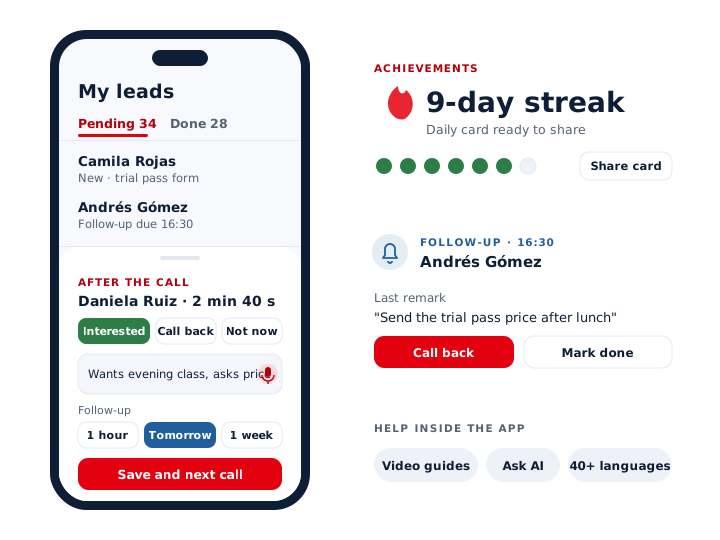
A telecaller app is a phone app that hands one caller a list of people to ring, the background for each conversation and a fast way to note the result, so the whole shift runs from a single screen. mCallz gives each telecaller a personal queue, a caller card carrying the previous note and a two-tap sheet after every call, then turns the effort into streaks you can share.
- Assigned leads waiting in Pending, finished ones in Done
- The previous conversation on screen before you say hello
- Video guides, Ask AI help and more than 40 app languages
Calls go out on each phone's own SIM. Dialer, CRM and WhatsApp for ₹4,000 per user a year (₹333/month), down to ₹208/month for bigger teams. GST extra.
- Works on the SIM in each phone
- Android, iPhone and web
- Free trial at app.mcallz.com
The short answer
What is a telecaller app?
A telecaller app is mobile software that lines up a caller's leads, shows each lead's history mid-call and saves the outcome before the next dial.
mCallz is a telecaller app built around one person's shift rather than a manager's report. The day begins in a pending queue of leads that the team lead assigned, which the caller can tap through one by one or pass to the auto dialer. When a lead rings or is dialled, a full-screen card shows the name, the current status and the remark from the last conversation, even on a locked phone. After hanging up, a sheet captures status, remark and callback time with two taps, and voice input fills names and requirements without typing. Follow-ups ring like alarms and stay open until they are marked done. Worked leads move to a Done tab, and achievements turn the effort into streaks plus shareable daily and weekly cards. The app speaks more than 40 languages, according to the feature list dated 14 October 2026.
- The shift starts from a ready queue, not a blank notebook.
- Every call ends with its next step already saved.
- Help sits inside the app: video guides and an Ask AI assistant.
Benefits
Telecaller app benefits for the person making the calls
A clear list to work
Assigned leads wait in your own pending queue, so you never have to ask who to ring next.
No cold openings
What the customer told you last time appears on screen while their phone is still ringing.
Less typing
Status, remark and follow-up take two taps, and you can speak names and requirements instead of typing them.
Promises kept
Callbacks ring at the minute you chose, even on a locked phone, and wait until you close them.
Progress you can see
Streaks and shareable daily and weekly cards show the work behind a long day.
Help in your language
Searchable video guides carry subtitles in every app language, and Ask AI explains features when you are stuck.
A shift on the phone
Telecaller app in a working day: from first call to the Done tab
Seven moments that repeat in almost every telecaller's day, and what the screen does at each one.
Open your queue
The Pending list holds the leads your team lead gave you. Filters by status, tag or product narrow it when the list is long.
Clear today's callbacks first
Start a session on today's due follow-ups, so promises from yesterday are kept before new names are touched.
Work the fresh leads
Tap a lead to call it, or let the auto dialer ring the queue in order; pause, skip or stop from any screen.
Read before you speak
The caller card shows the name, status and last remark. Open the full record mid-call if you need the product or the earlier notes.
Save the outcome
Pick a status, add a remark by voice or keyboard and choose a follow-up preset from 5 minutes to 1 month.
Catch the calls you missed
Missed calls raise a notification with a call-back button, where you choose the SIM, and a WhatsApp option beside it.
Finish in Done
Worked leads leave Pending and appear in Done with how they were completed, which is also what your team lead reviews.
Screens you use
App for telecaller work: caller card, after-call sheet and keypad
Caller card
A full-screen view with the lead's name, status and most recent remark, shown over the lock screen too.
After-call sheet
Opens as the call ends and asks three things: the new status, a remark and when to call again.
Keypad search
Typing digits or letters on the keypad finds matching contacts and leads, so you rarely scroll.
One search box
Finds a match in leads, contacts, calls, remarks, reminders, clients or chats, and returns each result as its usual full card.
Customer history
Calls, WhatsApp, remarks, reminders and lead details for one person, each in its own tab.
Copy all details
Copies custom fields, source data, remarks and amounts from a lead card when a colleague asks for them.
Calling habits
Telecaller app habits for effective telecalling
Good telecalling is mostly preparation and follow-through. These habits lean on features the app already has.
- Read the last remark before you say a word, and open with what the customer told you, not with a script.
- Write each remark for whoever calls next, which may be you in three weeks: what they want, the budget, the objection.
- Never end a call without a next step. If there is no decision yet, set a follow-up from the sheet before the next number rings.
- Ring due follow-ups before fresh leads. People who asked for a callback are warmer than anyone on a new list.
- When someone ignores mobile calls, try a WhatsApp voice call or send a saved template with the brochure attached.
- Work in blocks with the auto dialer and use pause for breaks, so a session never loses its place.
- Pick the status that is true, not the one that looks good. Your team lead sees the same Done tab you do.
Learning the app
Telecaller mobile app help: video guides, Ask AI and 40+ languages
New callers rarely get a long training session, so the help lives inside the app. A searchable library of video guides covers each feature, with subtitles in every language the app supports. When a question is too specific for a video, the Ask AI assistant answers it in a chat, and daily tips notifications point out shortcuts over the first weeks.
Language is picked inside the app, from more than 40, with right-to-left support for scripts that need it. Light and dark themes, optional wallpaper colours and a guided permission setup on day one make the phone feel like a tool rather than an obstacle.
When something does go wrong on a call, a support chooser connects you to basic or technical help on WhatsApp, and the diagnostic log in Settings can be copied and shared so support can see exactly what happened.
At a glance
Telecaller app features you touch on every call
| Feature | What it does | Best for |
|---|---|---|
| Pending queue | Lists the leads assigned to you that are still open | Starting the shift without asking around |
| Caller card | Shows name, status and last remark during the ring | Callbacks from people you spoke to weeks ago |
| After-call sheet | Two taps store the result, a short note and when to ring again | Back-to-back calling |
| Voice input | Turns speech into names, requirements and remarks | Callers who type slowly on a phone |
| Follow-up alarms | Ring at the set time and stay open until marked done | Promised callbacks |
| Done tab | Shows each finished lead and how it was completed | End-of-day review with the team lead |
| Achievements | Keeps streaks and builds shareable daily and weekly cards | Staying motivated through long weeks |
| Video guides and Ask AI | Explain features inside the app, with subtitles in every app language | Your first days on mCallz |
Honest limits
Telecaller app limits to know before your first shift
The app is built for a person calling from their own phone. A few things it will not do:
- Automatic SIM call logging on iPhone. Apple keeps the call history closed, so the parts that depend on the phone's own log need an Android phone; everything else works on iPhone.
- Calls without you. No recorded messages and no predictive dialling: each call rings one number and waits for you to talk.
- Some settings belong to your admin. Your admin can fix the pause between dialler calls and decide the shortest call that still counts as done.
- A shared inbound line. Calls reach your own number; IVR menus and call queues for a team number are planned but not available yet.
Worked example
Telecaller app example: one membership caller's Tuesday in Bogotá
A fitness club selling memberships in Bogotá, Colombia. The business is an illustration, not a named customer.
Laura calls people who filled in a trial-pass form for a fitness club. At 9:00 she opens mCallz in the language she picked and starts a session on her 12 due follow-ups. The first caller card reads "Wants early mornings, asked about the pool", so she opens with the 6 a.m. swim timetable instead of a sales pitch.
By lunch she has moved to her 45 new leads with the auto dialer, pausing it for a break. Two people who ignore mobile calls get a WhatsApp call, and one asks for the price list, which she sends as a saved template. Each call ends with a status, a spoken remark and, for the undecided, a follow-up for Thursday. At 6:00 her Done tab is full, her streak reaches nine days and she shares the daily card with her team group. Laura and the club are an illustration, not a named customer.
Price
Telecaller app price for each caller
Billed yearly, per user, GST extra. Every user on a team pays that team's band price, so 12 users pay ₹3,000 each. See full plan details, or ask us on WhatsApp.
Questions
Telecaller app FAQ
Is telecaller app free?
Not permanently. You can try mCallz on real calls during a free trial from app.mcallz.com; once it ends, each caller needs a paid seat, billed once a year.
Which telecaller app gives each caller their own lead queue?
mCallz does. A team lead assigns leads to each telecaller, who sees them in a personal Pending list and watches them move to Done once worked.
Is mCallz a telecaller app?
Yes. mCallz is a telecaller app that runs a caller's whole shift on the phone: the assigned queue, the caller card with the last remark, the after-call sheet, follow-up alarms and achievement streaks.
How much does a telecaller app cost with mCallz?
A telecaller seat is billed for a full year, and its price depends on how many callers you have. With 1 to 4 callers each seat is ₹4,000 (US$44.08), roughly ₹333 a month; a 20-caller floor pays ₹2,500 per seat, and anything bigger is quoted separately. GST extra, and the dialer, reminders and help library come with the seat.
What is the best telecaller app?
The best telecaller app is one that removes typing and remembering from the job. mCallz does that with a ready queue, the previous remark on screen, two-tap outcomes and alarm reminders, on the caller's own SIM.
How to do effective telecalling?
Prepare before each call, listen more than you talk and always agree a next step. In practice: read the last remark, open with the customer's own words, and set a follow-up before you hang up.
How to be a good telecaller?
Be consistent more than clever. Call at the times customers asked for, keep honest notes, return missed calls quickly and clear your callbacks before new leads each day.
How to do telecalling?
Start with a list of people who expect your call, a short opening and a clear goal for each call. A telecaller app then handles dialling, notes and reminders so your attention stays on the conversation.
Can I add remarks by voice?
Yes. Voice input fills lead names and requirements, and a remark on a reminder can be spoken too, which saves time between back-to-back calls.
What are streaks and daily cards in the telecaller app?
They come from Achievements in mCallz: streaks, plus daily and weekly cards you can share, for example in a team chat. They make steady effort visible to you and your team.
Can I use the telecaller app in my own language?
Yes. The in-app language picker offers over 40 choices, right-to-left scripts included, and the video guides are subtitled in each of them.
Can I call a lead on WhatsApp from the telecaller app?
Yes. Tap any WhatsApp button and choose a voice or video call; it works for saved contacts who have WhatsApp, and a whole list can also be auto-dialled through WhatsApp with a daily limit.
Can I search for a lead from the keypad?
Yes. The keypad matches contacts and leads as you type, so a name or part of a number brings up the person without opening the lead list.
Try the telecaller app on tomorrow's call list
Install mCallz, ask your team lead to assign ten leads and make the first call. The sheet that opens afterwards is the whole routine.