

Lead capture and organisation for sales teams
mCallz: Lead Management App That Captures Leads From Every Source
A lead management app is software that gathers enquiries from ads, forms, portals and walk-ins into one list, then sorts them by source, status and owner so none get lost between channels. mCallz imports those leads from sheets, APIs and files on its own, drops duplicate numbers, and keeps every lead's source and history.
- Scheduled imports from Google Sheets or any REST API
- Tag every lead by source, from IndiaMART to a walk-in
- See each skipped row with the exact reason it failed
Calls go out on each phone's own SIM. Dialer, CRM and WhatsApp for ₹4,000 per user a year (₹333/month), down to ₹208/month for bigger teams. GST extra.
- Works on the SIM in each phone
- Android, iPhone and web
- Free trial at app.mcallz.com
The short answer
What is a lead management app?
A lead management app collects enquiries from every channel into one organised list, recording where each came from, who owns it and its next step.
mCallz is a lead management app for Android, iPhone and the web that concentrates on getting leads in cleanly. It checks Google Sheets and any REST API in the background on a schedule, maps their columns to built-in and custom fields with a country setting per source, and lists every skipped row with the exact reason. Excel, CSV and JSON files import as well, including files shared straight from WhatsApp, mail or a browser, with repeated numbers filtered out during import. On the web CRM, custom webhooks and live sheets can hand new leads to salespeople in round-robin order. Leads are labelled by origin with tags like IndiaMART, JustDial, Walk-in, Website, Google or Facebook, and they hold custom fields, products and a status from your own pipeline. Every imported file or sheet stays a separate list you can filter, dial or delete. The import and lead tools described here match the product list published on 14 October 2026.
- Leads arrive from sheets, APIs, files and webhooks without retyping.
- Duplicates and bad rows are caught at import, with reasons shown.
- Source, status, products and custom fields keep a long list sortable.
Benefits
Lead management app benefits for businesses with many lead sources
No copy-paste between tools
Sheets and APIs are checked on a schedule, so new enquiries appear without anyone exporting them.
Clean data from day one
Repeated numbers are dropped and country codes sorted out as each file comes in.
Know where leads come from
Source tags show whether a lead arrived from Facebook, a portal, the website or the shop counter.
Fair lead sharing
Round-robin assignment on the web CRM spreads webhook leads evenly across the team.
Fields that fit your trade
Custom fields, including GPS location, hold details like budget, site address or model.
Easy to undo a bad import
Remove a faulty import as one list, and only the leads it created disappear.
Capture
Lead management software that imports from sheets, APIs and files
Most small businesses already collect leads somewhere: an ad form that writes to a Google Sheet, a website enquiry form, a portal account, or a spreadsheet a partner emails every week. mCallz connects to Google Sheets and to any REST API and checks them in the background on a schedule, so new rows turn into leads without anyone pressing import.
When you add a source, you map its columns to built-in fields and to your own custom fields, and set its country so numbers written without a code are read correctly. Rows that fail are listed with the exact reason, and you can inspect a source's valid and invalid rows as lead cards and clear out test entries before the team ever sees them.
One-off files work too: Excel, CSV or JSON, or a file shared into the import screen straight from WhatsApp, email or a browser. Repeat numbers are discarded and country codes sorted during the import. Every file or sheet becomes its own list that you can filter, dial or delete, and deleting it takes away just the leads it brought in.
Web forms
Lead management system for web forms: webhooks and round-robin
On the web CRM, a custom webhook can receive leads from a website or landing page form, and a live sheet can act as a source in the same way. Leads from these sources are shared out in round-robin order, so each salesperson gets the next one in turn instead of the quickest person grabbing them all.
Leads can also be handed out manually. Each team member then works from a separate pending queue, and a lead can be moved to a colleague with its transfer history kept.
If head office runs another system, mCallz can push call and CRM data to a third-party CRM API, keeping that system current while the sales team works from phones.
Organise
Lead management app fields: sources, tags, products and GPS
Once leads are in, these tools keep a list of thousands searchable and tidy.
- Ready-made source tags (Walk-in, Referral, Website, Facebook, Google, Instagram, WhatsApp, IndiaMART, JustDial) or ones you invent
- Custom lead fields, including a GPS location field for a site or shop address
- Voice input for names and requirements, useful at a counter or on a site visit
- Products and the customer's requirement attached to each lead from a searchable picker
- A status pipeline you create, rename, recolour and drag into order
- A tag sheet that searches hundreds of tags and merges duplicates when you rename one
- Bulk edit for putting tags and products on, or taking them off, a whole selection of leads
- Filters combining status, tag, source, product, list and custom fields, matching any or all
- Learned autofill that suggests values you have typed before
From lead to sale
Lead management app for small business: tracking a lead to a paid client
Capturing a lead only pays off if you can see what became of it. Each lead keeps a status history, including changes made on the web, and an edit history synced to the account. One screen shows every call, WhatsApp chat, remark and reminder for that person in separate tabs.
When someone buys, one tap turns the lead into a paid client with its own products or packages, paid and due amounts, and a renewal reminder ahead of expiry. Leads that go cold land in a lost leads list, ready for a win-back attempt. When the data is needed elsewhere, export leads to CSV, and the file follows whatever filter is active.
At a glance
Lead management app capture features at a glance
| Feature | What it does | Best for |
|---|---|---|
| Google Sheets auto-import | Checks the sheet on a schedule and adds new rows as leads | Ad leads that land in a sheet |
| REST API source | Pulls leads from any REST API with column mapping | Portals or tools that offer an API |
| Webhook with round-robin (web CRM) | Receives form submissions and shares them out in turn | Website and landing page enquiries |
| Excel, CSV and JSON import | Imports a file, or one shared from WhatsApp, mail or a browser | Event lists and partner spreadsheets |
| Duplicate and country handling | Drops repeated numbers and reads country codes per source | Businesses buying overlapping lists |
| Skipped-row report | Lists every row that failed with the exact reason | Fixing a broken sheet quickly |
| Source tags | Marks Facebook, Google, IndiaMART, JustDial, walk-in and custom sources | Judging each channel by the leads it sends |
| Custom fields and GPS | Adds your own fields, including a GPS location | Property, solar and home service visits |
| CSV export | Exports the leads that match the active filter | Sharing a filtered list with another tool |
Honest limits
Lead management app limits: what mCallz does not do
mCallz is strongest where leads turn into phone calls. Consider another tool if your plan depends on these:
- Direct ad-account connectors. Facebook and Google appear as source tags; the leads themselves reach mCallz through a Google Sheet, an API or a webhook rather than a built-in ad connector.
- Email marketing and lead scoring. The feature list has no email campaigns or automatic lead scores; WhatsApp is the messaging channel.
- Webhooks from the phone alone. Custom webhook sources and round-robin assignment are web CRM features, so they are set up from a browser.
- An inbound call centre. Inbound routing tools like IVR menus, virtual numbers and queues sit on the roadmap rather than in the app.
Worked example
Lead management app example: a Johannesburg solar installer with five lead sources
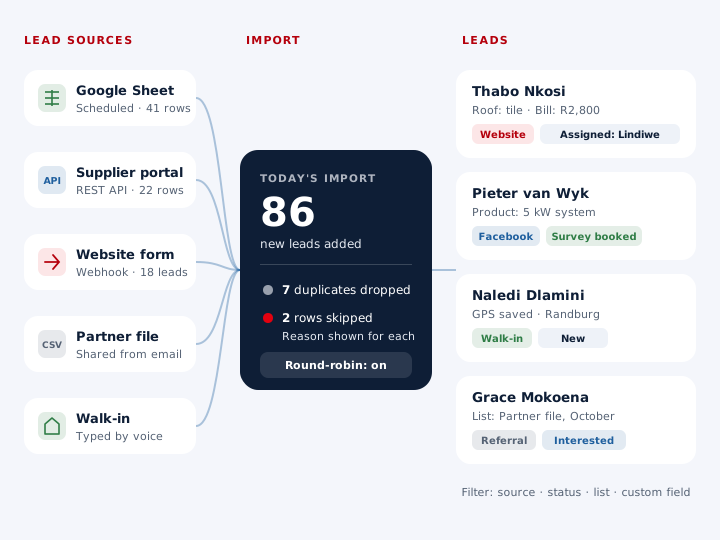
A rooftop solar installer in Johannesburg, South Africa. The business is an illustration, not a named customer.
Leads reach the installer from five places: Facebook lead forms written to a Google Sheet, a quote form on its website, a supplier portal with a REST API, a monthly spreadsheet from a partner electrician, and people who walk into the showroom.
The owner set up the Google Sheet and the portal API as scheduled sources, mapping columns such as roof type and monthly electricity bill to custom fields. The website form posts to a webhook on the web CRM, which hands each new enquiry to the four consultants in turn. The partner's file is imported by hand once a month, with duplicate numbers dropped as it comes in.
Walk-ins are typed in at the counter, often by voice, tagged Walk-in, with a GPS field holding the house location for the roof survey. At month end the owner filters by source to see which channel produced the most surveys, turns signed customers into paid clients with the system size as a product, and exports that month's leads to CSV for the bookkeeper.
Price
Lead management app price
Billed yearly, per user, GST extra. Every user on a team pays that team's band price, so 12 users pay ₹3,000 each. See full plan details, or ask us on WhatsApp.
Questions
Lead management app FAQ
Which lead management app imports leads from Google Sheets automatically?
mCallz does. It checks a connected Google Sheet in the background on a schedule, maps the columns to your fields and adds new rows as leads, listing any skipped row with its reason.
Is mCallz a lead management app?
Yes. mCallz is a lead management app that captures leads from sheets, APIs, files and webhooks, then lets the team call, message and follow them up on the same phone. It works on Android, iPhone and the web.
How much does a lead management app cost with mCallz?
Lead management is part of every mCallz user licence, sold for twelve months at a time. The licence is ₹4,000 per person (US$44.08) for the first band of up to 4 users, ₹3,500 from 5, ₹3,000 from 10 and ₹2,500 at 20; past that, ask for a quote. GST extra.
What is a lead management system?
A lead management system is the process and software a business uses to capture, sort, assign and track enquiries until they buy or drop out. It usually brings lead sources, statuses, owners and follow-ups into one place.
What is lead management?
Lead management is the work of handling potential customers from first enquiry to sale: recording them, qualifying them, following up and noting the result. Software makes that repeatable, so leads are not lost as volumes grow.
Is there a free lead management app?
mCallz has a free trial at app.mcallz.com. During the trial you can connect a sheet, import a file and work real leads, then buy yearly seats for the people who need them.
What is the best lead management software for small business?
For a small business whose leads end up as phone calls and WhatsApp chats, mCallz fits well because capture, calling and follow-ups share one app priced per user. A business that nurtures leads mainly by email may prefer an email-first tool.
How do IndiaMART or JustDial leads get into the app?
Through a Google Sheet, a REST API source or a file import, after which they carry their source tag. IndiaMART and JustDial are built-in tags you can filter on; the feature list does not describe a dedicated portal connector.
What happens to duplicate leads during import?
Duplicate numbers are dropped and country codes are handled as the file or sheet comes in, so repeated numbers do not create extra lead records.
Why were some rows skipped when importing leads?
Each skipped row is listed with the exact reason it failed, so you can correct the source data. You can also inspect a source's valid and invalid rows as lead cards and remove test entries.
Can new leads be assigned to salespeople automatically?
Yes, on the web CRM. Leads from a custom webhook or live sheet source can be assigned in round-robin order, and you can also assign leads by hand, with each salesperson getting their own pending queue.
Is there a real estate lead management app?
mCallz suits property teams: portal and ad leads come in from sheets or APIs, each tagged by source, with custom fields such as budget or locality and projects attached as products.
Can I export leads from a lead management app?
Yes. mCallz exports leads to a CSV file, and the export follows the active filter, so you can send out just one source, status or imported list.
Does the lead management app work on Android and iPhone?
Yes. mCallz runs on Android and iPhone, with a web CRM for webhooks, round-robin rules and reports. On iPhone everything is available apart from reading the phone's call log.
Bring every lead into one lead management app today
Connect one Google Sheet, map its columns and watch the first leads arrive with their source already tagged.