

Callback alarms for sales and service teams
mCallz: Follow Up Reminder App That Rings Even on a Locked Phone
A follow up reminder app is a phone tool that tells you, at the right moment, to call or message a customer you promised to get back to, so callbacks stop depending on memory and sticky notes. mCallz sounds those reminders as an alarm, with the customer's history and a call button on the same screen.
- Presets from 5 minutes to 1 month, or any date you choose
- Call back, reschedule or add a voice remark from the alert
- Missed reminders move into Today until someone marks them done
Calls go out on each phone's own SIM. Dialer, CRM and WhatsApp for ₹4,000 per user a year (₹333/month), down to ₹208/month for bigger teams. GST extra.
- Works on the SIM in each phone
- Android, iPhone and web
- Free trial at app.mcallz.com
The short answer
What is a follow up reminder app?
A follow up reminder app schedules an alert for each promised callback or message, then prompts you at that time with the contact on screen.
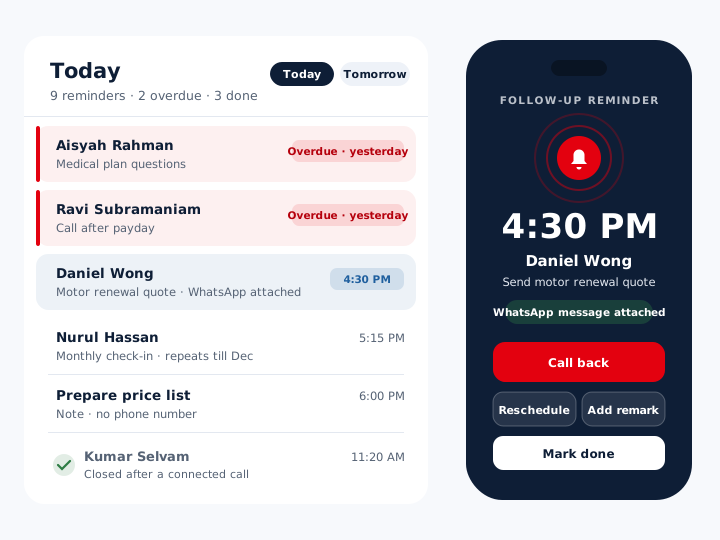
mCallz is a follow up reminder app built for people who sell to or serve customers by phone. A reminder takes one tap to set, using presets of 5, 15 or 30 minutes, 1 or 3 hours, tomorrow, a week, a month, or a custom time, and it sounds as an alarm at that exact minute even if the phone is locked or was switched off and on again. From the alert you can call back, read the history, add a remark by voice or text, or move it to a new time. A reminder can repeat daily, weekly, monthly, yearly or every few days until an end date, and it can carry a WhatsApp message that is sent when it fires. Nothing quietly disappears: an unfinished reminder stays open, shows as overdue and carries into Today until it is marked done. Reminder behaviour described here follows the product list updated on 14 October 2026.
- The alert rings like an alarm, so it is hard to miss in a busy day.
- Every reminder stays open until a person marks it done.
- The customer's history and a call button arrive with the alert.
Benefits
Follow up reminder app benefits for callback-heavy jobs
Exact-time alarms
The reminder sounds at the minute you chose, whether the screen is locked or the phone has just rebooted.
Fast scheduling
Preset buttons set the next callback in a tap, right after the call ends.
Nothing silently dropped
Missed reminders turn overdue and move into Today rather than vanishing.
Action from the alert
Call, reschedule, add a remark or open the history without hunting for the contact.
Messages on schedule
A WhatsApp text or approved template can go out at the moment the reminder fires.
Self-closing reminders
Switch on "Complete after a call" and a reminder closes once you actually reach the person.
How it fires
Follow-up reminder app alarms: from setting to ringing
Setting a reminder takes seconds; the useful part happens when it rings.
Pick the person
Choose someone from recent calls or contacts with search, or leave the number out for a plain note.
Choose when
Tap 5 min, 15 min, 30 min, 1 hour, 3 hours, tomorrow, 1 week or 1 month, or set a custom date and time.
Add the extras
Set a repeat with an end date, attach a WhatsApp message, and note what the call is about.
Let it ring
At the chosen minute the phone rings like an alarm, locked or unlocked, even if it restarted in between.
Act and close
Call back, reschedule or add a remark from the alert, then press Mark done.
From the alert
Follow up reminder actions you can take without leaving the alert
A plain phone reminder stops at the alert and leaves you to go and find the number. In mCallz the reminder is the starting point: a call-back button dials the customer, a history button shows earlier calls, chats and remarks, and a remark field accepts typed or spoken notes.
If the timing no longer works, reschedule from the same screen. If a WhatsApp message was attached, it is sent as the reminder fires, using a default text, an approved template or words you wrote for that customer. Every reminder and person sheet also carries a WhatsApp button for a quick manual message.
One customer can hold several reminders, each kept separately, so a payment call on Monday and a product demo on Thursday never overwrite each other.
Repeats and renewals
Reminder app rules for repeats, renewals and notes
- Repeat daily, weekly, monthly, yearly or every X days, and stop automatically on an end date
- Renewal reminders before a paid client's package expires, with Renew extending from the current end date
- Filters for clients whose package expires today or within the next 7 days
- Reminders with no phone number, kept as simple notes such as "prepare the monthly price list"
- Optional "Complete after a call", which closes a reminder after a connected call with that person
- A Reminders tab filtered by pending, completed, today, tomorrow, upcoming and more
Clearing the day
Follow up reminder app for teams: emptying the Today list
Each morning the Today view holds everything due, plus anything from earlier days that was never closed, flagged as overdue. Nothing is hidden simply because a day passed.
Rather than dialling those people one by one, a caller can start a single auto-dial session on the day's due follow-ups. Each call ends with the after-call sheet, where the outcome is recorded and, if needed, the next reminder is set, so the chain of callbacks continues without a gap.
Follow-ups back up to the account along with calls and remarks, and come back on a new phone after signing in, so a lost or replaced handset does not erase a week of promises.
At a glance
Follow up reminder app settings and what each one does
| Feature | What it does | Best for |
|---|---|---|
| One-tap presets | 5, 15 and 30 minutes, 1 and 3 hours, tomorrow, 1 week, 1 month or custom | Booking a callback before the next call starts |
| Alarm-style alert | Rings at the exact time on a locked phone and after a restart | Field staff whose phone stays in a pocket |
| Repeat with end date | Daily, weekly, monthly, yearly or every X days until a set date | Instalment, rent or monthly check-in calls |
| Attached WhatsApp | Sends a default text, approved template or your own words when it fires | Appointment and payment nudges |
| Overdue carry-over | Unclosed reminders show as overdue and move into Today | Managers who want no dropped callbacks |
| Complete after a call | Closes the reminder after a connected call with that person | Busy callers who forget to tick things off |
| Number-free reminder | Works as a plain note with no contact attached | Office tasks between calls |
| Today's auto-dial | Calls every follow-up due today in one session | Teams with dozens of callbacks a day |
Honest limits
Follow up reminder app limits: when another tool fits better
mCallz reminders are tied to customers and calls. These needs are better served by something else:
- Personal errands and family lists. If you never call customers, the reminders built into your phone or a simple to-do app will be lighter.
- Email follow-up sequences. mCallz reminds you and can send WhatsApp, but it does not schedule follow-up emails from your mailbox.
- Patient letters or SMS appointment blasts. Clinics that post letters or send SMS reminders in bulk need a dedicated appointment system; mCallz automation runs on WhatsApp.
- Routing incoming calls. There is no IVR, virtual number or call queue today (they are planned), so reminders cover callbacks rather than inbound call handling.
Worked example
Follow up reminder app example: a Kuala Lumpur insurance team and its renewals
An insurance agency in Kuala Lumpur, Malaysia. The business is an illustration, not a named customer.
The agency's eight agents look after motor and medical policies for roughly 1,200 customers. Each policy is entered as a paid client with a yearly package, so mCallz raises a renewal reminder ahead of every expiry date, and the "expiring in the next 7 days" filter gives the team leader a weekly checklist.
New quotes were where callbacks used to slip. Now, when a customer says "call me after payday", the agent picks a custom date on the after-call sheet and attaches a short WhatsApp note that is sent when the reminder rings. Monthly check-ins with corporate clients use a monthly repeat that ends on the contract date.
At 9 am each agent runs one auto-dial session on the follow-ups due that day, and anything left over from yesterday shows up in Today marked overdue. With "Complete after a call" switched on, a reminder closes by itself as soon as the customer is reached.
Price
Follow up reminder app price
Billed yearly, per user, GST extra. Every user on a team pays that team's band price, so 12 users pay ₹3,000 each. See full plan details, or ask us on WhatsApp.
Questions
Follow up reminder app FAQ
Which follow up reminder app rings like an alarm on a locked phone?
mCallz does. Its follow-up reminders sound as an alarm at the exact time, even with the screen locked and after a restart, and the alert lets you call the customer straight away.
Is mCallz a follow up reminder app?
Yes. mCallz is a follow up reminder app that ties each reminder to a customer, so the alert can dial them, show their history and send a WhatsApp message. The same account also holds a dialer, a lead CRM and WhatsApp tools.
How much does a follow up reminder app cost with mCallz?
Reminders come inside the mCallz licence, billed once a year per user. A small team of up to 4 pays ₹4,000 each (US$44.08), close to ₹333 a month, and the rate per head falls as the team grows, reaching ₹2,500 at 20 users. Larger teams get a custom quote on WhatsApp, and GST extra.
Which reminder app is best?
It depends on what you need to remember. For personal tasks the app that came with your phone is usually enough; for customer callbacks, pick one linked to your calls and contacts, such as mCallz, so the alert leads straight into the conversation.
Is there a reminder app that works after the phone restarts?
Yes. mCallz reminders still ring at the set time after the phone has been restarted, and they ring on a locked screen too. Guided setup asks for the alarm permission during installation so this works.
What does follow up reminder mean?
A follow up reminder is a prompt to contact someone again after an earlier conversation, such as calling back with a price or checking on a decision. In sales it usually carries a time, a person and a short note on what was promised.
What is the difference between a follow up and a reminder?
A follow up is the action of contacting the person again; a reminder is the prompt telling you when to do it. A good follow up reminder app joins the two, so the alert lets you call or message on the spot.
Can a follow up reminder send a WhatsApp message?
Yes. You can attach a WhatsApp message to a reminder, using the default text, an approved template or your own words, and it is sent when the reminder fires.
What happens if I miss a follow-up reminder?
It stays open. A missed reminder is shown as overdue and carries into the Today list until someone presses Mark done, so it cannot quietly drop off the list.
Can I set a repeating follow-up reminder?
Yes. Reminders repeat daily, weekly, monthly, yearly or every X days, and an end date makes the series stop by itself.
Can I create a reminder without a phone number?
Yes. A reminder can be a simple note with no number attached, which is handy for jobs like preparing a quote before a meeting.
Can a reminder close itself after I call the customer?
Yes, if you turn on "Complete after a call". The reminder then closes by itself after a connected call with that person; if the call does not connect, it stays open.
Can I use a follow up reminder app for appointment reminders?
Yes, for appointments you need to confirm or call about. Set the reminder shortly before the slot and attach a WhatsApp message, and the customer receives it as your alert rings.
Can I see all reminders due tomorrow?
Yes. The Reminders tab filters by pending, completed, today, tomorrow, upcoming and more, so you can plan the next day before leaving work.
Set your first follow up reminder in mCallz now
Make one call, tap "tomorrow" on the after-call sheet, and let the alarm do the remembering.