

Team call logs for owners
mCallz: Employee Call Monitoring for Every Business Call on Your Team's Phones
Employee call monitoring is the practice of reviewing the business calls staff make and receive, using call logs, outcomes and recordings, so managers coach from facts rather than guesses. mCallz rolls each employee's business calls up to the owner's account, and its backup rules can leave personal calls off the record.
- Analytics rings: tap one to open exactly those calls
- Lost leads, unique callers and monthly trends for any period
- Excluded numbers stay out of backup and automation
Calls go out on each phone's own SIM. Dialer, CRM and WhatsApp for ₹4,000 per user a year (₹333/month), down to ₹208/month for bigger teams. GST extra.
- Works on the SIM in each phone
- Android, iPhone and web
- Free trial at app.mcallz.com
The short answer
What is employee call monitoring?
Employee call monitoring means a business reviews which calls its staff handle, how they end and which customers were missed, using records of each call.
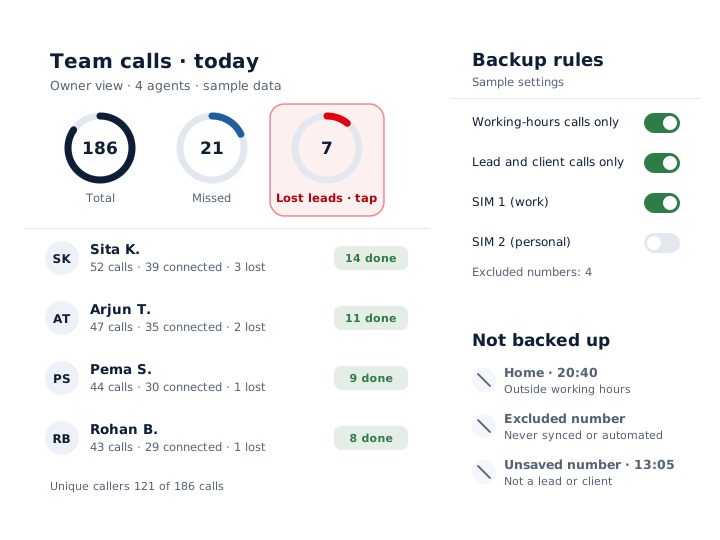
mCallz is an employee call monitoring app that brings the business calls on each staff phone into the owner's account. The owner sees team call logs and analytics rings for total, connected, missed, incoming and outgoing calls, along with unique callers, lost leads and rejected, blocked or spam calls, and a tap on any ring filters the log down to those calls. A lost lead is a number that never connected past the limit you choose: 60, 30 or 0 seconds. Monthly trends show whether missed calls are climbing, and the Done tab records how each assigned lead was finished. Recordings made by the phone can be imported into the app. For privacy, numbers on the excluded list never back up, and two optional rules limit backup to calls inside the branch's working hours, or to conversations with leads, assigned leads and paid clients. Each detail above was checked against the product feature list dated 14 October 2026.
- Owners read call activity from the account instead of asking for daily reports.
- Lost leads surface the numbers nobody reached, so they get a callback.
- Backup rules and excluded numbers keep personal calls off the business record.
Benefits
Employee call monitoring benefits for sales owners
Team call logs in one account
Calls from every employee's phone roll up to the owner, so nobody compiles a call sheet at 7 pm.
Missed customers found fast
The lost-leads ring lists numbers that never connected past your limit, one row per number.
Real reach, not inflated totals
Unique callers sit beside total calls, so twenty attempts on one number do not look like twenty customers.
Trends across months
Monthly charts for incoming, outgoing, missed and rejected calls show whether follow-up is slipping.
Clear lead hand-offs
The Done tab records the route each lead took to completion: dialer session, click to call, marked by hand or transferred.
Personal calls protected
Excluded numbers and optional backup rules keep family and private calls out of the account.
What the owner sees
Employee call monitoring with analytics rings and team call logs
The owner's account collects calling activity from every team phone. At the top sit rings for every call type the team handles: incoming and outgoing, connected and missed, rejected, blocked and spam, plus unique callers and lost leads. Each ring is a shortcut: tap "Missed" and the call log narrows to missed calls only, ready to work through.
Pick a period (a single day, a week, a month, everything so far or dates you choose) and view it either as a Summary or as an Analysis. Unique callers are shown next to total calls, which separates the number of people reached from the number of times someone pressed dial.
Monthly trend charts track incoming, outgoing, missed and rejected calls over time. A rise in missed calls during a busy season is visible weeks before it shows up as lost sales.
Lost leads
Call monitoring for lost leads and unfinished work
A number becomes a lost lead in mCallz when every attempt to reach it stayed below your connection limit (60, 30 or 0 seconds). However many tries it took, the number is listed only once, and the lost leads list is laid out for win-back calls.
For leads you assign, the Done tab closes the loop. It shows each worked lead and how it was completed: through the auto dialer, a click to call, a manual "done" mark or a transfer to a colleague, with the transfer history kept. An owner can tell at a glance whether a list was really called or simply cleared.
Recordings and other calls
Employee phone monitoring with call recordings from the phone
mCallz can import call recordings automatically from the phone's own recorder, or an employee can share a single recording into the app. It works with the recordings the phone already makes, so check that recording is switched on, and legal where you operate, before relying on it for coaching.
Calls made over WhatsApp, Google Meet and Zoom are logged in the call history beside ordinary SIM calls, which matters for teams whose customers prefer an internet call.
Privacy rules
Employee phone monitoring software that leaves personal calls out
Most sales staff use one phone for work and family. These controls decide what reaches the business account:
- Excluded numbers: numbers on this list are never backed up and are left out of every automation, including auto WhatsApp.
- Working-hours rule: back up only calls made inside the branch's working hours, days off and time zone.
- Leads-and-clients rule: back up only calls with leads, assigned leads or paid clients, so a call to a cousin stays on the phone.
- SIM choice: on a dual-SIM phone, pick which SIMs back up, for example the work SIM only.
- Delete permissions: whether deleted records are also removed on the server is controlled by admin permissions.
At a glance
Employee call monitoring features and who uses them
| Feature | What it does | Best for |
|---|---|---|
| Team call logs | Brings every employee's calls into the owner's account | Owners of small sales teams |
| Analytics rings | Counts calls by type, from connected and missed to spam, plus unique callers and lost leads | A two-minute daily review |
| Tap to filter | Opens the call log filtered to the ring you tapped | Working through missed calls one by one |
| Lost leads | Lists each unreached number once, judged by your 60, 30 or 0 second limit | Win-back lists |
| Monthly trends | Charts incoming, outgoing, missed and rejected calls by month | Spotting a slow month early |
| Done tab | Shows how each assigned lead was completed | Managers who split lead lists |
| Call recordings | Imports the phone's own recordings, or one shared into the app | Coaching new callers |
| Excluded numbers | Keeps chosen numbers out of backup and all automation | Family and personal contacts |
| Backup rules | Backs up only working-hours calls, or only calls with leads and clients | Staff who use one phone for work and home |
| SIM choice | Backs up only the SIMs you pick | Dual-SIM phones with a personal SIM |
Honest limits
Employee call monitoring limits and what mCallz does not do
mCallz shows call activity after the call. It is the wrong fit for these cases:
- Live listening or call barging. There is no way to join or listen in while a call is happening; a seated call centre that needs that should use contact centre software.
- Call-log tracking on iPhone. Apple keeps the iPhone call log closed to third-party apps, which means SIM calls made on iPhones never reach the team log automatically. Teams that need complete call records should use Android phones.
- IVR, virtual numbers and call queues. mCallz has none of these today (they are planned), so an inbound helpline needs a cloud telephony product.
- Covert monitoring. mCallz is a visible app that replaces the dialer on the employee's phone. It is not spyware, and staff should know it is in use.
Worked example
Employee call monitoring example: a Kathmandu trekking agency
A trekking and tour agency in Kathmandu, Nepal. The business is an illustration, not a named customer.
Each agent carries a dual-SIM phone with the agency SIM in slot one and a personal SIM in slot two. With the agents in the room, the owner sets backup to the work SIM only, adds the rule for working hours (Sunday to Friday, with Saturday off) and puts each agent's family numbers on the excluded list. Everyone knows what the owner can see before the first call is logged.
Every evening the owner glances at the rings. On a typical October day the lost-leads ring shows around a dozen numbers, mostly enquiries about Everest and Annapurna treks that rang out, and a tap turns them into the next morning's callback list. Imported recordings help a new agent hear how a senior colleague handles price questions, and the monthly trend chart showed missed calls climbing as peak season began, which prompted an extra agent on the morning shift. For eight users the agency sits in the 5 to 9 users band and pays ₹28,000 a year before taxes.
Price
Employee call monitoring price
Billed yearly, per user, GST extra. Every user on a team pays that team's band price, so 12 users pay ₹3,000 each. See full plan details, or ask us on WhatsApp.
Questions
Employee call monitoring FAQ
Which employee call monitoring app keeps personal calls out of the business record?
mCallz does, with three controls: an excluded numbers list that never backs up, an optional rule to back up only calls in working hours, and another to back up only calls with leads, assigned leads or paid clients.
What does mCallz show an owner about staff calls?
mCallz is an employee call monitoring app that shows the owner every employee's business calls, with rings for missed, connected, unique and lost-lead calls. A tap on any ring opens those calls, and monthly trends show the direction things are moving.
How much does employee call monitoring cost with mCallz?
Each employee you monitor needs one mCallz user, paid for a year at a time. Owners with 1 to 4 staff pay ₹4,000 per user (US$44.08), about ₹333 a month; with 5 to 9 users it is ₹3,500, and the per-user figure keeps shrinking up to 20 users, after which pricing is agreed on WhatsApp. GST extra.
Is employee monitoring legal?
Usually yes, when it has a clear business purpose, staff are told about it and it stays proportionate. In the EU and UK, GDPR requires transparency and a lawful basis; in the United States, federal law generally allows monitoring of business calls, but states such as California require every party's consent to record a call; and Nepal's Individual Privacy Act 2018, like the Digital Personal Data Protection Act 2023 in India, protects personal data. General information only, not legal advice: confirm the rules in each country where you have staff.
What is call monitoring?
Call monitoring is reviewing calls to check their volume, outcome and quality. In a call centre it can mean listening live; in a mobile sales team it usually means reading call logs, missed and lost calls, and recordings afterwards.
What is employee phone monitoring software?
It is software that reports how staff use work phones, usually calls, call outcomes and sometimes recordings. The better tools stick to business activity and give staff a way to keep personal calls private.
What are the types of employee monitoring?
The common types are time and attendance, location tracking for field staff, call and phone monitoring, computer and internet activity, and video. mCallz covers the first three: selfie attendance, duty-only location and team call logs.
Can my employer listen to my calls?
Not live through mCallz, which has no listen-in feature. Recordings that your phone itself made can be imported into the app, so ask your employer how recordings are used and check the backup rules in place.
Can I monitor employee calls on iPhone?
Only partly. iPhones do not allow apps to read the call log, so mCallz cannot log SIM calls on them automatically; for complete team call logs, give the team Android phones.
How do I keep personal calls out of call monitoring?
Add personal numbers to the excluded list, or turn on the rule that limits backup to calls with your leads, assigned leads or paid clients. On a dual-SIM phone you can also back up the work SIM alone.
What is a lost lead in call monitoring?
It is a number your team dialled that never got a conversation longer than the threshold you picked, which can be 60, 30 or 0 seconds. mCallz lists it a single time, so the list works as a ready callback queue.
Can I compare unique callers with total calls?
Yes. The analytics show unique callers beside total calls for any period, from today back to the account's whole history or custom dates, which separates real reach from repeated dialling.
Start employee call monitoring on two phones this week
Install mCallz on two sales phones, agree the backup rules with the people who carry them, and read the first rings tomorrow evening.