

A work phone app for sales and service staff
mCallz: Call Management App for Android and iPhone, Made for Work Calls
A call management app is a phone app that takes charge of how calls are placed, answered, logged and followed up, so business calls no longer pass through a plain dialer that knows nothing about the customer. mCallz can become the phone app on Android, puts lead details on the ringing screen, and keeps SIM and internet calls in a single history.
- Caller name, deal status and latest note on a full-screen card
- A keypad that finds contacts and saved leads while you type
- Missed-call alerts with call-back, SIM choice and WhatsApp
Calls go out on each phone's own SIM. Dialer, CRM and WhatsApp for ₹4,000 per user a year (₹333/month), down to ₹208/month for bigger teams. GST extra.
- Works on the SIM in each phone
- Android, iPhone and web
- Free trial at app.mcallz.com
The short answer
What does a call management app do?
A call management app replaces or extends the phone dialer so every call shows who is calling, gets logged, and leads to a next step.
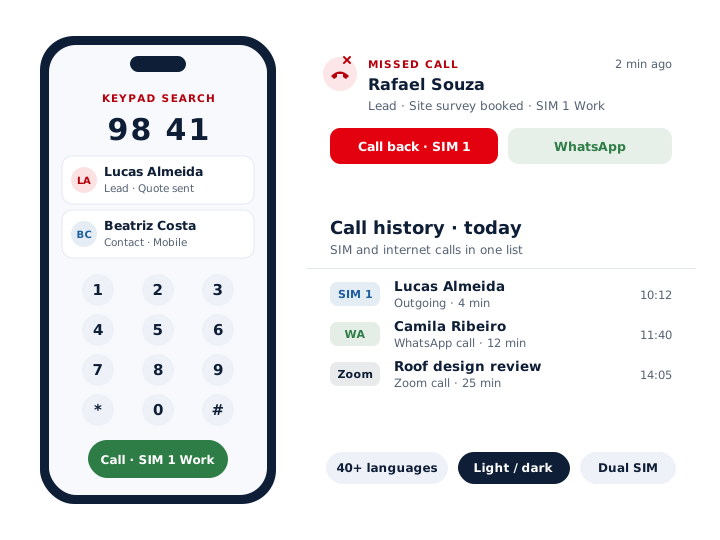
mCallz is a call management app that Android users can set as the default phone app, while their contacts and call history keep working as they did. When a number rings, a full-screen card names the caller and shows their lead status and newest remark, and it appears on top of the lock screen too. The keypad searches contacts and saved leads together as digits are typed, a dual-SIM phone can use a fixed business SIM or ask for each call, and two calls can be merged into a conference. Missed calls raise a notification with one-tap call-back and a WhatsApp button. Calls made on WhatsApp, Google Meet and Zoom are listed with ordinary SIM calls, and unknown callers can be saved as contacts a minute after hanging up. The app runs in more than 40 languages, and the feature list behind this page is dated 14 October 2026.
- Context arrives before you say hello, not after the call.
- Mobile and app-based calls share one list per customer.
- A missed call becomes a call-back or a WhatsApp in one tap.
Benefits
Call management app benefits for people who sell by phone
Caller context on screen
The ringing screen names the lead and shows where the deal stands, so the greeting can be personal.
Faster number lookup
Typing a few digits on the keypad brings up matching contacts and leads in one list.
Work and personal SIM kept apart
Fix the business SIM as the default, or pick a SIM for each call on a dual-SIM handset.
No forgotten missed calls
Each missed call leaves a notification with call-back and WhatsApp buttons built in.
App calls on the record
Conversations held on WhatsApp, Google Meet or Zoom are not lost outside the dialer.
Comfortable for every user
More than 40 languages, right-to-left layouts, and a light or dark theme.
The dialer
Call management app for Android: taking over the phone app
On Android, mCallz can be chosen as the default phone app during setup. From then on, outgoing calls, incoming calls, contacts and the call log all open inside mCallz, while the SIM, the number and the carrier stay exactly as they were.
The incoming screen is where the change shows first. Instead of a bare number, the person answering sees the caller's name, the current lead status and the newest remark, and can open the complete lead record while still talking. Because the card also appears on a locked phone, nobody has to unlock, open a CRM and search before picking up.
After hanging up, a short sheet collects the outcome, a note and when to call next; two taps usually cover it. Teams that would rather keep their phone maker's dialer can use CRM team mode, which leaves that dialer in place and still opens the sheet after each call. Where another app owns the call screen, caller ID mode shows the caller's details in a ringing notification instead.
Everyday calling
Phone call management app tools for daily calling
The small actions a salesperson repeats fifty times a day, each moved closer to the thumb.
Keypad search
Start typing a number and the keypad lists matching contacts and saved leads at once, so a half-remembered number is still found.
Dual SIM
Choose the SIM for each call, or set one SIM as the default for business. The history then carries the right SIM name against every call.
Conference calls
Add a second person during a call and merge the two lines, which helps when a manager or a technician needs to join.
Contact actions
Every contact has call, WhatsApp and SMS buttons, so the channel a customer prefers is one tap away.
Missed-call alerts
The notification itself offers call-back, with a SIM choice, and a WhatsApp button, without opening the app first.
Auto-save new callers
An unknown number can be saved as a contact 60 seconds after the call, with a name prefix. Switch it off if you would rather save by hand.
International numbers
Numbers with country codes are shown and dialled correctly, which matters for anyone with customers abroad.
Dial from a computer
Click a phone number in Chrome on the computer and the phone places the call, using the SIM, auto-call and speaker settings you saved.
Internet calls
Call management app for WhatsApp, Meet and Zoom calls
Plenty of customers now ring through WhatsApp, and many sales meetings happen on Google Meet or Zoom. A dialer that only sees mobile network calls leaves those conversations out of the record, and the customer's timeline ends up with gaps.
mCallz logs WhatsApp, Google Meet and Zoom calls in its call history next to SIM calls, so a customer's timeline covers every conversation whatever the channel. WhatsApp voice and video calls can also be started from any WhatsApp button in the app, for saved contacts who use WhatsApp.
iPhone
Call management app for iPhone: what carries over
Apple does not let third-party apps read the iPhone's list of recent calls, so the iPhone version of mCallz includes every feature apart from that one. Leads, follow-up reminders, WhatsApp tools, contacts and the rest of the app are available on iOS.
In practice, automatic logging of SIM calls is an Android strength. A team with mixed handsets can put its heaviest callers on Android and let iPhone users work leads and reminders. Before deciding, test the kind of calls you make on an iPhone of yours while the free trial runs.
Setup
Call management app setup in four steps
Most phones are ready in a few minutes. The app explains each permission before asking for it.
Install and sign in
Install mCallz, sign in to your account and pick your language from the in-app picker.
Follow the permission guide
A guided screen walks through the dialer role, notifications and alarms. A battery setting is requested only on phones that need it.
Set your SIM rules
Make the business SIM the default or ask on every call, and decide whether new callers are saved automatically.
Take a test call
Have a colleague ring you from a number saved as a lead, check the caller card, then fill in the after-call sheet once.
At a glance
Call management app features at a glance
| Feature | What it does | Best for |
|---|---|---|
| Default phone app (Android) | Runs calls, contacts and the call log from one app | Anyone who wants work calls in a single place |
| Full-screen caller card | Shows name, lead status and newest remark, also on a locked phone | Greeting returning customers by name |
| Keypad search | Matches contacts and leads as digits are typed | Finding a lead without opening the CRM |
| Dual SIM rules | A default business SIM, or a choice on each call | Handsets carrying a work SIM and a personal SIM |
| Missed-call notification | Call-back with SIM choice, plus a WhatsApp button | Staff who are often driving or in meetings |
| Conference call | Adds a call and merges the lines | Bringing a manager into a live negotiation |
| Internet call logging | Puts WhatsApp, Meet and Zoom calls in the call list | Teams that sell over video and WhatsApp |
| Dial from computer | A click on a number in Chrome makes the phone ring out | Desk staff who work from a laptop |
| Caller ID mode | A ringing notification with caller details when the card cannot show | Phones where another app owns the call screen |
Honest limits
Call management app limits to check before you install
mCallz manages the calls on the phone in your hand. It is not the right purchase when:
- You need a shared office number with menus. IVR, virtual numbers and call queues are planned but not available today, so an inbound helpline is better served by a cloud phone system for now.
- Every caller uses an iPhone and wants SIM calls logged automatically. Apple does not expose the list of recent calls to apps, so automatic SIM call logging needs Android handsets.
- You only want a personal spam blocker. mCallz does flag spam and block numbers, but it is built around leads and follow-ups; a free consumer dialer may suit a purely personal phone.
- You plan to play recorded messages. There is no robocalling: every call needs a real person on the line.
Worked example
Call management app example: five solar sales reps in São Paulo
A solar panel installer in São Paulo, Brazil. The business is an illustration, not a named customer.
Each of the installer's five reps carries one Android phone holding a work SIM and a personal SIM. After setting mCallz as the phone app, every rep marks the work SIM as the default, so quotes and site-survey calls never leave from a private number. Homeowners who ring back after receiving a quote appear on the full-screen card with the status "Quote sent" and the roof size noted in the newest remark.
Many homeowners prefer a WhatsApp call in the evening, and those calls now sit in the same history as SIM calls. When a rep is up on a roof and misses a call, the notification offers a call-back on the work SIM or a WhatsApp reply. Back at the office, the coordinator clicks numbers in a supplier spreadsheet in Chrome and her phone dials them. Each person picks their own language in the app, so the owner and the reps do not have to share one setting.
Price
Call management app price per user
Billed yearly, per user, GST extra. Every user on a team pays that team's band price, so 12 users pay ₹3,000 each. See full plan details, or ask us on WhatsApp.
Questions
Call management app FAQ
What is a call management app?
A call management app is a phone app that controls how calls are made, answered, kept in the history and followed up. Business versions such as mCallz add lead details to the call screen and ask for a status after each call.
What is the best call management app?
For people who sell or support customers from their own mobile number, mCallz is built for that job: dialer, caller card, lead record and WhatsApp in one app. For a purely personal phone, a free consumer dialer with spam blocking is usually enough.
Which call management app for Android replaces the default dialer?
mCallz does. On Android it can be set as the default phone app, so incoming and outgoing calls, contacts and the call log all run through it with lead details attached.
Is there a call management app for iPhone?
Yes. The iPhone edition of mCallz carries every feature apart from reading the phone's recent calls, which iOS does not open to apps. Leads, reminders, contacts and WhatsApp tools work on iOS.
Is mCallz a call management app?
Yes. mCallz is a call management app that turns the Android dialer into a work tool: a full-screen caller card with lead status, keypad search across contacts and leads, dual SIM rules and an after-call status sheet.
How much does a call management app cost with mCallz?
Budget ₹4,000 for each phone user over twelve months, which equals US$44.08, if your team has four users or fewer. From five users the yearly rate per phone goes down in steps, reaching ₹2,500 (US$28.30) for a 20-user team, and anything bigger is quoted separately. GST extra, and the dialer features on this page are part of every band.
Is there a free call management app?
mCallz offers a free trial, so you can set it as your phone app and take real calls before paying. Sign up at app.mcallz.com; after the trial it is billed per user.
Can a call management app block spam calls?
mCallz flags likely spam from other users' reports before you answer, lets you report numbers and set your own threshold, and keeps blocking and unblocking in one place. Saved leads and clients always ring through.
Can I make conference calls with mCallz?
Yes. During a call you can add another call and merge the two into a conference, for example to bring in a manager or a colleague who knows the product.
What happens to my contacts when I switch dialers?
They stay where they are. mCallz uses the phone's existing contacts and call history, so switching the default phone app does not move or delete anything.
Does the caller card show when my phone is locked?
Yes. The full-screen card with the caller's name, lead status and newest remark appears over the lock screen. If a phone blocks it, a self-check points to the exact setup step to fix it.
Can I dial a customer from my computer?
Yes. Click a phone number in Chrome on your computer and your phone places the call, following the SIM, auto-call and speaker settings you chose.
Does the call management app work in my language?
Probably. mCallz is available in more than 40 languages with an in-app picker, supports right-to-left scripts, and offers light and dark themes.
What permissions does a call management app need?
mCallz asks for the dialer role, notifications and alarms through a guided setup that explains each one. A battery exception is requested only on phones that would otherwise stop the app in the background.
Put the mCallz call management app on one phone this week
Set it as the phone app, take a handful of calls, and watch the lead details arrive before you say hello.