

Lead pipeline for telecalling teams
mCallz: Telecalling CRM Software for Every Lead Your Callers Work
A telecalling CRM is a lead database built for phone sales, where every call updates the lead's stage, notes and next callback, so nothing depends on a caller's memory or notebook. mCallz keeps that pipeline on the telecaller's phone, with statuses, tags and products you define and the previous remark waiting on screen when the lead rings again.
- Imports from Google Sheets, REST APIs and Excel files
- Pipeline stages you name, colour and reorder yourself
- Assign, transfer and review worked leads in a Done tab
Calls go out on each phone's own SIM. Dialer, CRM and WhatsApp for ₹4,000 per user a year (₹333/month), down to ₹208/month for bigger teams. GST extra.
- Works on the SIM in each phone
- Android, iPhone and web
- Free trial at app.mcallz.com
The short answer
What is telecalling CRM?
Telecalling CRM is software that keeps every lead a phone sales team dials, with its status, call notes, owner and next follow-up held together.
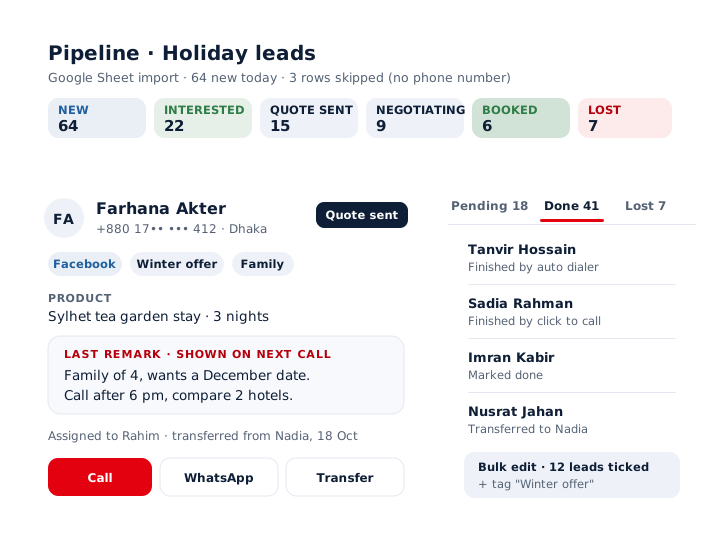
mCallz is a telecalling CRM that lives on the Android phone or iPhone each caller already carries. Leads flow in from a Google Sheet or REST API checked on a schedule, from Excel, CSV or JSON files, or from a webhook, and any number already saved is skipped rather than doubled. Each lead then moves through a status pipeline the owner designs: create stages, rename them, recolour them and drag them into order. Remarks typed after one call appear on screen during the next, so a caller never opens a conversation cold. Managers assign leads into personal queues, transfer them with the history intact and see finished work in a Done tab that records how each lead was closed. Tags and products can be added to or removed from many leads at once with bulk edit. Every point here matches the product feature list of 14 October 2026.
- The pipeline stages are yours, not a fixed template.
- The last remark greets the caller on the next call with that lead.
- Leads that never buy wait in a lost list for a later win-back round.
Benefits
Telecalling CRM benefits for team leads and callers
Your own sales stages
Name, colour and order statuses to match how your team really sells; a stage that still holds leads cannot be deleted by accident.
Context on every callback
The note from the previous conversation shows while the phone rings, so callers pick up exactly where they stopped.
Leads in without typing
Sheets and APIs are checked in the background, and any row that fails is listed with the reason it was skipped.
Fair lead distribution
Each telecaller works a personal pending queue, and a transfer carries the earlier history to the new owner.
Clean data at scale
Bulk edit changes tags and products across a whole filter at once, and every change lands in the lead's history.
A second chance for cold leads
Lost leads collect in their own list for a win-back campaign instead of vanishing from view.
Statuses and remarks
Telecalling CRM pipeline: statuses, remarks and tags
The pipeline starts with statuses. An admin creates them, renames them, picks a colour for each and drags them into the order a sale normally follows, for example New, Interested, Demo booked, Negotiating and Won. A status that still has leads in it cannot be removed, so a tidy-up never wipes out live work. Each status change is kept in the lead's status history, including changes someone made on the web.
Remarks carry the conversation forward. Whatever the telecaller writes after a call shows on the call screen the next time that number rings or is dialled, over the lock screen too. When a remark is saved during a visit, mCallz attaches the area name and coordinates on its own.
Tags and products describe the lead. Source tags such as Facebook, Google, Website, Referral and Walk-in come built in, and a searchable tag sheet copes with hundreds of your own: type a new word to create it, rename a tag to merge duplicates, or delete one nobody uses. Products and the customer's requirement attach from a searchable picker that the call and paid client forms share.
Imports
Telecalling CRM software imports: Google Sheets, API and Excel
Leads bought from ads, portals and web forms rarely arrive in one place. Five steps pull them into a single pipeline.
Connect the source
Link a Google Sheet or a REST API, or share an Excel, CSV or JSON file into the import screen from WhatsApp, email or the browser.
Map the columns
Match each source column to a built-in or custom field and set the country for that source, so numbers get the right code.
Check the rows
Skipped rows appear with the exact reason, and valid and invalid rows can be inspected as lead cards to strip out test data.
Let it run
Connected sheets and APIs are rechecked in the background on a schedule; repeat numbers are dropped and every file becomes its own list.
Undo cleanly
Remove a bad import and only its own leads go with it; anything that came from another source stays in place.
Team work
CRM for telecalling teams: assignment, transfer and the Done tab
A team lead filters the fresh leads and assigns them to telecallers. Each person sees a pending queue of their own, which they can work by hand or pass straight to the auto dialer. When a lead needs a senior voice or a different language, it can be transferred to another team member, and the transfer history stays on the record.
Finished leads leave the queue and move to the Done tab. The tab records how each one closed: an auto dialer session, a click-to-call, a manual mark, or a hand-over to a colleague. The daily review becomes one screen to read rather than a round of questions to each caller.
Leads that say no are not thrown away. They gather in a lost leads list that can be filtered and worked again when a new offer, price or season gives a reason to try.
Filters and bulk edit
Telecalling CRM app filters and bulk edit
- One shared filter covers due today, lead owner, status, tag, source, product, imported list and custom field values, each of them searchable.
- Stack several filters, pick many values in each and choose match any or match all for tags and products; every pick appears as a chip you can remove.
- Tick leads, or take the whole filtered set, and add or remove tags and products in one action.
- Tag and product edits are written into each lead's history, so a bulk change can be traced afterwards.
- Export the filtered leads to CSV, or copy every detail of a single lead card to paste elsewhere.
- Custom fields, a GPS location field, learned autofill and voice input keep data entry quick on a small screen.
At a glance
Telecalling CRM features and who uses each one
| Feature | What it does | Best for |
|---|---|---|
| Custom statuses | Create, rename, recolour and reorder pipeline stages; stages in use are protected | Owners who sell in a fixed set of steps |
| Remarks on the next call | Puts the previous note on the call screen when the lead calls or is called | Callers juggling dozens of callbacks a day |
| Tag sheet | Searches hundreds of tags, creates new ones and merges duplicates by renaming | Teams running many campaigns at once |
| Scheduled imports | Pulls leads from Google Sheets or a REST API in the background, with column mapping | Businesses buying leads from ads and portals |
| Assignment and transfer | Gives each caller a pending queue and keeps the transfer trail | Team leads splitting the morning's leads |
| Done tab | Lists worked leads with the way each was finished | Managers closing out the day |
| Lost leads list | Holds rejected leads together for a later win-back | Seasonal offers and repeat sales |
| Bulk edit | Changes the tags and products of a ticked batch or a whole filter together | Cleaning up after a campaign ends |
Honest limits
Telecalling CRM limits before you switch
mCallz is a phone-first pipeline for people who sell by calling. Three situations call for a different product:
- An inbound helpline on one shared number. Call queues, IVR and virtual numbers sit on the mCallz roadmap rather than in the app today, so a desk that must route incoming calls needs a cloud telephony product for now.
- Predictive or recorded calling. The dialer places one call at a time with a real person speaking, which suits telecallers, not robocall campaigns.
- Automatic call logging on iPhone. Apple keeps the iPhone call history closed to apps, so SIM calls are logged automatically only on Android; the pipeline itself still works on iPhone.
Worked example
Telecalling CRM example: a holiday package desk in Dhaka
A travel agency in Dhaka, Bangladesh. The business is an illustration, not a named customer.
The agency runs Facebook lead forms for beach and hill trips, and the forms write into a Google Sheet. mCallz checks that sheet on a schedule, maps the name, phone and destination columns, and drops any number already in the pipeline. Around 1,500 leads a month arrive this way, close to 70 per working day.
Each morning the team lead filters new leads by destination tag and assigns them across the eight telecallers. The pipeline has six stages: New, Interested, Quote sent, Negotiating, Booked and Lost. When a customer rings back about a quote, the telecaller reads the earlier remark, such as "family of 4, wants Cox's Bazar in December", before saying hello. Before the winter season, the team lead opens the lost list, bulk-adds a "Winter offer" tag and assigns those leads for a second round.
Price
Telecalling CRM price per user
Billed yearly, per user, GST extra. Every user on a team pays that team's band price, so 12 users pay ₹3,000 each. See full plan details, or ask us on WhatsApp.
Questions
Telecalling crm FAQ
What is telecalling CRM full form?
CRM stands for customer relationship management. In a telecalling CRM, it is the system that remembers each lead a phone team calls, what that lead said and when to call again.
What is a telecalling executive?
A telecalling executive is the person who phones leads or customers to sell, book appointments or collect feedback. In a CRM such as mCallz, that person works an assigned queue and saves a status and remark after every call.
Which telecalling CRM shows the last remark on the next call?
mCallz does. The note saved after one conversation appears on the full-screen call screen the next time that lead calls or is called, together with the lead's current status.
Is there a telecalling CRM app for Android and iPhone?
Yes. mCallz is a telecalling CRM installed on each caller's Android phone or iPhone, while owners also get a web dashboard. Only Android can read the phone's call history, so automatic SIM call logging is an Android feature.
How much does a telecalling CRM cost with mCallz?
mCallz charges per telecaller for a year, on a sliding scale by headcount. A desk of up to 4 pays ₹4,000 per telecaller (US$44.08), about ₹333 a month; 10 to 19 users pay ₹3,000 each, and teams above 20 get a quote. GST extra, and the pipeline, imports and dialer all sit inside that one seat price.
Is there a free telecalling CRM?
mCallz offers a free trial at app.mcallz.com, so a team can import real leads and build its pipeline before paying. After the trial, each user moves to a paid yearly seat.
What is the difference between a telecalling dialer and CRM?
A dialer places the calls, while a CRM stores the leads and what happened on each call. In mCallz both live in one app, so a dialer session works straight through a filtered CRM list and each call updates the lead.
Can a telecalling CRM import leads from Google Sheets?
Yes. mCallz rechecks a connected Google Sheet or REST API on a schedule, maps its columns to your fields and lists any skipped row with the reason. Excel, CSV and JSON files can be imported too.
How do I assign leads to telecallers?
Filter the leads you want, then assign them to a team member, who sees them in a personal pending queue. Leads from a webhook or live sheet can also be shared round-robin through the Web CRM.
Can I see which leads a telecaller has finished?
Yes. Worked leads move to the Done tab, which shows whether each was completed by the auto dialer, a click-to-call, a manual mark or a transfer.
What happens to leads that are not interested?
They stay in the CRM in a lost leads list instead of being deleted. When a new offer comes up, the list can be filtered, tagged in bulk and assigned again.
Can I change tags on many leads at once?
Yes. Tick leads or use the whole active filter, then add or remove tags and products in one step. Each change is saved to the history of every lead it touched.
Is telecalling CRM software available outside India?
Yes. mCallz works worldwide, handles international number formats and comes in more than 40 languages. Prices are set in Indian rupees with a US dollar price shown beside them.
Build your telecalling CRM pipeline from one sheet
Create your stages, connect a single Google Sheet and assign the first leads. Tomorrow's callbacks will open with today's remarks already on screen.