

Field staff tracking, with consent
mCallz: Employee Location Tracking App for Field Staff, Only While on Duty
An employee location tracking app is a phone app that records where field staff travel during working hours, turning GPS readings into routes, stops and distances a manager can review. mCallz starts recording only after the employee agrees on a consent screen, and only between punch in and punch out.
- A GPS reading every 15 seconds, uploaded every 5 minutes
- Kilometres per day and month, with fake GPS left out
- Recording pauses for breaks and ends at punch out
Calls go out on each phone's own SIM. Dialer, CRM and WhatsApp for ₹4,000 per user a year (₹333/month), down to ₹208/month for bigger teams. GST extra.
- Works on the SIM in each phone
- Android, iPhone and web
- Free trial at app.mcallz.com
The short answer
What is an employee location tracking app?
An employee location tracking app logs field staff positions on duty, then shows the places visited, time spent at each and distance travelled.
mCallz is an employee location tracking app for Android and iPhone built around consent and working hours. Location stays off until the employee switches it on once, after reading a consent screen. From then on the phone notes a position every 15 seconds, but only between punch in and punch out, or until the branch closing time, and uploads each batch every 5 minutes. Tapping Break pauses recording until Resume work. On the web, a manager opens any employee and day to see the route on a map, numbered stops of 5 minutes or longer with area names and arrival and departure times, plus distance, idle time, breaks, time in office and battery. Points from fake GPS apps, and jumps no vehicle could make, are kept out of the kilometres. Every figure here comes from the feature list mCallz updated on 14 October 2026.
- Nothing is recorded before punch in, during a break or after punch out.
- Stops, distance and battery explain a field day without check-in phone calls.
- Spoofed points and impossible jumps do not inflate the kilometres.
Benefits
Employee location tracking app benefits for field teams
Kilometres you can pay against
Distance per working day and per month, built from cleaned GPS points, gives travel allowance a number to start from.
Visit proof without check-in calls
Stops of 5 minutes or more appear with an area name and the minutes spent there.
Off-duty privacy
Recording begins at punch in and ends at punch out or the branch closing time.
Honest distance
Fake GPS points are flagged to the office, and jumps no vehicle could make are dropped.
Context for quiet stretches
Battery level and saved breaks sit beside the route, which helps a manager read a gap in the day.
Staff see their own distance
The employee's phone shows the kilometres covered so far today.
Consent first
How the employee location tracking app switches on, and when it stops
Location in mCallz follows the working day, not the phone. These are the five points where recording changes state.
The employee reads the consent screen
Location sharing is offered to the employee, who sees what is collected and turns it on once.
Punch in starts recording
From punch in, the phone notes its position every 15 seconds.
Uploads every 5 minutes
Points travel to the company account in 5-minute batches instead of a constant stream.
Break pauses it
Tapping Break stops recording; Resume work starts it again, and the break is saved to the day.
Punch out ends it
Recording stops at punch out, or when the branch closing time arrives.
Route view
Employee GPS tracking app route view on the web
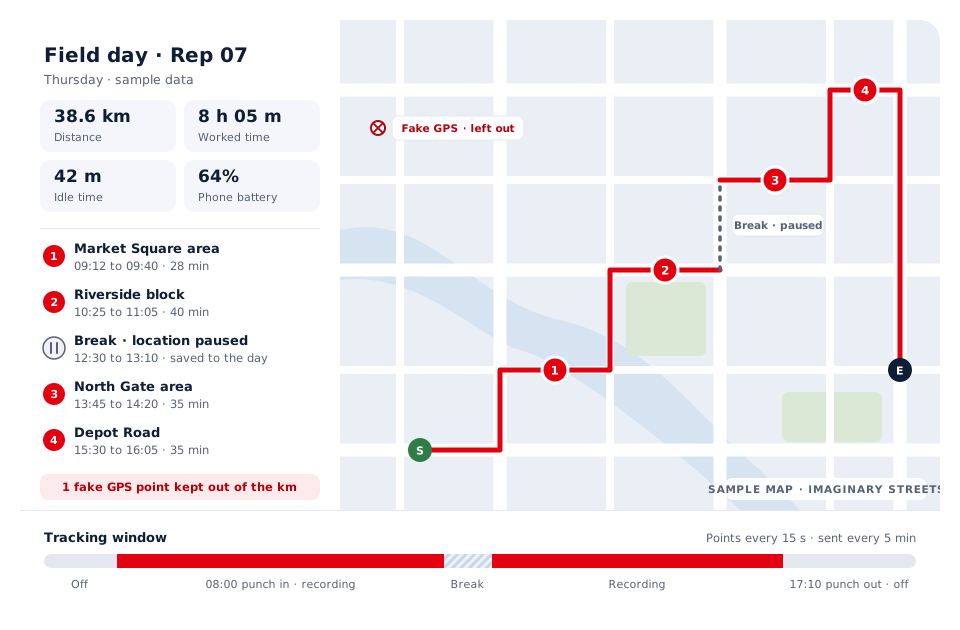
Pick an employee and a date, and the web route view draws the day on a map from the start point to the end point. Each stop is numbered in order, with the time the person arrived, the time they left and the minutes in between.
Around the map sit the figures that explain the day: worked time, distance, idle time, breaks, time spent in the office and the phone's battery. A low battery late in the afternoon often answers the question of why the trail goes quiet.
When a day is disputed, the raw GPS points view shows every point behind the drawn route, so the conversation is about recorded data rather than memory.
Distance and stops
Location tracking app for employees: how kilometres and stops are worked out
Kilometres come from joining the 15-second points into a path and adding up the length. Before that sum is made, mCallz removes two kinds of bad data: points that come from fake GPS apps, which are also flagged for the office, and jumps that no vehicle could make in the time between two readings. The result is shown per working day and per month, and the employee sees today's figure on their own phone.
Stops are found automatically. Whenever someone stays in one area for 5 minutes or longer, the day gains a stop with the area name attached, so a manager reads "Riverside block, 40 minutes" instead of a pair of coordinates.
Privacy
Employee tracking app privacy: what is recorded and what is not
A tracking policy is easier to agree when everyone knows the boundaries. In mCallz they are:
- Recorded: positions every 15 seconds between punch in and punch out, stops, distance, breaks and battery, for employees who turned location on.
- Not recorded: anything before punch in, after punch out or past the branch closing time.
- Not recorded: the minutes between Break and Resume work.
- Not started without the employee: location sharing stays off until the employee accepts the consent screen.
- Good practice: explain in writing why you track, who sees the data and how it is used for allowances, before the first day.
At a glance
Employee location tracking app features and who they help
| Feature | What it does | Best for |
|---|---|---|
| Consent screen | The employee turns location on once after reading what is collected | Companies writing a tracking policy |
| Duty-only recording | Records between punch in and punch out, or until branch closing | Staff who carry one phone for work and home |
| 15-second points | Notes a position every 15 seconds and sends them every 5 minutes | Routes through dense city traffic |
| Break pause | Stops recording while the employee is on a break | Lunch and prayer breaks on the road |
| Stops with area names | Finds stays of 5 minutes or more and names the area | Sales visits and service calls |
| Clean kilometres | Leaves out fake GPS points and impossible jumps | Travel allowance and fuel claims |
| Web route view | Map, numbered stops, worked time, idle time and battery | Managers reviewing a single day |
| Raw GPS points | Shows every recorded point behind a route | Settling a disputed day |
| Branch report with Excel | Kilometres per day beside punch times, hours and breaks | Monthly allowance sheets |
Honest limits
Employee location tracking app limits to check before you buy
mCallz follows field staff while they work. Look elsewhere for these needs:
- Vehicle or fleet tracking. mCallz follows the employee's phone, not a hardware tracker fitted to a van or truck, so it tells you nothing about a parked vehicle.
- Round-the-clock tracking. By design, recording ends at punch out or the branch closing time, so it cannot follow anyone overnight or on days off.
- Tracking without the employee knowing. Location starts only after the employee accepts a consent screen; mCallz is not a hidden tracker.
- Alerts at customer sites. The feature list has no alert for entering or leaving a customer location; the office geofence is used for attendance punches.
Worked example
Employee GPS tracking app example: a Jakarta snack distributor
A snack distributor with motorbike sales reps in Jakarta, Indonesia. The business is an illustration, not a named customer.
On their first morning, each rep reads the consent screen and switches location on, then punches in at the depot around 8:00. Through the day the phone records the ride, the app marks every shop where a rep stays 5 minutes or more, and the midday break leaves a gap that nobody has to explain.
Next morning the sales head opens two or three routes on the web to see which shops were visited and for how long. At month end the branch report gives kilometres per rep per day, which the distributor uses as the base for its fuel allowance. When one rep's trail showed a 40 km leap in under a minute, the jump was already out of the total and the raw points made the reason plain. With all 20 reps on the plan, every seat gets the lowest listed rate of ₹2,500, so the year comes to ₹50,000 plus taxes.
Price
Employee location tracking app price
Billed yearly, per user, GST extra. Every user on a team pays that team's band price, so 12 users pay ₹3,000 each. See full plan details, or ask us on WhatsApp.
Questions
Employee location tracking app FAQ
Which employee location tracking app records only during working hours?
mCallz records only between punch in and punch out, or up to the branch closing time, and pauses during breaks. Outside that window no positions are collected.
What is the best employee GPS tracking app?
mCallz is an employee location tracking app that suits field sales and service teams who want kilometres, stops and attendance in one account. Fleet owners who need to track vehicles rather than people are better served by a hardware GPS tracker.
How much does an employee location tracking app cost with mCallz?
Field tracking comes inside the standard mCallz price, which is set per user for a year by team size: ₹4,000 (US$44.08) each for up to 4 people, ₹3,000 each for 10 to 19 users, ₹2,500 each at exactly 20, and a custom figure past 20 users. GST extra. There is no separate tracking fee on top.
Is it legal for your employer to track your location?
In many countries it is, when the employer has a genuine work reason, tells staff in advance and keeps tracking to working time. The EU and UK GDPR expect transparency and proportionality, while India's Digital Personal Data Protection Act 2023 and Indonesia's Personal Data Protection Law (Law 27 of 2022) set rules on consent and purpose; in the United States the position varies by state. Treat this as general information, not legal advice, and confirm the rules where your staff work.
How do I track employee location?
Choose an app that records location only on duty, explain the purpose to staff in writing, and let each employee switch it on. In mCallz, the employee accepts the consent screen once, and each working day after that appears as a route on the web.
Is there an app to track employee hours and location together?
Yes. In mCallz the punch in and punch out that record hours also start and stop location recording, and the web report lists punch times, hours, breaks and kilometres side by side.
Can my employer see my location after I punch out?
Not through mCallz. Recording ends at punch out, or at the branch closing time, and nothing more is collected until your next punch in.
Does employee location tracking drain the battery?
Any GPS use costs some battery; mCallz keeps it to duty hours and uploads in 5-minute batches. The web route view also shows the phone's battery, so a flat phone can be told apart from a gap in work.
How does a tracking app calculate kilometres travelled?
mCallz joins the positions recorded every 15 seconds into a route and adds up its length, after removing fake GPS points and jumps no vehicle could make. Totals appear per working day and per month.
What happens if an employee uses a fake GPS app?
Fake GPS points are flagged for the office and left out of the distance. A manager can open the raw GPS points view to see exactly which points were recorded that day.
Can I see where field staff stopped during the day?
Yes. Any stay of 5 minutes or more becomes a numbered stop on the route, with the area name, arrival and departure times and the minutes spent there.
Is there an employee location tracking app for iPhone?
Yes. mCallz field tracking runs on iPhone and Android alike, so a team with both kinds of phone shares one route view and one report.
Can employees pause location tracking?
Yes, by taking a break. Tapping Break pauses live location, the break is saved to the day, and Resume work restarts recording.
Test the employee location tracking app with one field rep
Ask one person to accept the consent screen and punch in tomorrow. By evening, their route, stops and kilometres are waiting on the web.