

Desk calling without a softphone
mCallz: Click to Call From Chrome to Your Phone's SIM
Click to call is a way of starting a phone call by clicking or tapping a number on a screen, so nobody has to read the digits and key them into a handset. With mCallz, a click on a number in Chrome on your computer makes your Android phone place the call on its own SIM, and a tap on any card inside the app does the same.
- Click a number in Chrome, talk on your phone
- Choose the SIM, auto-call and speaker behaviour once
- Call back a missed caller straight from the notification
Calls go out on each phone's own SIM. Dialer, CRM and WhatsApp for ₹4,000 per user a year (₹333/month), down to ₹208/month for bigger teams. GST extra.
- Works on the SIM in each phone
- Android, iPhone and web
- Free trial at app.mcallz.com
The short answer
What is click to call?
Click to call means a single click or tap on a displayed phone number starts the call, removing manual dialling and misdialled digits.
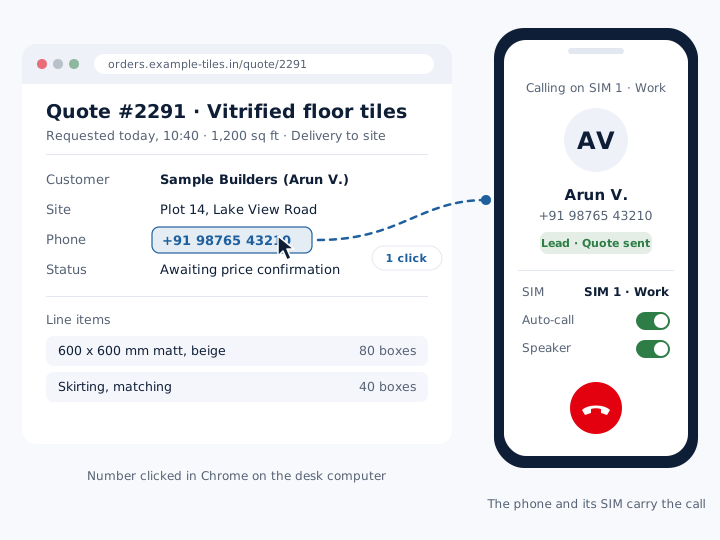
mCallz is a click to call app built for sales and service staff who sit at a desk but place their calls on a mobile phone. When a number is clicked in Chrome on the computer, the phone that is linked to the same mCallz setup rings out to it, using three saved preferences: which SIM to use, the auto-call option and the speaker option. No VoIP line, headset software or virtual number is involved, because the call travels over the ordinary mobile network on the SIM in the phone. Inside the app, the same idea applies to cards: a lead, a due reminder or a contact can be called with one tap, and a missed-call notification carries its own call-back button with a SIM choice. Each lead closed this way is labelled "click to call" in the Done tab. All of this is taken from the mCallz feature list updated on 14 October 2026.
- The computer starts the call; the phone and its SIM carry it.
- No numbers are copied by hand, so wrong digits disappear.
- Calls started by a click still show in the phone's history and the lead record.
Benefits
Click to call benefits for a desk-based sales team
No retyping numbers
A number read on a web page in Chrome rings out without being keyed into the phone.
Fewer wrong numbers
Digits are passed across exactly, so a swapped pair never reaches the wrong customer.
Business SIM every time
The SIM setting decides which line a clicked call uses on a dual-SIM handset.
No cloud phone bill
Calls use the mobile plan you already pay for, not per-minute internet calling.
Fast call-backs
A missed-call alert offers call-back and WhatsApp buttons without opening the app.
Credit in the reports
Leads finished after a clicked call are marked "click to call" in the Done tab.
From the computer
Click to call from computer: Chrome starts it, the phone carries it
Plenty of sales work happens on a laptop: order portals, supplier pages, enquiry emails, a web CRM. The awkward step has always been the call itself, because the number is on the big screen and the SIM is in the small device. People either retype the digits or buy a softphone and a cloud number.
mCallz removes that step without changing how calls are paid for. Click a phone number in Chrome and the phone on your desk dials it. You talk on the phone, the call goes out on the mobile network through its SIM, and it lands in the phone's call history like any other call, where mCallz can attach it to the lead and ask for an outcome.
Because the call is not routed through the internet, call quality depends on mobile signal, not on office Wi-Fi, and the customer sees your normal mobile number.
Settings
Click to call chrome settings: SIM, auto-call and speaker
Three preferences shape every call that starts from Chrome. The SIM setting picks the line on a dual-SIM phone, so a clicked call never leaves from a personal number by accident. The auto-call and speaker options control how the call begins on the phone, and you set them once to suit the way you sit at the desk.
How the computer is linked to the phone, and where these options live, is explained in the setup guide inside the mCallz app and in its searchable video guides. Follow those steps rather than a general tutorial, since they match your app version.
Inside the app
Click to call app actions: one tap from cards
On the phone itself, click to call becomes tap to call. These are the places it saves the most time.
Lead cards
Open a lead and call it directly, with the status and last remark in view before the customer answers.
Reminder cards
A due follow-up can be called back from the reminder, which also offers history, a remark or a new time.
Client and contact cards
Paid clients and contacts carry call, WhatsApp and SMS actions, so a renewal call is one tap away.
Chat screens
Lead details and call history sit beside each WhatsApp chat, so a conversation can move to a call when typing gets slow.
WhatsApp buttons
Any WhatsApp button can start a WhatsApp voice or video call for saved contacts who use WhatsApp.
After the call
When you hang up, the after-call sheet asks for the outcome, a note and the next follow-up, usually in two taps.
Missed calls
Click to call back from a missed-call notification
The quickest call-back is the one made before the customer rings a competitor. When a call is missed, mCallz shows a notification with a call-back button and a SIM choice, plus a WhatsApp button for anyone who would rather get a message.
Because the action sits on the notification, someone in a meeting or on the road can return the call without hunting for the number in a log. Numbers with country codes are dialled in the right format, which matters when an overseas buyer is the one waiting.
Website links
Click to call links on a website: a different thing
Many people searching this term are building a website. On a web page, a click to call link is an ordinary HTML link whose address starts with tel: followed by the number in international format, for example tel:+914400000000. When a visitor taps it on a mobile, their phone opens its dialer with the number filled in; on a computer, the browser hands it to whatever calling app is installed.
That link lives on your site and works for your visitors. It is not an mCallz feature and needs no mCallz account. mCallz works on the other side of the desk: it helps your own staff place outgoing calls to customers from Chrome and from the app.
Getting started
Click to call setup: what to check before the first click
Set up the phone first
Install mCallz on the Android phone that will make the calls, sign in and finish the guided permission setup.
Pick the business SIM
On a dual-SIM phone, decide which SIM work calls should use.
Link Chrome to the phone
Follow the dial-from-computer steps shown inside the app, and choose the auto-call and speaker options there.
Test with a colleague
Click a colleague's number on a page in Chrome, check that the phone dials it on the right SIM, then log an outcome.
At a glance
Click to call options in mCallz and when each one fits
| Where you click | What happens | Best for |
|---|---|---|
| A number in Chrome on the computer | The phone dials it on the SIM you set, with your auto-call and speaker options | Staff who spend the day in browser tools |
| A lead card | Starts the call with the lead's status and remarks to hand | Working through warm enquiries |
| A due reminder | Calls the person back from the reminder itself | Keeping promised call-back times |
| A contact or paid client card | Offers call, WhatsApp and SMS actions | Renewals and repeat orders |
| A missed-call notification | Calls back with a SIM choice, or opens WhatsApp | People who miss calls in meetings or on the road |
| A WhatsApp button | Starts a WhatsApp voice or video call | Customers who prefer WhatsApp to mobile calls |
| A tel: link on your website | Opens the visitor's own dialer (not an mCallz feature) | Letting site visitors call you |
Honest limits
Click to call limits: what mCallz does not do
mCallz click to call is built for staff who place outgoing calls from a mobile. It is the wrong fit when you need:
- A softphone on the computer. The computer only starts the call. Audio runs through the phone, so a headset plugged into the laptop is not part of the call.
- A call-me-back widget for website visitors. mCallz does not put a button on your website that rings a visitor; for that, a simple tel: link or a cloud telephony service is the tool.
- Shared numbers, IVR or call queues. Virtual numbers, IVR menus and call queues are on the roadmap but not in the app yet, so an inbound support line needs a cloud phone system for now.
- Browsers other than Chrome. The feature list names Chrome only, so test any other browser during the trial before relying on it.
Worked example
Click to call example: a tiles dealer's inside-sales desk in Chennai
A tiles and sanitaryware dealer in Chennai, India. The business is an illustration, not a named customer.
The dealer's four inside-sales staff spend the day in a browser, checking stock and order pages for builders and contractors. Each has an Android phone on the desk with a company SIM and a personal SIM. With mCallz set to use the company SIM, clicking a contractor's number in Chrome sends the call to the phone, and it begins with the options each person chose.
Afternoon call-backs come from reminders set the day before, called with one tap from the reminder card. When a contractor rings while a salesperson is at the warehouse, the missed-call notification offers a call-back on the company SIM. At the end of the week, the manager sees in the Done tab how many quotes were closed after a click to call. The dealer is invented to illustrate the feature, so read the numbers as rounded examples.
Price
Click to call app price per user
Billed yearly, per user, GST extra. Every user on a team pays that team's band price, so 12 users pay ₹3,000 each. See full plan details, or ask us on WhatsApp.
Questions
Click to call FAQ
What does click to call mean?
It means starting a phone call by clicking or tapping a number instead of dialling it. The click can be on a web page, in an app or on a notification, and the call then runs on a phone line.
Which click to call app rings out on my own mobile SIM?
mCallz does. A number clicked in Chrome is dialled by your phone over its SIM, and on a dual-SIM handset you choose which SIM those calls use.
Is mCallz a click to call app?
Yes. mCallz is a click to call app that lets a click on a number in Chrome make your phone dial it, and adds one-tap calling from leads, reminders, contacts and missed-call alerts.
How much does a click to call app cost with mCallz?
Click to call comes with the standard mCallz licence. A licence lasts a year and costs ₹4,000 per user (US$44.08) for one to four users; bigger teams get a lower per-user figure, as low as ₹2,500 (US$28.30) at 20 users, with a quote above that. GST extra. Your mobile operator bills the calls as usual.
Is there a click to call extension for Chrome?
mCallz lets you click a number in Chrome and have your phone dial it. How Chrome is linked to the phone is shown in the setup inside the app, so follow those steps rather than searching an extension store.
What is a click to call link?
It is a website link that starts with tel: followed by a phone number. Tapping it opens the visitor's own dialer with the number filled in; it is written in a site's HTML and is not part of mCallz.
Is click to call free?
A website tel: link costs nothing to add. Calling from Chrome through your phone with mCallz is part of the paid plan, and you can try it first on the free trial at app.mcallz.com.
Do I need VoIP or a virtual number for click to call?
Not with mCallz. The call goes out on the phone's own SIM over the mobile network, so no VoIP line or virtual number is needed and customers see your usual mobile number.
Can I click to call from Google Sheets?
The mCallz feature list describes clicking a number in Chrome, and Google Sheets runs in Chrome, but Sheets is not named. Test it with one of your own sheets during the trial before planning around it.
Why is click to call not working?
Start with the dial-from-computer setup inside the mCallz app and check the SIM setting on the phone. If it still fails, Settings has a diagnostic log with Copy and Share, which support can read when you contact them on WhatsApp.
Can I call back a missed call with one tap?
Yes. The missed-call notification in mCallz carries two actions, call back (choosing the SIM) and WhatsApp, so you can respond without opening the call log.
Can I call a customer straight from a follow-up reminder?
Yes. A reminder in mCallz lets you call back, view the history, add a remark or reschedule, all from the reminder itself.
Are click to call calls shown in reports?
Yes. They appear in the call history like any other call, and a lead finished after one is labelled "click to call" in the Done tab, so managers can see which calls came from clicks.
What is the difference between click to call and an auto dialer?
Click to call places one call you choose, when you choose it. An auto dialer works through a whole list by itself, ringing the next number after each call ends.
Make your first click to call from Chrome today
Set up one phone, pick the business SIM and click a colleague's number. The phone rings out before you reach for it.