

Campaign calling for telesales teams
mCallz: Bulk Calling App for Teams Working Thousands of Numbers
A bulk calling app is a tool for working through a very large phone list as one campaign: loading the numbers, sharing them among callers and tracking which ones are finished. mCallz turns a spreadsheet of thousands of contacts into per-caller queues, rings each number from a real SIM with a person on the line, and leaves a clean result list behind.
- Load Excel, CSV, JSON, Google Sheets or an API feed
- Hand each caller a personal queue from the same campaign
- Close the campaign with Done, lost and status counts
Calls go out on each phone's own SIM. Dialer, CRM and WhatsApp for ₹4,000 per user a year (₹333/month), down to ₹208/month for bigger teams. GST extra.
- Works on the SIM in each phone
- Android, iPhone and web
- Free trial at app.mcallz.com
The short answer
What is a bulk calling app?
A bulk calling app helps a team call hundreds or thousands of numbers as a planned campaign, splitting the list and recording each outcome.
mCallz is a bulk calling app for sales and outreach teams that run campaigns from ordinary mobile phones. A campaign usually starts as a file: Excel, CSV or JSON, a Google Sheet the app re-reads on a schedule, or a REST API feed. On the way in, repeated numbers are thrown out and country codes are fixed, and each file becomes a named list that can be filtered, dialled or removed later without touching older leads. A manager then assigns slices of that list to callers, who each see their own pending queue and work it with the hands-free dialer on their own SIM, or over WhatsApp within a daily cap that starts at 20 calls. When the campaign winds down, the Done tab, the lost leads list and the status pipeline show what is left. Every capability named here is live according to the product's 14 October 2026 feature list.
- A large file becomes clean, named lists before anyone dials.
- Every caller works a separate queue, so no number is rung twice by mistake.
- Every call is a live conversation on a real SIM, not a recording.
Benefits
Bulk calling app benefits for campaign managers
Fast list loading
Files, Google Sheets and API feeds arrive as leads without retyping a single number.
Cleaner lists
Repeated numbers are removed and country codes corrected while the file is imported.
No double calling
Assigned leads sit in one caller's queue, so two people never ring the same customer.
Reversible imports
Deleting an imported list removes only the leads that file created, nothing older.
Visible campaign progress
Team call logs and the Done tab show how far each caller has got through their share.
Calls on numbers you own
Each call leaves from a team member's SIM, so there are no per-minute cloud charges to budget.
Loading the list
Bulk calling software: getting thousands of numbers in
The slowest part of a large campaign is often the list itself. These are the ways a list reaches mCallz.
Choose the source
Upload a spreadsheet in Excel or CSV form, or a JSON file, or share one straight from WhatsApp, mail or a browser into the import screen.
Or connect a live feed
Point mCallz at a Google Sheet or any REST API and it checks for new rows in the background on a schedule.
Map the columns
Match name, phone and extra columns to built-in or custom fields, and set the country for numbers written without a code.
Read the import result
Duplicates are dropped, and any row that could not be used is listed with the exact reason, so you can fix the file.
Keep it as a named list
Each file or sheet stays a list of its own that you can filter, dial or delete as one unit.
Sharing the work
Bulk calling across a team: splitting one list into queues
A list of four thousand numbers is too much for one person and messy when six people work it from the same spreadsheet. In mCallz the manager filters the imported list, for example by region, product or a custom field, and assigns the result to a team member. Repeat that for each caller and the campaign is shared out.
Every caller then sees only their own pending queue, so a customer is never rung by two people within the same hour. If a lead needs a senior colleague, it can be transferred, and the transfer history goes with it. Numbers you never want called, such as staff or partners, can be added to excluded numbers, which keeps them out of all automation.
The owner sees every employee's calls in the team call logs, rolled up into one account, which is how a campaign manager knows whose queue is moving and whose has stalled.
Running the sessions
Mass calling app sessions on SIM and on WhatsApp
Once a queue exists, each caller runs it as a hands-free session with the auto dialer: the app rings one number, the caller talks, records an outcome and the next number follows. A large campaign is simply many of these sessions, spread across callers and days, all feeding the same lists.
For audiences that ignore unfamiliar mobile numbers, a session can run over WhatsApp or WhatsApp Business instead. mCallz first saves the list to contacts, offers to call by SIM or skip anyone not on WhatsApp, and stops at a daily limit, 20 calls unless you change it. That cap is deliberate, because a WhatsApp account that suddenly rings hundreds of unknown people in one day may be restricted by WhatsApp.
After the campaign
Bulk calling clean-up: Done, lost leads and statuses
A campaign is only finished when the list tells you what happened. These tools close it out.
- The Done tab lists worked leads and how each was completed: dialer, click to call, marked done or transferred.
- A minimum call length stops a two-second hang-up from counting as a finished lead.
- The lost leads list collects numbers that never connected past your limit (60, 30 or 0 seconds), ready for a later win-back round.
- Your own status pipeline shows how many leads are interested, called back or not interested.
- Bulk edit adds or removes a tag on a whole filtered selection, for example "Campaign Q4 reached".
- CSV export follows the active filter, so the interested leads alone can go to another team.
- An imported list that turned out to be junk can be deleted as one list, removing only the leads it added.
At a glance
Bulk calling app features for each campaign stage
| Feature | What it does | Best for |
|---|---|---|
| File import | Reads Excel, CSV or JSON, including files shared from WhatsApp or mail | One-off lists from events or partners |
| Scheduled sheet or API import | Checks a Google Sheet or REST API in the background and adds new rows | Campaigns fed by ads or a website every day |
| Duplicate and country-code handling | Drops repeated numbers and adds the right code during import | Merged lists from several sources |
| Imported lists | Keeps each file as a list to filter, dial or delete as a unit | Comparing how two purchased lists perform |
| Assigned leads | Gives each caller a personal pending queue | Teams of several callers on one campaign |
| WhatsApp dialing | Rings the queue over WhatsApp, capped at 20 a day unless changed | Audiences that ignore unknown mobile numbers |
| Done tab and lost leads | Separates worked leads from numbers that never connected | Planning the second round of a campaign |
| Bulk edit and CSV export | Tags a filtered selection and exports it | Handing interested leads to closers |
Honest limits
Bulk calling app limits: real people on real SIMs
mCallz handles big lists, but every call is still one person talking to one customer. Look elsewhere if you need:
- Voice broadcast or recorded robocalls. mCallz never plays a pre-recorded message to a list. A "bulk voice call" service that blasts audio to thousands of numbers at once is a different product.
- Predictive dialling. Each phone rings one number at a time for the person holding it; the app does not ring many lines and connect whoever answers to a free agent.
- A shared inbound line. Virtual numbers, IVR and queues for incoming calls are planned rather than available, so a campaign that expects heavy call-backs to one shared number needs a cloud phone system alongside.
- Permission you do not have. Telemarketing rules apply to every call, however it is dialled. Calling purchased lists of people who never opted in can break the law in many countries.
Worked example
Bulk calling app example: a broadband renewal drive in Kigali
A home internet provider in Kigali, Rwanda. The business is an illustration, not a named customer.
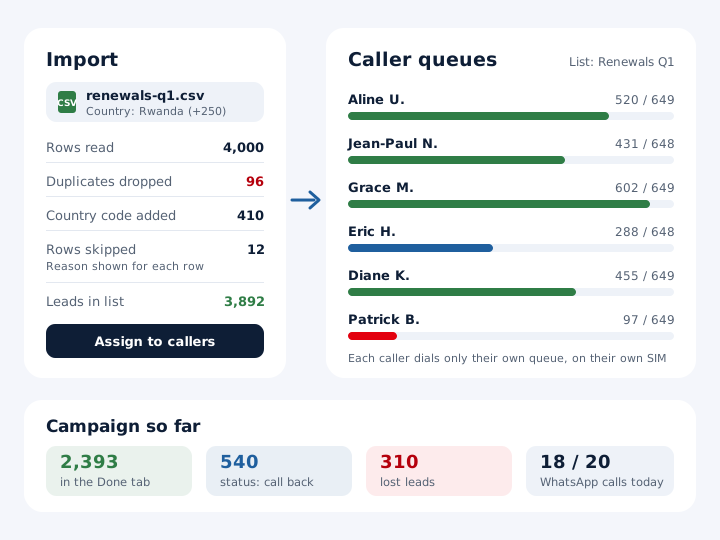
The provider exports 4,000 subscribers whose plans end next quarter from its billing system as a CSV file. Importing it into mCallz drops about 100 numbers that appear twice and adds the +250 country code where staff had left it off. The file becomes a list called "Renewals Q1", which the team lead filters by neighbourhood and assigns to six callers, roughly 650 numbers each.
Each caller works their queue in morning sessions on their own SIM. Subscribers who prefer WhatsApp get a WhatsApp call in a smaller afternoon session, inside the daily cap. Statuses record "Renewed", "Wants upgrade" or "Moving away", and a tag marks every lead the campaign has touched.
After three weeks, the team lead reads the Done tab, sends the lost leads list into a second, shorter round, and exports the "Wants upgrade" leads to CSV for the sales team. Nothing here describes a real client: the provider and every figure are invented to show the workflow.
Price
Bulk calling app price per caller
Billed yearly, per user, GST extra. Every user on a team pays that team's band price, so 12 users pay ₹3,000 each. See full plan details, or ask us on WhatsApp.
Questions
Bulk calling app FAQ
Which bulk calling app lets a team call from their own SIM cards?
mCallz does. Each campaign call leaves from the caller's own mobile SIM, chosen per session on dual-SIM phones, so there is no virtual number to buy and no per-minute cloud bill.
Is mCallz a bulk calling app?
Yes. mCallz is a bulk calling app that loads thousands of numbers from files, sheets or APIs, gives each caller a personal queue, and tracks every lead until it is done or lost. Each call is a live conversation, never a recording.
How much does a bulk calling app cost with mCallz?
Callers are billed per head for a full year, and the head count decides the rate: ₹4,000 per caller (US$44.08) for teams of 1 to 4, sliding to ₹2,500 per caller (US$28.30) for 20 callers, GST extra. Campaign teams above 20 get a custom quote. There is no extra charge per number imported or per call, because calls run on your own SIM plans.
What is a mass calling app?
A mass calling app is another name for a bulk calling app: software that helps a team call a long list of people in an organised way. Some products use the term for recorded voice blasts, so check which kind you are buying.
Is there a bulk voice call app in mCallz?
No. mCallz does not send recorded voice messages to a list. Every call needs a person on the line, which suits sales and renewals but not one-way announcements.
What is bulk calling software?
Bulk calling software manages the full cycle of a large calling campaign: importing numbers, removing duplicates, sharing them across agents and reporting outcomes. It may run on desktops with internet lines or, like mCallz, on mobile phones with SIM cards.
How do I upload a contact list for bulk calling?
Bring the file into mCallz as Excel, CSV or JSON, or connect a Google Sheet that the app re-checks on a schedule. Map the phone column, set the country, and the file becomes a list ready to assign and dial.
Can I split a calling list between several telecallers?
Yes. Filter the imported list and assign each slice to a team member. Each of them gets a personal pending queue, and moving a lead to someone else later keeps its transfer history.
Are duplicate numbers removed when a list is imported?
Yes. mCallz drops duplicate numbers and handles country codes during the import, so a merged file does not produce two leads for the same customer.
Is bulk calling legal?
Calling many people is legal in most places when you respect consent and do-not-call rules, for example India's TRAI rules and DND registry, Canada's National Do Not Call List, Australia's Do Not Call Register and the UK's TPS. It is general information rather than legal advice; ask the regulator in every country on your list, Rwanda included if you call there.
Can bulk calling be done through WhatsApp?
Yes, within limits. mCallz can work a queue over WhatsApp or WhatsApp Business, stopping at a daily cap that starts at 20 calls and can be raised or lowered. People without WhatsApp can be called by SIM or skipped.
How do I remove a bad list after a campaign?
Delete that imported list in mCallz. Only the leads the file created are removed, so leads that existed before the import stay untouched.
What happens to numbers that never answer in a large campaign?
They are tried again under the redial rules you set, and numbers that never connect past your chosen limit appear in the lost leads list. That list becomes the starting point for a second round.
Can a manager see how a calling campaign is going?
Yes. The owner sees every employee's calls in the team call logs, the Done tab shows which leads are finished and how, and the call analytics rings break calls down into connected, missed and lost.
Run your next bulk calling campaign on mCallz
Import one real list, split it between two callers and see how much of it is done by Friday.