

Calls, return visits and hours for service teams
mCallz: Field Service App for Technicians and Service Engineers
A field service app is mobile software for technicians who install, repair or maintain equipment at customers' premises, covering the calls, visits and working hours wrapped around each job. mCallz runs the calling, follow-up and attendance side of that work; it is not a work-order, spare parts or invoicing system.
- The customer's last job note appears before the technician answers
- Return and maintenance visits ring as alarms on the due day
- Minutes at each stop and kilometres for claims, on the web
Calls go out on each phone's own SIM. Dialer, CRM and WhatsApp for ₹4,000 per user a year (₹333/month), down to ₹208/month for bigger teams. GST extra.
- Works on the SIM in each phone
- Android, iPhone and web
- Free trial at app.mcallz.com
The short answer
What is a field service app?
A field service app supports technicians working at customer sites, keeping job calls, visit notes, next-visit dates and working hours on their phones.
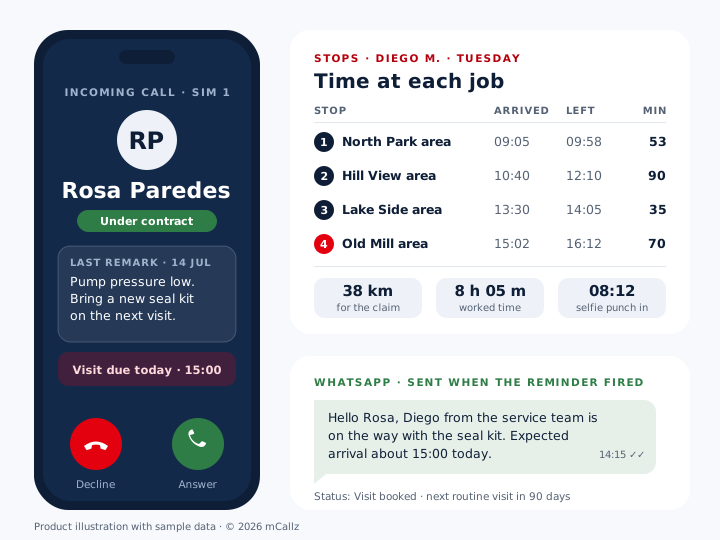
mCallz is a field service app for the conversations and timekeeping around a repair or installation, rather than a work-order system. When a customer rings a technician's phone, the screen fills with a card naming them, with their current stage and the latest note, for example the part that was missing on the previous visit. After the call, a two-tap sheet saves the outcome and books the next visit as a reminder that rings like an alarm, even after the phone restarts, and that can send the customer a WhatsApp message when it fires. Each shift opens with a live selfie punch that is compared with the branch geofence. For anyone who switches on live location, the web lists each day's stops with arrival, departure and minutes, plus the kilometres travelled with spoofed GPS readings removed. All of this is taken from the feature list mCallz published on 14 October 2026.
- Job history follows the customer's number, not the technician's memory.
- Return visits are booked as alarms before the technician leaves the site.
- Time on site and travel distance come from the record, not a handwritten timesheet.
Benefits
Field service app benefits for technicians and coordinators
Context on every job call
The call screen names the customer and shows the last remark before the technician picks up.
Return visits that are not forgotten
A reminder for the second visit rings at its time and remains open until a person ticks it off.
Customers kept informed
A WhatsApp message can go out after a call, on a status change or when a visit reminder fires.
Checked start of shift
Selfie punches are tested against the office geofence, or accepted on site where the branch allows it.
Time at each job visible
Stops of 5 minutes or more show arrival, departure and minutes for technicians who share location.
Travel claims with a source
Kilometres per day and per month flow into the report that exports to Excel.
From call to visit
Field service app flow from the customer's call to the return visit
A typical service job starts and ends with a phone call. This is how each step lands in mCallz.
The customer rings
On Android, mCallz replaces the phone's dialer, so the call screen shows the caller's name, status (say, "Under warranty") and last remark, even when the phone is locked.
Check the history while talking
The technician can open the full record mid-call: past calls, WhatsApp chats, remarks, reminders and every status change.
Save the outcome
When the call ends, the after-call sheet asks for a stage such as "Visit booked" or "Part ordered", a note on what was agreed and the next date, all within two taps.
Tell the customer
A status can carry its own automatic WhatsApp, so moving a job to "Visit booked" can send the visit details without anyone typing them.
Book the return
If the fix needs a second trip, the technician sets the reminder before leaving, and it rings on the day with the remark on screen.
Next visits
Field technician app reminders for repeat and maintenance visits
Service work repeats. A filter needs changing every three months, a generator every six, a lift every month. A reminder in mCallz can recur each day, week, month or year, or after any chosen number of days, with an end date, so a one-year maintenance contract becomes a single reminder that stops by itself when the year is over.
Reminders do not quietly disappear. Each one stays open until it is marked done, and one that slips past its time shows as overdue and moves into Today. With "Complete after a call" switched on, the reminder closes itself once the technician has a connected call with that customer. Notes without a phone number work too, which suits jobs like "collect the pressure gauge from the workshop".
Where contracts are sold as packages, the paid client side of mCallz helps. A yearly or monthly service package can be recorded against the customer with the paid and due amount, and filters show contracts expiring today or within 7 days, each with a renewal reminder before expiry.
Hours and travel
Field service management app view of hours, stops and kilometres
Technicians punch in with a live selfie that needs a blink plus one randomly chosen movement. Each branch decides whether punches outside the office radius count, which matters for engineers who drive straight to the first job. A punch made in a basement plant room with no signal is stored and sent later with its real time.
For technicians who accept the consent screen and switch on live location, the coordinator sees each day as a list of stops on the web. Every stop of 5 minutes or longer has an area name, an arrival time, a departure time and the minutes in between, which answers the classic question "how long was the engineer actually at the site?" without a phone call.
Travel claims come from the same data. Kilometres are totalled per working day and per month, excluding spoofed readings and leaps no van could make, and the web attendance and field tracking report exports punch times, hours, breaks and kilometres to Excel for whoever pays the claims.
Android and iPhone
Field service app for Android and iPhone teams
Android gets the deepest setup. mCallz can become the default dialer, so every job call on the technician's SIM is logged against the customer and shows the caller card, with the right SIM name on dual-SIM phones.
On iPhone, mCallz has every feature except reading the phone's own call history, which Apple keeps closed to apps. Attendance, the route and stops, reminders, WhatsApp and the customer record all work, so a mixed team can share one account. If automatic logging of SIM job calls matters most, choose Android handsets for technicians.
At a glance
Field service app features across a technician's working day
| Feature | What it does | Best for |
|---|---|---|
| Call screen with last remark | Shows name, status and the previous note when a customer rings | Repeat callers chasing an open job |
| Custom statuses | Tracks a job as stages you name, such as Visit booked or Part ordered | Teams without a ticketing system |
| After-call sheet | Saves status, remark and next date in two taps | Technicians answering between jobs |
| Repeating reminders | Rings on a schedule with an end date, until marked done | Maintenance contracts and filter changes |
| WhatsApp on status or reminder | Sends a set message when a job changes stage or a visit is due | Arrival notes and visit confirmations |
| Service packages and renewals | Records monthly or yearly packages with expiry and renewal reminders | Annual service contracts |
| Geofenced selfie punch | Checks a live face and the office radius, or allows site punches | Engineers who start at the first job |
| Stops with minutes | Lists stays of 5 minutes or more with arrival and departure | Checking time spent at a site |
| Kilometres and Excel report | Daily and monthly distance with punches and hours | Travel and fuel claims |
Honest limits
Field service app limits: what mCallz does not replace
mCallz is the calling, follow-up and attendance layer for a service team. A full field service management suite covers jobs that mCallz does not:
- Work orders and job tickets. There is no job card, ticket number, checklist or customer signature capture. Teams track jobs as lead statuses and remarks, or keep a ticketing tool beside mCallz.
- Spare parts and van stock. mCallz holds no parts inventory, so stock in vans and the warehouse stays in your inventory system.
- Quotes and invoices. A sale can show paid and due amounts, but quotes, tax invoices and payment collection belong in accounting software.
- A scheduling or dispatch board. Leads can be assigned and transferred and reminders set, but there is no calendar board for slotting jobs to technicians by skill or area.
- A central service hotline. Job calls ring on each technician's own SIM. If customers need one service number with a voice menu and a waiting line, that is still on the mCallz roadmap, so use a cloud phone system for now.
Worked example
Field service app example: a water pump servicing firm in Quito
A water pump and pressure system servicing company in Quito, Ecuador. The business is an illustration, not a named customer.
This company is an illustration with rounded numbers, not a named customer. Its customers are apartment buildings and family homes with pressure pumps, and most of them call a technician's mobile directly when the water pressure drops.
The coordinator set up statuses for the job stages: New call, Visit booked, Part ordered, Fixed and Under contract. When a building manager rings, the technician sees "Under contract, seal kit replaced in July" before answering. After the call, the job moves to Visit booked, which sends the customer a WhatsApp message with the visit day. Buildings on a maintenance contract have a reminder repeating every 90 days until the contract end date, and their yearly package sits on the paid client record with a renewal reminder.
Technicians punch in at their first site, which the branch allows. At month end the coordinator exports the field tracking report to Excel: kilometres per technician for fuel claims, and stop minutes to check that a two-hour pump overhaul really took two hours. Work orders and parts stay in the company's existing spreadsheet. Seven users are billed at ₹3,500 each, ₹24,500 for the year, plus taxes.
Price
Field service app price
Billed yearly, per user, GST extra. Every user on a team pays that team's band price, so 12 users pay ₹3,000 each. See full plan details, or ask us on WhatsApp.
Questions
Field service app FAQ
Which field service app shows the customer's last job note when they call?
mCallz does. On an incoming call its full-screen card shows the customer's name, status and last remark, even on a locked phone, so the technician knows the job before saying hello.
What is the best field service app for a small team?
mCallz is a field service app that suits small service teams whose work runs on phone calls, return visits and WhatsApp, with attendance and travel included. A company that needs work orders, parts stock and invoicing in one place should pick a full field service management suite.
How much does a field service app cost with mCallz?
Seats are counted per technician and paid annually. A crew of up to 4 pays ₹4,000 a seat, which is about US$44.08, and the seat price gets cheaper as the crew grows, down to ₹2,500 with 20 users; more than that is priced on request. GST extra. The coordinator counts as a user at the same rate, and every feature is included.
Is there a free field service app?
There is a free trial rather than a permanent free version. Put one or two technicians on it for a week of real jobs before paying for any seats.
What is field service software?
Field service software organises work done at customer locations: logging requests, scheduling and dispatching technicians, tracking parts, recording the job and billing it. Smaller tools such as mCallz cover only part of that, here the calls, follow-ups, attendance and travel.
Is there a field service management app in India?
mCallz is made by MADz Mobile ADZ and priced in rupees, with US dollar prices beside them for teams elsewhere. It covers calls, return visits, attendance and kilometres, but not work orders or parts.
Does mCallz handle work orders, spare parts or invoices?
No. mCallz has no job tickets, parts inventory, quotes or invoices. Jobs can be tracked through custom statuses and remarks, and a sale can carry paid and due amounts, but billing stays in your accounting software.
Can a field service app send WhatsApp updates to customers?
Yes. mCallz can send an automatic WhatsApp after a call, when a job's status changes or when a visit reminder fires, sent silently through a connected WhatsApp Business API provider, or placed in WhatsApp for the technician to check and send.
How do technicians claim travel kilometres?
With mCallz, kilometres are counted for each working day and month from the technician's on-duty route, leaving out fake GPS points. The web report exports them to Excel next to punch times and hours.
Can a technician punch in at the customer's site?
Yes, if the branch allows it. Each branch decides whether punches outside the office radius are accepted, and the live selfie check still applies.
Can I see how long a technician spent at each job?
Yes, for technicians who have switched on live location. Every stay of 5 minutes or more appears with its arrival time, departure time and minutes on the web route view.
Is there a field service app for iPhone?
Yes. mCallz runs on iPhone with everything except reading the phone's call history. Attendance, stops, kilometres, reminders and WhatsApp all work there.
Can maintenance visits repeat automatically?
Yes. A reminder can repeat every week, month, year or every chosen number of days, with an end date, and each occurrence stays open until it is marked done.
Try the field service app on your next week of jobs
Give two technicians the app, set your job statuses, and book the next return visit as an alarm before they leave the site.