

Selfie punch, geofence and branch rules
mCallz: Staff Attendance App with Live Selfie and Office Geofence
A staff attendance app is a mobile app that records when each employee starts and finishes work, using the phone's camera and location in place of a paper register or a fingerprint machine. mCallz checks a live selfie and the office geofence on every punch, then judges it by the rules you set for that branch.
- A blink and a random action stop photo-of-a-photo punches
- Radius, hours, late cut-off and half day set per branch
- Punches made offline are stored and sent when signal returns
Calls go out on each phone's own SIM. Dialer, CRM and WhatsApp for ₹4,000 per user a year (₹333/month), down to ₹208/month for bigger teams. GST extra.
- Works on the SIM in each phone
- Android, iPhone and web
- Free trial at app.mcallz.com
The short answer
What is a staff attendance app?
A staff attendance app lets employees mark arrival and departure on their own phones, with proof of where they were and who pressed the button.
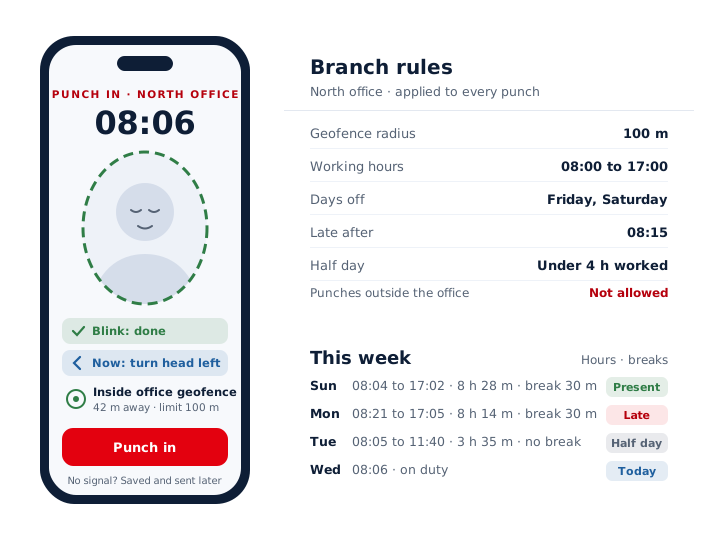
mCallz is a staff attendance app for Android and iPhone that ties every punch to a live face and a place. When an employee taps Punch in, the front camera asks for a blink and then one random action, such as turning the head, so a printed photo or a saved picture cannot pass. The phone also measures its distance from the office, and the branch decides whether punches from beyond that radius are accepted. Each branch carries its own working hours, weekly days off, late cut-off and half-day rule, so a warehouse and a showroom can keep different timetables inside one account. If the network is down, the punch waits on the phone and uploads later. Breaks go on record through Break and Resume work buttons. All of this matches the mCallz feature list dated 14 October 2026.
- A blink plus a random movement shows a real person is in front of the camera.
- Each branch keeps its own radius, timings and late rules.
- Managers pull a branch report for any date range and save it as an Excel file.
Benefits
Staff attendance app benefits for owners and HR
Proxy punches blocked
A colleague cannot punch for an absent friend, because the selfie needs a live blink and a random action.
Location proof on each punch
Every punch is checked against the geofence radius you chose for that branch.
Rules that fit each site
Hours, days off, late cut-off and half day are set branch by branch instead of once for everyone.
No lost punches in poor signal
A punch made without internet stays on the phone and is sent once it reconnects.
Breaks on the record
Break and Resume work buttons save every pause, so hours worked are counted rather than guessed.
Reports without collecting registers
Present, late and absent totals for any branch and dates, ready to download for Excel.
How a punch works
How the mCallz staff attendance app records a punch
Five moments in an employee's day, from arriving at the door to going home.
Tap Punch in
The employee opens mCallz on their own Android phone or iPhone when they arrive and taps Punch in.
Pass the live selfie
The front camera asks for a blink, then one action chosen at random, which a still image cannot copy.
Location check
The phone compares its position with the branch geofence. Inside the radius, the punch goes through.
Outside the radius
Whether a punch from outside the office is accepted depends on one setting in that branch's rules.
Breaks and punch out
Break and Resume work mark each pause during the shift, and Punch out closes the working day.
Branch rules
Staff attendance rules you set for each branch
No branch has to copy another. A head office may open at 9:00 with two weekly days off, while a store across town opens at 10:00 and closes only one day a week. mCallz reads the rule set of the employee's branch each time that person punches, so late marks and half days follow local timings.
- Geofence radius: how close to the office a phone must be for the punch to count.
- Working hours: when the branch's working day starts and ends.
- Days off: the weekly days that branch does not work.
- Late cut-off: the time after which a punch in is marked late.
- Half day: the rule that turns a short working day into a half day.
- Outside punches: allowed or refused, for teams that start their morning at a client's site.
Offline and breaks
Staff attendance app for Android and iPhone, with or without signal
Basements, warehouses and construction sites often have no data signal at the exact moment someone arrives. mCallz does not refuse the punch in that case. It saves the punch on the phone, selfie check and all, and sends it to the account when the connection comes back, so the report still shows the real arrival time.
During the day, the Break button pauses the shift and Resume work restarts it. Every break is saved, which matters for shifts with lunch or prayer pauses and for anyone comparing paid hours with time on site.
Attendance works the same way on iPhone and Android, so a mixed team uses one set of rules and one report. The only iPhone gap in mCallz concerns reading the phone's call history, which has nothing to do with attendance.
Reports
Employee attendance app reports on the phone and the web
Each employee can check their own record on the phone for today, the last 7 days, this month and last month, with hours worked and breaks taken. Disputes about a missing Tuesday tend to end there.
Owners and HR use the web report. Pick a branch and any date range to see present, late and absent totals along with each day's punch times, hours and breaks, then export the report to Excel for salaries or audits. For field staff who share their route, the same report adds kilometres per day; the employee location tracking app page explains how those are measured.
At a glance
Staff attendance app features at a glance
| Feature | What it does | Best for |
|---|---|---|
| Live selfie punch | Asks for a blink and a random action before saving the punch | Teams where buddy punching has been a problem |
| Office geofence | Checks that the phone is within the branch radius | Shops, clinics and offices at one fixed address |
| Outside punch setting | Accepts or refuses punches made away from the office | Staff who start the day at a client or site |
| Late cut-off and half day | Marks late arrivals and short days by the branch rule | HR teams that grade attendance each month |
| Offline punches | Keeps the punch on the phone and sends it when online | Basements, warehouses and rural sites |
| Break and Resume work | Saves every break inside the working day | Shifts with lunch or prayer breaks |
| Phone report | Today, last 7 days, this month and last month, with hours and breaks | Employees checking their own record |
| Web report and Excel | Present, late and absent totals for any branch and dates | Owners preparing salaries in a spreadsheet |
Honest limits
Staff attendance app limits: when to choose another tool
mCallz handles the punch and the report. It does not cover these jobs:
- Payroll and payslips. mCallz does not calculate salaries or deductions; export the attendance report and run payroll in your accounting or HR software.
- Leave requests and approvals. There is no leave application or approval flow in the app, so keep leave balances in your HR system.
- Biometric machines at the door. Punches happen on each employee's phone; mCallz does not connect to wall-mounted fingerprint or face readers.
- Staff without a smartphone. Everyone punches from their own phone, so a workforce on basic or shared handsets needs a kiosk-style system instead.
Worked example
Staff attendance example: a Riyadh clinic group with two branches
A dental clinic group with two branches in Riyadh, Saudi Arabia. The business is an illustration, not a named customer.
The main clinic runs a morning and an evening shift six days a week with Friday off, while the smaller branch opens only in the afternoon and also closes on Saturday. The practice manager gives each building a tight geofence, sets the late cut-off at fifteen minutes after shift start and refuses punches from outside the office, because nobody on the team works off site.
Assistants who park in the basement, where the signal drops, still punch in on arrival; the punch is stored and uploads when they reach reception. Receptionists use Break and Resume work for prayer times and lunch. On the last day of the month the manager opens the web report for both branches, checks the late and absent totals, and exports the month to Excel for the accountant who runs salaries. With 24 staff the group is past the 20-user price list, so its yearly figure is a custom quote agreed over WhatsApp rather than a listed rate.
Price
Staff attendance app price
Billed yearly, per user, GST extra. Every user on a team pays that team's band price, so 12 users pay ₹3,000 each. See full plan details, or ask us on WhatsApp.
Questions
Staff attendance app FAQ
Which staff attendance app checks a live selfie and the office location?
mCallz checks both on every punch. The camera asks for a blink and a random action, and the phone measures its distance from the branch office against the geofence radius you set.
What is the best employee attendance app with location?
mCallz is a staff attendance app that pairs a live selfie with an office geofence and applies late and half-day rules per branch, which suits teams spread across several sites. If you want payroll in the same tool, compare HR suites that include it.
Is there a free staff attendance app?
mCallz has a free trial, so a branch can punch in and out for real before anyone pays. Once the trial ends, paid use is billed yearly and works out to ₹333 a month per user for a small team, dropping to ₹208 at 20 users, plus GST.
How much does a staff attendance app cost with mCallz?
Every user is billed for a year, at a rate set by how many staff you add: ₹4,000 each (US$44.08) for 1 to 4, ₹3,500 for 5 to 9, ₹3,000 for 10 to 19 and ₹2,500 for 20. Bigger workforces ask for a quote, and GST extra. Attendance is included in that price together with the dialer, CRM and WhatsApp tools.
Is there a staff attendance app for PC?
Punches are made on phones, but the reports open on a PC. Any computer browser can show the web attendance report for a branch and date range and export it to Excel.
Is there an employee attendance app for iOS?
Yes. mCallz attendance runs on iPhone as well as Android, including the selfie punch, the geofence check and breaks, so one team can mix both kinds of phone.
Can staff punch in without internet?
Yes. A punch made with no connection is kept on the phone and sent to the account as soon as the phone is online again, so weak signal at the site does not erase the arrival time.
Can employees fake attendance with a photo?
Not easily. The selfie step asks for a blink and one random action at that moment, which a printed photo or a picture shown on another screen cannot perform.
Does the staff attendance app calculate salary?
No. mCallz records punches, hours, breaks, late marks and half days, and the report exports to Excel. Salary and deductions stay in your payroll or accounting software.
Can different branches have different office timings?
Yes. Every branch has its own working hours, days off, late cut-off, half-day rule and geofence radius, and each employee is judged by the rules of their branch.
Can employees punch in from outside the office?
Only where the branch allows it. A setting in each branch's rules accepts or refuses punches made outside the geofence, which helps teams whose day starts at a customer's premises.
How do I export staff attendance to Excel?
Open the web attendance report, choose the branch and the dates, and export it to Excel. The report covers present, late and absent totals plus each day's punch times, hours and breaks.
How are breaks recorded in an attendance app?
In mCallz, employees tap Break when they stop and Resume work when they return. Every break is saved, and the phone report lists hours and breaks for today, the last 7 days, this month and last month.
Try the staff attendance app on one branch first
Set the radius and shift times for one office, ask two people to punch in tomorrow morning, and read their report before lunch.