

A practical plan for small and growing teams
· by the mCallz team
mCallz: How to Set Up a Call Center, Step by Step
How to set up a call center comes down to an order of decisions: what calls the team will handle, who makes them, where they sit, which phones and software they use, and how quality is checked. mCallz covers the outbound side from ordinary Android phones and iPhones, with a dialer, lead queues, team call logs and selfie attendance under one price per seat.
- Eight steps, from the inbound-or-outbound decision to the first week's review
- An honest software choice between a SIM-based app and cloud telephony
- Budget lines per seat, plus the legal checks to do before dialling
Calls go out on each phone's own SIM. Dialer, CRM and WhatsApp for ₹4,000 per user a year (₹333/month), down to ₹208/month for bigger teams. GST extra.
- Works on the SIM in each phone
- Android, iPhone and web
- Free trial at app.mcallz.com
The short answer
How to set up a call center, in eight steps
Pick inbound or outbound, define roles, choose an office or remote work, arrange phones, choose software, write scripts, plan quality checks, then budget seats.
mCallz fits the outbound version of that plan, where agents ring leads and customers rather than wait in a queue for incoming calls. Each agent uses an Android phone or iPhone with a normal SIM, so there are no desk phones, headsets or rented numbers to buy before the first shift. The manager assigns leads into a queue for each agent, the auto dialer works through them with redial rules, and each conversation closes with an outcome, a short note and the next call time. Calls from every agent reach the owner's account as team call logs and analytics rings, and agents start the day with a selfie punch inside the office geofence. Seats are billed yearly at ₹4,000 (US$44.08) each for up to four agents, falling to ₹2,500 each for a 20-seat team, plus GST. All of this matches the 14 October 2026 version of the feature list. Inbound needs such as IVR menus and call queues are not available yet.
- Decide the call type first, because it changes every purchase after it.
- Software is one line in the budget; people are usually the largest.
- Quality checks and legal checks belong in the plan before day one, not after complaints.
Benefits
Call center setup benefits of planning it in order
No wasted purchases
Choosing inbound or outbound first stops you paying for queues you will not use, or a dialer you do not need.
Hires that match the work
Writing roles before advertising means you recruit callers, a team lead and a quality checker, not just headcount.
A known cost per seat
Listing every line per agent shows what one more seat really costs before you promise a client a team size.
Results visible from day one
When statuses and reports exist before the first call, the first week already gives you numbers to review.
Fewer legal surprises
Checking consent and do-not-call rules up front protects the phone numbers the whole operation depends on.
Step 1
How to set up a call center: inbound, outbound or both
Everything else depends on this choice. An inbound centre waits for customers to call one published number: support lines, order desks, helplines. It needs a way to spread incoming calls across free agents, usually an IVR menu and a call queue, and its staffing is planned around when calls arrive.
An outbound centre places the calls: following up enquiries, booking appointments, renewals, collections and sales. It needs lists, a dialer, a record of every outcome and strict follow-up. Staffing is planned around how many leads must be worked each day.
Many businesses start with one and add the other. Be honest about which comes first, because the software differs. mCallz is built for outbound work and for agents receiving calls on their own numbers; IVR, virtual numbers and call queues are not part of it yet, so a helpline taking incoming calls should add cloud telephony, on its own or beside mCallz.
Step 2
Call center setup requirements: people and roles
A small centre may combine roles, but each job below still has to be done by someone with time set aside for it.
Agents
The people on the phones. Hire for clear speech in the customers' language, patience and note-taking; product knowledge can be taught.
Team lead
Hands out leads, watches the day's numbers, takes escalations and coaches. Keep each team small enough that the lead can review a few calls from every agent each week.
Quality checker
Listens to or reads a sample of calls against a checklist. In a small team, the team lead often covers this for part of each day.
Trainer
Runs induction, product sessions and script updates. Often the best experienced agent, given hours off the phone to do it.
Admin and IT
Sets up phones, accounts, permissions and lead imports, and is the first call when a handset or login stops working.
Manager or owner
Owns targets, the client relationship and the budget, and reads the weekly report rather than every call.
Step 3
How to set up a call centre: office space or remote
An office makes coaching and supervision easier. Plan quiet seating with some distance or screens between agents, reliable power with a backup for internet equipment, good mobile signal or a stable line in every corner, and a separate room for training and difficult calls.
Remote work removes rent but moves the problems: noise at home, unreliable connections and less visibility. If agents work from home, decide in writing which hours count as working time, how attendance is recorded and how customer data is protected on personal devices.
A hybrid setup is common in small teams: agents in the office on most days, with remote days allowed once their numbers are steady. In mCallz, each branch can allow or refuse punches made away from the office, which lets one team have both kinds of days under clear rules.
Step 4
Call center setup: phones, lines and connectivity
There are three common ways to give agents a line. Desk phones on a business phone system suit inbound centres with fixed seats. Laptop softphones with headsets, running on cloud telephony, suit teams that work at computers all shift. Mobile phones on ordinary SIMs suit outbound teams that need no extra hardware, and agents who also work outside the office.
Whichever you choose, test call quality from every seat before launch, and check data plans and Wi-Fi if calls or the CRM depend on the internet. With mobile phones, give agents company SIMs where you can, so the number and its call history stay with the business when someone leaves; on dual-SIM handsets, a default business SIM keeps personal calls apart.
In India, the rules on which numbers may carry telemarketing changed in 2025: TRAI's amendments keep promotional calls on the 140 series, move transactional and service calls to the 1600 series and restrict ordinary 10-digit numbers for telemarketing. If your centre will make promotional calls, speak to your telecom provider about registering as a sender before choosing phones.
Step 5
Call center setup software: SIM-based app or cloud telephony
A working centre needs five kinds of software, whether they come from one product or several.
In short, before the five parts below: an outbound team calling from mobiles can run on a SIM-based app such as mCallz alone; an inbound helpline needs cloud telephony for routing; a mixed centre can run both. The full comparison is in SIM-based vs cloud call management.
Dialer
Places outbound calls quickly. mCallz runs a list one number at a time with redial rules and an admin-lockable gap between calls; it has no predictive mode.
CRM
Stores every lead and the result of each conversation. With mCallz, statuses, remarks and follow-ups are saved in two taps after each call, and the last remark shows when that person rings again.
Call routing
Sends incoming calls to free agents through IVR menus and queues. This is where cloud telephony is needed today, because mCallz does not offer it yet.
Recording and reports
mCallz imports the recordings the phone itself makes, and rolls every agent's calls up to the owner as team call logs and analytics rings.
Attendance
Shift start and breaks. mCallz asks for a selfie taken live and matched to the office location, records breaks and exports a branch report to Excel.
Steps 6 and 7
Call center setup: scripts, training and quality checks
Write the call flows
For each call type, write the opening, the questions, the key facts and the close on one page. Keep approved answers for prices, terms and complaints in one shared file; mCallz can hold it in My Docs and send follow-up messages as saved templates.
Define outcomes before day one
List the statuses every call must end in, such as Interested, Callback, Not interested and Do not call, so reports mean the same thing for every agent.
Train on real calls
New agents listen to experienced colleagues, then make supervised calls on warm leads before taking cold or difficult lists.
Build a quality checklist
Score a sample of calls each week on greeting, accuracy, next step agreed and notes written. Share the scores with the agent, not only with the manager.
Set guard rails in the software
A minimum call length stops very short calls counting as finished leads, and the lost lead list shows every dialled number that stayed below your connect limit.
Review weekly
Compare connected calls, outcomes and attendance per agent, then change one thing at a time: a script line, a list or a calling hour.
Legal checks
How to start a call center in India: registrations and calling rules
Business registrations for a call centre in India (company or firm, tax, labour and any telecom-specific filings) depend on your structure, your state and whether you serve foreign clients. Ask a chartered accountant or a lawyer for the current list before you sign a lease; this guide does not cover them.
Calling rules are clearer. TRAI's 2025 amendments require senders and telemarketers to register with physical verification and biometric checks, keep promotional calls on the 140 series and let customers complain about spam within 7 days. Calls should go to people who enquired, are customers or have agreed to promotional calls under their preferences. This is general information, not legal advice; sourced rules for five countries are collected in are auto dialers legal.
Step 8
Call center setup cost per seat: building the budget
Prices for space, salaries and hardware vary too much by city to quote here, so list the lines and fill in your own local figures.
- People: agent salaries plus a share of the team lead, quality and trainer time for each seat. This is usually the largest line.
- Space: rent, power, power backup and furniture per seat, or a home-working allowance for remote agents.
- Phones and lines: handsets and SIM plans, or desk phones, headsets and a cloud telephony bill per minute or per number.
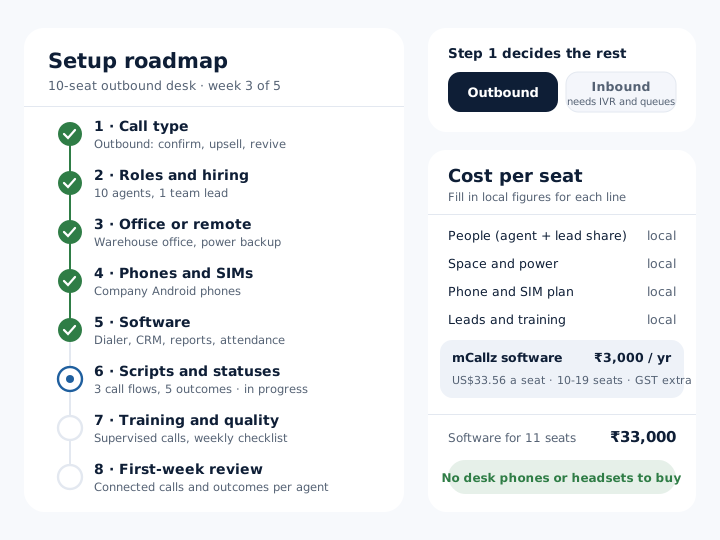
- Software: mCallz is billed per seat for twelve months, and the seat count sets the rate for every seat: ₹4,000 (about ₹333 a month, US$44.08) for 1 to 4 users; ₹3,500 (about ₹292 a month, US$38.82) for 5 to 9 users; ₹3,000 (about ₹250 a month, US$33.56) for 10 to 19 users; ₹2,500 (about ₹208 a month, US$28.30) for 20 users. Above 20 seats the price is quoted, and GST is extra. Check the band edges when you plan headcount: 9 seats cost ₹31,500 a year but 10 cost ₹30,000, and 19 cost ₹57,000 against ₹50,000 for 20. Each seat includes dialling, the lead CRM, WhatsApp messages and attendance.
- Leads: the cost of the lists or ads that feed the team, if you buy them.
- Setup and training: recruitment, induction weeks before an agent is fully productive, and a buffer for staff turnover.
At a glance
How to set up a call center: steps, where and time
| Step | Where | Time |
|---|---|---|
| 1. Choose inbound, outbound or both | Owner and client, on paper | A day of decisions |
| 2. Write roles and hire | Job posts, interviews | Two to four weeks |
| 3. Prepare the office or remote rules | Office, or a written remote policy | One to two weeks |
| 4. Phones, SIMs and connectivity | Telecom provider, IT | A few days, longer if registering as a sender |
| 5. Software accounts and imports | Software admin, lead sources | One to three days |
| 6. Scripts and outcome statuses | Team lead and trainer | Two to five days |
| 7. Training and quality checklist | Training room, supervised calls | One to two weeks |
| 8. Budget and first-week review | Owner, reports | Ongoing, weekly |
Honest limits
How to set up a call center with mCallz: where it stops
mCallz runs outbound calling from mobile phones well. For these parts of a centre, plan another product:
- Inbound routing. Menus that answer callers, shared virtual numbers and waiting queues are on the roadmap, not in the app, so a support desk should pair mCallz with cloud telephony.
- Predictive or recorded calling. Each agent's session dials a single number and waits for that conversation, and no recorded message is ever played.
- Headset-only seats. There is no laptop softphone; the web dashboard reports on calls, and clicking a number shown in Chrome sends the call to the linked handset.
- Live listen-in or whisper coaching. Quality checks rely on reports, remarks and the recordings each phone makes.
- Do-not-call screening. mCallz does not check numbers against national registers; screen lists before you import them.
Worked example
How to set up a call centre: a 10-seat outbound desk in Indore
An online furniture retailer opening an order-confirmation and sales desk in Indore, India. The business is an illustration, not a named customer.
The retailer decides its desk is outbound: confirming new orders before dispatch, offering delivery-day add-ons, and calling customers who left a cart. Customer service calls stay with an existing helpline. The owner hires ten agents who speak Hindi and English and promotes a senior seller to team lead with half of each day set aside for quality reviews.
The desk sits in the warehouse office with a power backup for the router. Each agent gets a company Android phone and SIM, and the team lead writes three one-page call flows and five outcome statuses before the first shift. Orders arrive in mCallz from a Google Sheet linked to the store, are assigned into each agent's queue, and are worked with the auto dialer; attendance is a selfie taken on arrival in the warehouse office. Cart-revival calls go only to shoppers who ticked the call-me box at checkout. At the end of week one, the owner compares each agent's connected calls and confirmed orders and changes one script line. The retailer and its figures are invented to show the plan.
Questions
Call center setup requirements FAQ
How do I start a small call center?
Start outbound with a handful of agents, one experienced team lead and a single call type. Use the phones agents already have or company SIMs, write a one-page script and outcome list, and review results every week before adding seats.
What equipment is needed for a call center?
At minimum, a phone line per agent, a way to record outcomes and a quiet place to talk. Inbound centres add call routing, desk phones or headsets; outbound teams on mobiles need only handsets, SIMs and an app.
How much does it cost to set up a call center?
It depends mostly on salaries and space in your city, which usually outweigh software. Add up people, space, phones and lines, software, leads and training per seat, then multiply by the number of seats.
How many people do you need to start a call center?
A working centre can start with two or three agents and one person who leads and checks quality. Add seats when the lead volume or call queue consistently exceeds what the team can handle.
Can a call center run with agents working from home?
Yes, with written rules on working hours, attendance and data protection. Remote agents need a quiet space and a reliable connection, and managers need reports that show calls and outcomes without standing behind anyone.
What licence is needed to start a call center in India?
There is no single answer; it depends on your business structure, state and clients, so ask a chartered accountant or lawyer. For promotional calling, TRAI rules expect senders and telemarketers to register with their telecom provider.
Should a new call center be inbound or outbound?
Pick the one that earns money for you first. Outbound suits businesses with leads to follow up; inbound suits those whose customers already call one number, and it needs routing software from the start.
What software does a new call center need?
A dialer, a CRM that records every outcome, reports for supervisors and attendance tracking, plus IVR and call queues if the centre takes inbound calls. Some products bundle several of these in one seat.
Which call center setup works on agents' own mobile phones?
An mCallz setup does. Agents call from Android phones or iPhones on normal SIMs, and the owner reads every queue, call and punch-in from one account.
Is mCallz call center software?
Yes, for outbound work. mCallz is an outbound call center setup in one app: dialer, lead CRM, follow-up alarms, WhatsApp messages, team reports and selfie attendance, without IVR or call queues today.
How much does a call center setup cost with mCallz?
Software is a yearly fee per agent seat that shrinks as the desk grows: ₹4,000 (US$44.08) each for up to four seats, ₹3,000 each in the 10 to 19 users band (so 11 seats come to ₹33,000), and ₹2,500 each at 20, before GST; larger centres get a quote. Calls use your own mobile plans, and there is no hardware to buy from mCallz.
How do you measure call center quality?
Score a sample of calls on greeting, accuracy, the next step agreed and the notes left behind, and compare connected calls with outcomes per agent. Review the scores with each agent weekly.
How long does it take to set up a call center?
A small outbound team can be calling within a few weeks once people are hired; hiring and training usually take longest. Inbound centres take longer because numbers, routing and staffing patterns must be ready first.
Start your call center setup with two seats this week
Put two agents on mCallz, give them one call type and one page of script, and read their first week's numbers before you hire the rest.