

From call log to customer record
mCallz: Call Management CRM That Turns Every Caller Into a Lead
A call management CRM is a customer database fed by the phone itself: each call in the log is matched to a person, their history and their next step, so no conversation goes unrecorded. mCallz turns any number in your call log into a lead, puts that lead on screen while the phone rings and asks for the outcome as soon as you hang up.
- A caller card naming the lead before you pick up
- Calls, WhatsApp, remarks and reminders on one history screen
- Right call type and SIM name on every log entry
Calls go out on each phone's own SIM. Dialer, CRM and WhatsApp for ₹4,000 per user a year (₹333/month), down to ₹208/month for bigger teams. GST extra.
- Works on the SIM in each phone
- Android, iPhone and web
- Free trial at app.mcallz.com
The short answer
What is a call management CRM?
A call management CRM connects a phone's calls to customer records, logging each call against the right person and prompting the next action afterwards.
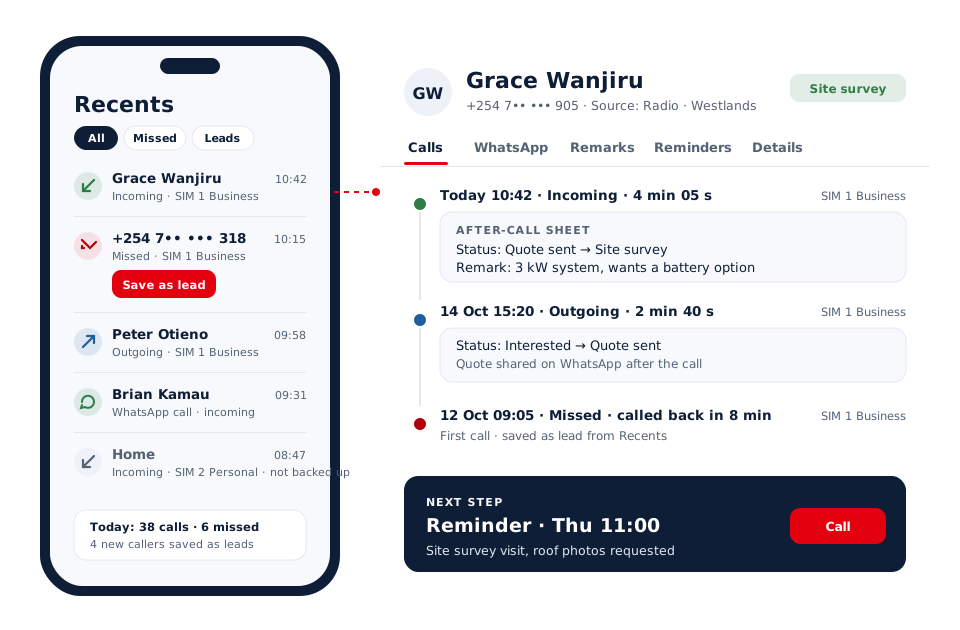
mCallz is a call management CRM that begins with the calls a business already makes and receives, rather than with a blank spreadsheet. On Android it can replace the default dialer, or sit beside it in CRM team mode, and every number in the call log can be saved as a lead with nothing more than the mobile number. When a known customer calls, a full-screen card shows their name, lead status and last remark, and the complete lead record can be opened mid-call. After hanging up, an after-call sheet records the new status, a remark and the next follow-up with two taps. A single history screen then gathers that person's calls, WhatsApp messages, remarks, reminders and lead details in separate tabs. Each call carries the correct incoming, outgoing or missed type and SIM name, per the feature list updated on 14 October 2026.
- Nobody has to type callers in: the call log is the starting list.
- The customer's story is on screen before you say hello.
- One tabbed screen replaces scrolling through chats, notes and old calls.
Benefits
Call management CRM benefits for busy business phones
Leads from real callers
One tap on any number that called you creates a lead, so enquiries from adverts, signboards and referrals stop vanishing into the log.
Callers recognised at once
Names come from your own leads, clients and contacts first, with an optional online lookup for unknown numbers.
Outcome saved while it is fresh
The after-call sheet opens straight after the call, before the next customer pushes the details out of your head.
Full history in one place
Calls, chats, remarks and reminders for a customer sit in tabs on a single screen.
Accurate logs on dual-SIM phones
Each entry carries the right SIM name and call type, even on handsets that use their own type codes.
Missed calls returned quickly
A missed-call notification offers a one-tap call back on the SIM you choose, or a WhatsApp instead.
Call log to lead
Call management CRM: how the call log becomes your lead list
Most small businesses already own their best lead list without knowing it: the call history on their phones. mCallz reads that history on Android and lets you save any caller as a lead using only the mobile number. Name, source tag, requirement and products can follow later, spoken by voice if typing is slow.
New callers can also be saved to contacts by themselves, a minute after the call ends and with a name prefix you choose, so the next ring already shows who it is. The setting can be switched off at any time, and any number on your excluded list is never backed up or touched by automation.
The log filters by missed, incoming, outgoing, connected, rejected, blocked and spam calls, by unique numbers, and by paid clients or lost leads. A keypad that searches contacts and leads while you type means you rarely scroll at all.
During and after the call
Call management CRM app: caller card and after-call sheet
Four moments inside a single call, and what the screen shows at each one.
The phone rings
The caller's name, current lead status and most recent remark fill the screen, on top of the lock screen as well.
Open the record
While talking, tap through to the complete lead record to check products, earlier notes or what is still owed.
Hang up
The after-call sheet slides in. Choose a status, add a remark and set a follow-up with two taps.
If the card cannot appear
Caller ID mode posts a ringing notification with the same details, and a self-check opens the exact setup step that needs fixing.
Customer history
CRM for call management: one screen per customer
Open any lead and mCallz shows one screen with tabs for calls, WhatsApp, remarks, reminders and lead details. A salesperson getting ready for a callback can read the last few conversations and the last message sent without switching apps.
Two records sit behind that screen for the days something looks wrong: the lead status history, which includes changes made on the web, and the lead edit history, which syncs to the account. When someone asks who changed a status or a phone number, the answer is in the trail.
Search reaches the same records from anywhere in the app. One box looks across calls, contacts, leads, remarks, reminders, clients and chats, and returns the same full cards you would see on their own screens.
Call types and SIM names
CRM dialer details: call types, SIM names and internet calls
- Correct incoming, outgoing and missed types, learned automatically on phones that use their own call type codes.
- The right SIM name on every call, older Android versions included, with a SIM choice per call or a default business SIM.
- WhatsApp, Google Meet and Zoom calls logged in the same history as SIM calls.
- Choose which SIMs back up, and optionally back up only calls in working hours or only calls with leads and clients.
- Spam flagged from other users' reports before you answer, while saved leads and clients always ring through.
- Click a number in Chrome on your computer and the phone places the call.
At a glance
Call management CRM features from ring to record
| Feature | What it does | Best for |
|---|---|---|
| Caller card | Full-screen name, status and last remark while the phone rings | Owners who answer customers themselves |
| Save caller as lead | Creates a lead from any call-log number with only the mobile number | Shops and services that get phone enquiries |
| After-call sheet | Status, remark and follow-up in two taps once the call ends | Desks taking calls back to back |
| Customer history screen | Calls, WhatsApp, remarks, reminders and details in tabs | Callbacks that need the whole story |
| Auto-save contacts | Adds each new caller to contacts a minute after hanging up, under your chosen prefix | Teams that never find time to save numbers |
| Missed-call actions | One-tap call back with SIM choice, or a WhatsApp | Lines that ring while staff are busy |
| Call types and SIM names | Correct type and SIM label on each entry | Dual-SIM business phones |
| CRM team mode | Keeps the phone's usual dialer and opens the after-call sheet after each call | Staff attached to their normal dialer |
Honest limits
Call management CRM limits to check first
mCallz builds its CRM out of each phone's calls. That design rules out a few setups:
- One public number answered by many people. mCallz does not route calls through an IVR, virtual number or queue today, though all three are planned, so calls cannot yet be passed from a single line to whoever is free.
- Turning the call log into leads on iPhone. Apple does not let apps read the call history, so the log-to-lead flow on this page needs Android; iPhone users still get the rest of the CRM.
- Automated voice blasts. The app never plays recorded messages or places robocalls; every call has a person talking on it.
Worked example
Call management CRM example: a solar installer in Nairobi
A solar installation company in Nairobi, Kenya. The business is an illustration, not a named customer.
The company advertises rooftop systems on local radio and on the side of its vans, and most enquiries arrive as plain phone calls to five staff phones, about 50 on a busy day. Before mCallz, numbers sat in the call history until someone remembered to copy them out. Now each salesperson saves a new caller as a lead straight from the log, tagged with the source they mention, such as "Radio" or "Van".
Every phone holds two SIMs, and only the business SIM is set to back up, so personal calls stay out of the account. When a homeowner rings back a week later, the caller card already reads "Quote sent: 3 kW, asked about a battery" before anyone answers. After the call the salesperson moves the lead to Site survey and sets a follow-up. Before approving a discount, the owner opens that customer's history screen and reads every call, WhatsApp message and remark in order.
Price
Call management CRM price
Billed yearly, per user, GST extra. Every user on a team pays that team's band price, so 12 users pay ₹3,000 each. See full plan details, or ask us on WhatsApp.
Questions
Call management crm FAQ
What is a CRM dialer?
A CRM dialer is a phone dialer joined to customer records, so placing or receiving a call brings up the matching lead and saving the outcome updates it. On Android, mCallz works this way by replacing the default dialer.
Is there a call management CRM app?
There is: mCallz is a call management CRM you install on Android phones and iPhones, and owners can also sign in on the web. Reading the call log is Android only, because iOS keeps it closed.
Which call management CRM turns every caller into a lead?
mCallz does. Any number in the call log can be saved as a lead with only the mobile number, and new callers can be added to contacts automatically 60 seconds after the call.
How much does a call management CRM cost with mCallz?
There is one yearly plan, priced per user by team size. Up to 4 users pay ₹4,000 each (US$44.08), about ₹333 a month; a 20-user team pays ₹2,500 each (US$28.30), about ₹208 a month; teams in between sit on bands in the middle, and larger teams are quoted. GST extra, and the caller card and history screen carry no separate charge.
Is there a free call management CRM?
You can use mCallz free during its trial, which starts at app.mcallz.com without a sales call. To keep using it after the trial, each user moves to the yearly plan for your team size.
What is contact management in CRM?
Contact management in a CRM means keeping each person's details, conversations and next steps in one record. mCallz builds that record from calls and adds WhatsApp chats, remarks and reminders on the same screen.
Can I see who is calling before I answer?
Yes. The caller card shows the name, lead status and last remark while the phone rings, even when it is locked. Unknown numbers can be checked with an optional online lookup, and reported spam is flagged.
Can I keep my phone's own dialer and still use the CRM?
Yes. CRM team mode leaves the phone's usual dialer in place and opens the after-call sheet after each call, so calls are still matched to leads.
Can the CRM tell my two SIMs apart?
Yes. Every call in the history shows the correct SIM name, older Android versions included. You can also choose which SIMs back up to the account, so a personal SIM stays private.
Are WhatsApp calls included in the call history?
Yes. WhatsApp, Google Meet and Zoom calls are logged beside SIM calls, so a customer who prefers WhatsApp still has a complete record.
What happens when I miss a customer's call?
A missed-call notification appears with a one-tap call back, on the SIM you choose, and a WhatsApp button. The missed call also shows in the customer's history.
Can I see every call, chat and note for one customer?
Yes. The customer history screen has tabs for calls, WhatsApp, remarks, reminders and lead details, and status changes made on the web appear in the status history too.
How do I keep private numbers out of the CRM?
Put them on the excluded list, and mCallz leaves them out of backup and all automation. You can also back up only calls made in working hours or only calls with leads and clients.
Try a call management CRM on the calls you already get
Install mCallz, open your call log and save today's first caller as a lead. When they ring again, their story is waiting on screen.