

Your call log, organised for work
mCallz: Call History Manager with Backup, Filters and Restore
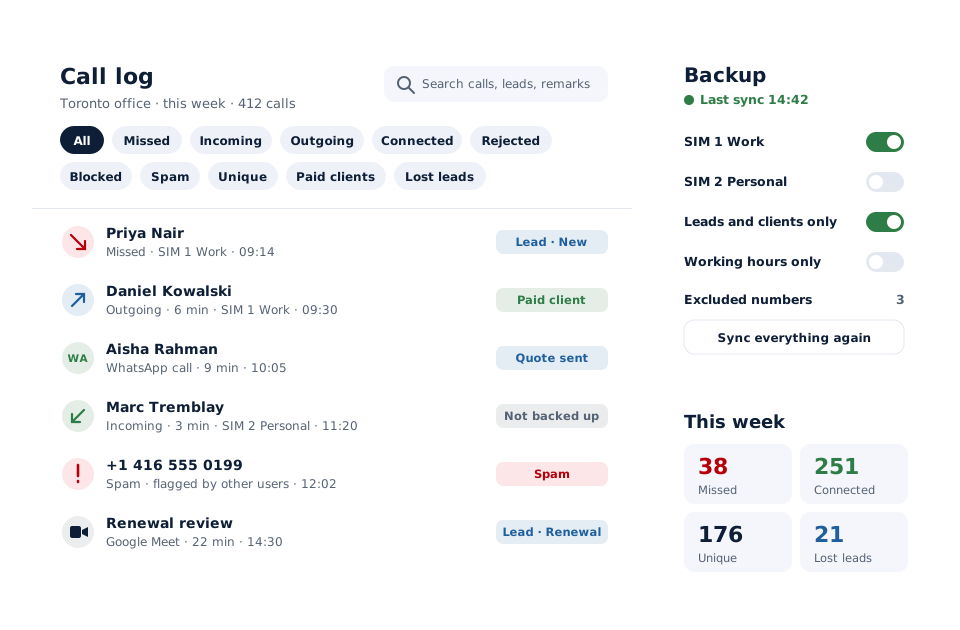
A call history manager is an app that turns a phone's raw list of calls into a record you can filter, search, back up and report on, so older calls stay useful instead of scrolling out of sight. mCallz labels every call with the correct SIM and type, sorts the log into ten filters, and keeps a copy in your account for the next phone.
- Filters for missed, rejected, spam, paid clients, lost leads and more
- Internet calls from WhatsApp, Meet and Zoom in the same list
- Backed up to your account, restored by signing in on a new handset
Calls go out on each phone's own SIM. Dialer, CRM and WhatsApp for ₹4,000 per user a year (₹333/month), down to ₹208/month for bigger teams. GST extra.
- Works on the SIM in each phone
- Android, iPhone and web
- Free trial at app.mcallz.com
The short answer
What is a call history manager?
A call history manager stores, sorts and protects a phone's record of calls, letting you filter by call type, search numbers and restore the log.
mCallz is a call history manager for Android phones that reads the device's call log and makes it workable for a sales or service team. Each call carries the correct SIM name, even on older Android versions, and the correct incoming, outgoing or missed type on phone models that write their own codes, which the app learns by itself. Ten filters split the log into missed, incoming, outgoing, connected, rejected, blocked, spam, unique numbers, paid clients and lost leads, and calls from WhatsApp, Google Meet and Zoom appear among the SIM calls. The history backs up to the account, with a choice of which SIMs to include and a list of numbers to leave out, and it returns on a new phone once the user signs in. Everything described here is taken from the feature list dated 14 October 2026.
- Every row shows the right SIM and the right call type.
- Ten filters surface the calls that matter in seconds.
- A replacement phone gets the old history back after sign-in.
Benefits
Call history manager benefits for sales and service teams
Accurate call labels
SIM names and call types are corrected on handsets that record them their own way.
Targeted filters
Pull up only rejected calls, only spam, or only calls with paying clients.
Nothing lost on a new phone
Sign in on the replacement and the backed-up history comes back with the leads behind it.
Private numbers stay private
Numbers on the excluded list never enter the backup or any automation.
Proof that sync ran
A sync log lists each run and its time, with a retry button if one failed.
Numbers you can act on
Totals by day, week, month or custom dates are built from the same log.
Filters
Call log manager filters and what each one shows
Each filter answers a different question about the day. Analytics rings above the log carry the same counts, and tapping a ring opens the matching calls.
- Missed: calls nobody picked up, usually the first list to clear each morning.
- Incoming and outgoing: direction alone, handy for checking who chased whom.
- Connected: calls that were actually answered, kept apart from attempts.
- Rejected: calls declined on purpose, often a hint to try WhatsApp next.
- Blocked and spam: numbers you stopped or that others flagged, out of the working view.
- Unique numbers: one row per caller, so ten calls from one person count once.
- Paid clients: calls with customers who have already bought from you.
- Lost leads: numbers called that never connected past your limit of 60, 30 or 0 seconds.
Accuracy
Call history manager app: correct SIM names and call types
Some Android phones write their own codes into the call log, so a basic history app can show an incoming call as missed or leave the SIM column blank. On a dual-SIM handset that makes it impossible to separate business calls from personal ones.
mCallz learns those codes automatically and shows the true incoming, outgoing and missed type, and it names the right SIM on every row, older Android versions included. Calls placed through WhatsApp, Google Meet and Zoom are written into the same history, so the record of a customer covers app conversations as well as calls over the mobile network.
Backup and restore
Call history backup to your account, and restore on a new phone
The backup holds calls together with leads, statuses, remarks, follow-ups, clients, templates and WhatsApp CRM history. If a record goes missing on either side, a self-check repairs it.
Choose the SIMs
Decide which SIMs back up. A personal SIM can stay off while the work SIM is copied.
List excluded numbers
Family or private numbers on the excluded list stay out of backup and out of every automation.
Add optional rules
Back up only calls inside the branch's working hours, or only calls with leads, assigned leads and paid clients.
Let sync run
Sync works in the background, with a full pass whenever the app opens; the sync log shows what ran and when, and a sync-everything-again button forces a fresh copy.
Restore by signing in
On a replacement phone, sign in to the same account and the backed-up calls, leads, remarks and follow-ups return.
Search and analytics
Call history management app: search and analytics
One search box covers calls, contacts, leads, remarks, reminders, clients, chats, templates, products and packages, and each result appears as the same full card it has on its own screen. Typing part of a number or a word from a remark finds the call and the lead behind it.
Analytics read from the same history: totals for incoming, outgoing, missed, connected, unique, rejected, blocked, spam and lost leads, for today, this week, this month, all time or a custom range, with Summary and Analysis views. Monthly trends show whether missed or rejected calls are creeping up.
Owners get one more layer: the team call logs show every employee's calls in the owner's account, which is the starting point for reviewing staff calls.
iPhone
Call history manager for iPhone: what is possible
iOS does not allow any app to read the iPhone's recent calls, so no call history manager can import SIM calls on an iPhone, and mCallz is no exception. The mCallz iPhone app still holds leads, remarks, reminders, contacts and the data backed up to the account; only the automatic import of the phone's own calls is missing.
For the full filtered log with SIM labels, use an Android phone. On an iPhone, the Recents tab of Apple's Phone app remains the place to view or clear individual calls.
At a glance
Call history manager features and when to use them
| Feature | What it does | Best for |
|---|---|---|
| Type filters | Missed, incoming, outgoing, connected and rejected views | Clearing call-backs each morning |
| Spam and blocked filters | Separates flagged and stopped numbers | Keeping the working list clean |
| Unique numbers | One row per caller instead of one per call | Counting the real people reached |
| Paid clients and lost leads | Calls with buyers, and numbers that never connected past your limit | Account care and win-back lists |
| SIM and type correction | Right SIM name and call type on phones with their own codes | Dual-SIM and older Android phones |
| Internet call logging | WhatsApp, Meet and Zoom calls in the log | Customers who prefer app calls |
| Account backup | Copies calls and CRM data, with SIM choice and excluded numbers | Upgrades, lost phones and repairs |
| Sync log | Each run with its time, plus retry and sync-everything-again | Admins checking that data arrived |
Honest limits
Call history manager limits and alternatives
mCallz keeps a business call log in order. Look elsewhere if:
- You need the history of an iPhone. iOS blocks call log access for every app, so the filtered log needs an Android phone.
- You want to edit or invent call log entries. Some apps sold as call log editors change past entries; mCallz records calls as they happened and has no editing tool.
- You need your operator's billing record. The app reads what the phone itself logged; for a billing dispute, ask your mobile operator for its statement.
- You run a desk-phone call centre. There are no IVR menus, virtual numbers or call queues today (they are planned), so a cloud phone system logs desk lines better.
Worked example
Call history manager example: a Toronto insurance broker replaces a phone
An insurance brokerage in Toronto, Canada. The business is an illustration, not a named customer.
Each of the eight brokers uses an Android phone with a work SIM and a personal SIM. Backup covers the work SIM only, and each broker puts family numbers on the excluded list. The office manager also turns on the rule that copies only calls with leads, assigned leads and paid clients, so private conversations stay on the handset.
Halfway through the month one broker drops her phone in a parking garage. She signs in on a replacement that afternoon, and her calls, client records, remarks and upcoming follow-ups come back. On Friday the manager opens the lost leads filter, sees which renewal enquiries never stayed connected past 30 seconds, and transfers them to a colleague for another try, while the paid clients filter shows which existing policyholders called during the week.
Price
Call history manager app price
Billed yearly, per user, GST extra. Every user on a team pays that team's band price, so 12 users pay ₹3,000 each. See full plan details, or ask us on WhatsApp.
Questions
Call history manager FAQ
Can I get my call history?
On Android, yes: the phone keeps its own log, and a call history manager such as mCallz reads it, sorts it and backs it up to your account. On an iPhone, apps cannot read that log, so use the Recents tab in the Phone app.
Which call history manager backs up calls to an account?
mCallz backs up calls to your mCallz account, together with leads, statuses, remarks, follow-ups and clients. You choose which SIMs are included and can keep chosen numbers out completely.
Is mCallz a call history manager?
Yes. mCallz is a call history manager that corrects SIM names and call types, adds internet calls to the log, and keeps a backup you can restore on another phone by signing in.
What is the best call history manager app for Android?
For a work phone, mCallz fits well because the log is tied to leads, paid clients and follow-ups and is backed up to an account. If you only want to tidy a personal log, a simple free app may be all you need.
Is there a call history manager for iPhone?
Not one that can read your calls: iOS keeps the recent-calls list closed to every app. The mCallz iPhone app covers leads, reminders and backed-up data, but the filtered call log needs Android.
How much does a call history manager cost with mCallz?
A single user pays ₹4,000 a year, close to US$44.08, and that rate holds up to 4 users. Larger teams step down through lower bands to ₹2,500 a user, close to US$28.30, at 20 users, with a quote beyond that. GST extra. Backup, filters and analytics come with the plan rather than as extras.
Is there a free call history manager?
mCallz can be tried free before you pay, through the trial at app.mcallz.com. Use the trial to check the SIM labels and filters on your own phone model.
How do I restore call history on a new phone?
Install mCallz on the new phone and sign in to the same account. The backed-up calls, leads, remarks and follow-ups are restored to the app.
Can I stop personal calls from being backed up?
Yes. Leave your personal SIM out of backup, add private numbers to the excluded list, or back up only calls with leads and clients or only calls in working hours.
Why does my call log show the wrong SIM or call type?
Some phone makers store calls with their own codes, which confuses ordinary history apps. mCallz learns those codes automatically and shows the right SIM name and call type, including on older Android versions.
Can a call log manager edit call history?
Not in mCallz. It keeps calls exactly as the phone recorded them, which is what a business needs when the log is used as a record of work.
How do I manage call history on iPhone?
Use the Recents tab in Apple's Phone app, where you can view, call back or delete entries. Third-party apps, mCallz included, cannot read or manage that list on iOS.
Switch on the mCallz call history manager before your next phone change
Turn on backup for your work SIM today, and the next handset starts with every business call already in place.