

For owners building a telecalling operation
mCallz: Telecalling Software to Set Up and Run Your Calling Team
Telecalling software is the toolkit behind an outbound phone sales team: the dialer, the shared lead list, the record of each call and the follow-ups, all managed from one account. mCallz packs that operation into a single per-seat app, so callers dial from their own SIMs while the owner reads every call, lead and punch-in on the web.
- One seat covers the dialer, CRM, WhatsApp follow-up and attendance
- No desk phones, headsets or virtual numbers to buy
- Every caller's calls and results in one owner account
Calls go out on each phone's own SIM. Dialer, CRM and WhatsApp for ₹4,000 per user a year (₹333/month), down to ₹208/month for bigger teams. GST extra.
- Works on the SIM in each phone
- Android, iPhone and web
- Free trial at app.mcallz.com
The short answer
What is telecalling software?
Telecalling software equips a phone sales team with a dialer, a lead database, call records and follow-up tools, so managers can measure every caller's output.
mCallz is telecalling software that an owner can put in place without buying desk phones, headsets or virtual numbers. Each caller installs the app on their own Android phone or iPhone and goes on dialling from the SIM inside it; on Android, mCallz can become the default dialer, so calls reach the record with no extra taps. Behind those phones sits one business account: leads pulled from Google Sheets, a REST API or Excel files, a status pipeline the owner designs, an auto dialer with redial rules, WhatsApp messages sent after calls, and team call logs listing each employee's calls. The same seat includes selfie attendance checked against the office location, so the shift and the calls are reviewed together. Pricing is per user per year, from ₹4,000 a seat for small teams down to ₹2,500 a seat at 20 users, and the feature list behind this page was last updated on 14 October 2026.
- No telephony hardware: the team calls from the phones it already owns.
- One per-user price instead of separate dialer, CRM and attendance bills.
- Calls, leads and punch times report to a single owner account.
Benefits
Telecalling software benefits for business owners
No hardware to buy
Staff keep their own handsets and SIM numbers, so the setup cost is seats rather than desk lines.
One bill per seat
Dialling, the lead pipeline, reminders and attendance share one per-user plan instead of four subscriptions.
Output you can read
Team call logs and analytics rings show each person's connected, missed and lost-lead calls without a written report.
Leads that arrive by themselves
Ad form sheets and API feeds are fetched on a schedule and can be dealt to callers in turn.
Data that stays with the company
Leads, remarks and WhatsApp CRM chats remain in the business account when someone resigns.
Shift and calls side by side
A selfie punch inside the office geofence shows who started work, next to who called whom.
What the team runs on
Telecalling software stack: six parts a calling team needs
A working telecalling setup has six moving parts. In mCallz all six live in the same account, which is what keeps the owner's view complete.
Phones on their own SIM
On Android the app takes over as the dialer, with a default business SIM on dual-SIM handsets. The iPhone app offers everything except reading the phone's call log.
Auto dialer
Callers run through a list hands-free, unanswered numbers are tried again up to three times, and the admin can fix the pause between calls for everyone.
Lead pipeline
Statuses you name and order, tags, products and custom fields, with each caller's previous note shown when that lead rings again.
WhatsApp follow-up
A message goes out after missed, outgoing or incoming calls, either sent silently via the WhatsApp Business API or placed ready in WhatsApp for the caller to send.
Team call logs
The owner's account receives every employee's calls, summarised as rings for connected, missed, rejected and lost-lead calls.
Attendance
Live selfie punches checked against the office location, recorded breaks and a branch report that exports to Excel.
Rollout plan
Telecalling software setup: rolling it out to a team
A practical order for an owner switching a team over. Start with two callers on the free trial, then add the rest once the pipeline feels right.
Create the business account
Sign up at app.mcallz.com. Each caller then installs the app and signs in, and the guided setup walks them through the dialer role, notifications and alarm permissions.
Design the pipeline before importing
Name the statuses your sales really follow, add the tags and custom fields you will filter by, and list your products. Leads are easier to sort when the labels exist first.
Connect the lead sources
Link a Google Sheet or REST API that is rechecked on a schedule, or import Excel, CSV or JSON files. Webhook and live-sheet leads can also be dealt to callers in turn by the Web CRM.
Set the guard rails
Lock the gap between auto-dialled calls, choose the minimum call length that counts a lead as done, and decide which SIMs back up. Personal numbers go on the excluded list.
Add attendance rules
For each branch, set the geofence radius, working hours, days off, late cut-off and whether staff may punch in away from the office.
Review the first week
Read the Done tab, the analytics rings and the attendance report together, then adjust statuses or redial rules before adding more seats.
Computer and phone
Telecalling software for PC: what runs on the computer
An honest answer first: mCallz is not a desktop softphone. The calls themselves travel over each caller's mobile SIM, so the phone stays in the loop. What the computer adds is the web dashboard, where an owner or team lead reads team call logs, attendance and field routes and exports reports to Excel.
For callers who sit at a desk, there is also dial from computer. Clicking a phone number in Chrome makes the linked phone place the call, with settings for which SIM to use, whether to call automatically and whether to switch on the speaker. The caller keeps working from a big screen while the call, the log and the after-call sheet still happen on the phone.
If your team must talk through headsets plugged into laptops, with no mobile phone involved, a cloud dialer suits that setup better than mCallz does today.
India and worldwide
Telecalling software India: rupee pricing and local lead sources
Plans are priced in Indian rupees and billed yearly, working out to between ₹333 and ₹208 for each user every month depending on team size, with the US dollar price printed beside every figure for teams elsewhere. GST is added on top. Lead source tags already include IndiaMART and JustDial alongside Facebook, Google and walk-ins, so enquiries bought from Indian directories can be tracked by source from day one.
The app is not limited to India. Number formats from other countries are handled for display and dialling, each imported source can carry its own country setting, and callers choose from more than 40 app languages, including right-to-left layouts.
Whichever country you call in, telemarketing rules apply to the calls, not to the software: India has TRAI's commercial communication regulations and its do-not-disturb preferences, the United States has the TCPA, and the United Kingdom has PECR. None of this is legal advice; it is general information, so confirm the rules in each country you call.
Free and paid
Telecalling software free: trial, paid seats and other costs
mCallz does not have a free-forever plan. What it offers instead is a free trial, opened from app.mcallz.com, in which you can import a real list, make real calls and watch the owner view fill up. A demo can also be booked on WhatsApp if you would rather be shown around first.
After the trial you pay per seat for a full year, and every seat on the team gets the same rate: ₹4,000 (US$44.08) each for 1 to 4 callers, falling step by step to ₹2,500 (US$28.30) each for a team of 20, with a custom quote above that and GST extra. Calls go out on your existing mobile plans, so there is no per-minute charge from mCallz. The one outside cost to plan for is WhatsApp: background sending runs through a WhatsApp Business API provider you connect, and that provider bills separately. Sending by opening WhatsApp with the message ready needs no API at all.
Buying checklist
Best telecalling software: questions to ask before you buy
- Do callers keep their own numbers, or must you rent virtual ones? (mCallz: their own SIMs.)
- Is the auto dialer included in the seat, or sold as an add-on? (Included.)
- Can leads arrive from your ad forms without manual uploads? (Google Sheets and REST APIs are rechecked on a schedule.)
- Can the owner see every caller's calls without asking for a report? (Team call logs and analytics rings.)
- What happens to leads and chats when a caller leaves? (They stay in the business account.)
- Does it cover attendance, or will you need a second app? (Selfie punch with office location check is in the same seat.)
- Does it handle inbound queues and IVR? (Not yet in mCallz, so inbound helplines should look elsewhere.)
At a glance
Telecalling software features and the owner job each one does
| Feature | What it does | Best for |
|---|---|---|
| SIM dialer replacement | Makes the app the phone's dialer so every SIM call is logged against a lead (Android) | Teams moving off personal notebooks |
| Auto dialer with redial | Calls a list in sequence and retries unanswered numbers up to three times | Owners buying leads in volume |
| Scheduled lead import | Checks a linked Sheet or REST API for fresh rows at set intervals | Businesses running ad lead forms |
| Round-robin assignment | Shares webhook and live sheet leads across callers in turn (Web CRM) | Fair splits without a dispatcher |
| Team call logs and rings | Puts every employee's calls and outcomes in the owner's account | Owners who manage several callers |
| WhatsApp after calls | Sends a set message after missed, outgoing or incoming calls | Teams that cannot answer every ring |
| Selfie attendance | Logs each punch-in with a live selfie, checked against the office location | Shift-based calling rooms |
| Third-party CRM push | Forwards calls and lead updates to an outside CRM via its API | Companies keeping an existing CRM |
Honest limits
Telecalling software limits: when another setup fits better
mCallz is designed for outbound teams calling from mobile phones. Look at other products in these situations:
- An inbound helpline on one shared number. mCallz plans to add IVR menus, virtual numbers and call queues, but none of them is live today.
- Laptop-only calling through headsets. There is no desktop softphone; the computer can trigger a call, but the phone places it.
- Predictive dialling or voice broadcasts. Each caller's phone places a single call and a human does the talking; recorded-message campaigns are not supported.
- An all-iPhone team that needs automatic call logging. iOS keeps its call history private from apps, which means SIM calls log themselves only on Android.
Worked example
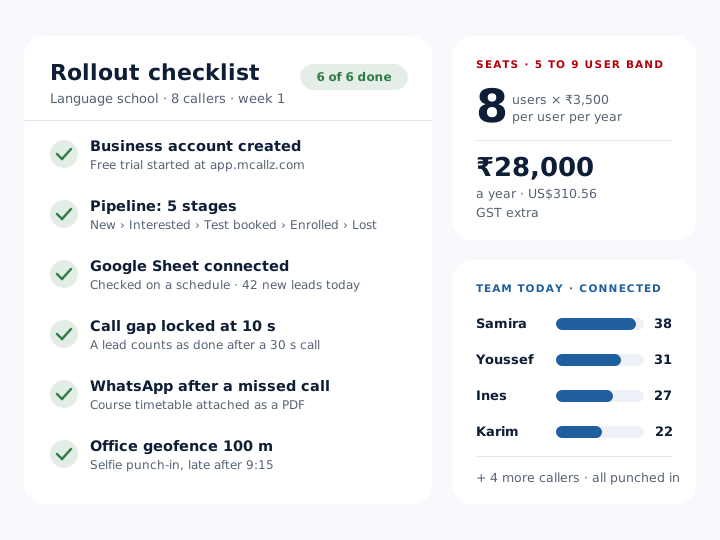
Telecalling software example: a language school in Casablanca adds 8 seats
A private language school in Casablanca, Morocco. The business is an illustration, not a named customer.
The school sells evening and weekend courses and receives about 900 enquiries a month from social media ads, collected in a Google Sheet. The owner starts the trial with two callers, builds a pipeline of New, Interested, Placement test booked, Enrolled and Lost, and connects the sheet so new rows arrive on their own. After a week the remaining six callers install the app and sign in.
The team lead locks the gap between auto-dialled calls at ten seconds and sets the minimum call length for a done lead at 30 seconds. Each phone backs up only its business SIM, and the branch geofence is set to 100 metres around the school. When a caller misses an incoming enquiry, mCallz sends the course timetable on WhatsApp. Every Friday the owner opens the web dashboard, compares each caller's connected calls with their Done tab, and downloads the attendance report in Excel. The school is an illustration, not a named customer.
Price
Telecalling software price per seat
Billed yearly, per user, GST extra. Every user on a team pays that team's band price, so 12 users pay ₹3,000 each. See full plan details, or ask us on WhatsApp.
Questions
Telecalling software FAQ
What is telecalling?
Telecalling is selling, booking or following up with customers by phone, usually by working through a list of leads. Doing it as a team needs software to share the leads, place the calls and record each result.
Which telecalling software lets a team call from its own SIM cards?
mCallz lets a team do that. Callers keep their current mobile numbers, and on dual-SIM phones a default business SIM can be set so personal calls stay separate.
Is mCallz telecalling software?
Yes. mCallz is telecalling software that combines a SIM dialer, auto dialer, lead pipeline, WhatsApp follow-up, team call logs and staff attendance in one per-user app for Android, iPhone and the web.
How much does telecalling software cost with mCallz?
Seats are billed yearly, and the bigger the team, the less each seat costs: ₹4,000 (US$44.08) per seat when you have up to 4 callers, ₹2,500 at 20, and a custom quote past that. A team of 10 is charged ₹3,000 a seat, so it pays ₹30,000 a year (US$335.60). GST extra.
Is there telecalling software for PC?
mCallz runs on phones, with a web dashboard for owners and reports. From a computer, clicking a number in Chrome makes the phone dial it, but there is no softphone that calls through the laptop itself.
Is there free telecalling software?
Not free forever, but mCallz can be tried at no cost first. A team can import leads and run real calling days during the trial, then move each caller to a paid yearly seat.
What is the best telecalling software in India?
For Indian teams calling from their own mobile numbers, mCallz fits well: rupee pricing, IndiaMART and JustDial source tags and dual-SIM support come built in. Inbound helplines that need IVR should choose a cloud telephony product instead.
Can I see a telecalling software demo?
Yes. A demo of mCallz can be booked on WhatsApp, and afterwards you can test it on your own leads during the free trial.
What is telemarketing software for small business?
It is a tool that lets a few staff call prospects from a shared list and track the results without a call centre setup. Per-user pricing and calling from existing phones keep it affordable for a team of two or three.
Is there AI telecalling software?
mCallz includes an Ask AI help assistant that answers questions about using the app, but it does not make calls by itself. Every call is placed for, and spoken by, a real person.
How can I track my telecallers' work?
Team call logs bring every employee's calls into the owner account, analytics rings count connected, missed and lost-lead calls, and the Done tab lists the leads each person finished.
Can telecallers work from home with this software?
Yes. Calls from their own phones still roll up to the owner account, and each branch's attendance rules decide whether a punch-in from outside the office is allowed.
Can I keep my existing CRM and still use mCallz?
Yes. Call records and lead data can be sent from mCallz to another CRM's API, so callers work in one app while your existing system stays up to date.
Set up your telecalling software with two callers first
Start the trial, connect one lead sheet and give two callers a week. Their calls, punches and results will already be waiting in your dashboard.