

For teams tired of running two tools
mCallz: CRM With Dialer That Saves Every Call to the Lead
A CRM with dialer is a customer database that places calls itself, so a salesperson rings a contact from the record and the outcome is written back to it without switching apps. mCallz removes the second tool altogether: tap a lead, or start the auto dialer on a filtered list, and the status picked after each call lands on that same lead.
- Dial any filter: status, tag, product, source or imported list
- Auto dialer, redial and WhatsApp dialing inside the CRM
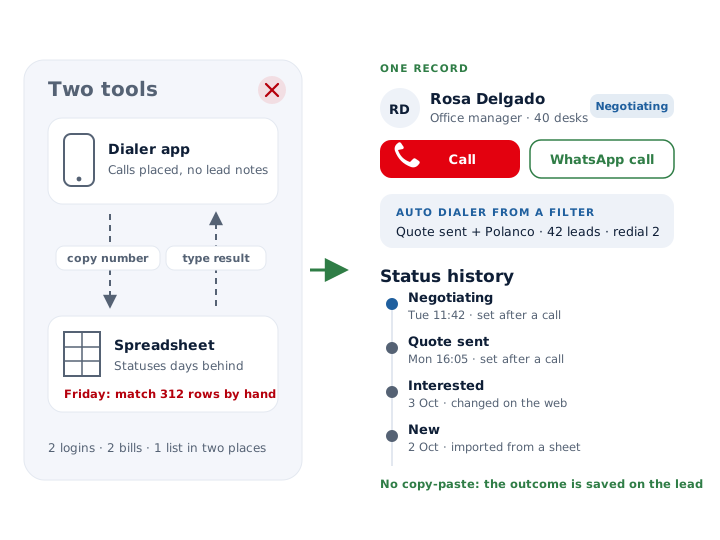
- Status history on every lead, with no copying between tools
Calls go out on each phone's own SIM. Dialer, CRM and WhatsApp for ₹4,000 per user a year (₹333/month), down to ₹208/month for bigger teams. GST extra.
- Works on the SIM in each phone
- Android, iPhone and web
- Free trial at app.mcallz.com
The short answer
What is a CRM with dialer?
A CRM with dialer is a sales database that places calls from each contact record and stores every call and its outcome on that record.
mCallz is a CRM with dialer for sales teams that currently keep leads in one tool and make calls in another. Because the app becomes the phone's dialer on Android, there is no integration to maintain: a salesperson calls a lead by tapping it, or hands a whole filtered list to the auto dialer, and the after-call sheet writes the status, remark and next follow-up onto the same record. Filters combine status, tag, product, source, imported list and custom fields, so a list such as "Interested, tagged Villa, from the March expo sheet" becomes a calling session in a few taps. Unanswered numbers can be redialled up to three times, the same list can be called over WhatsApp, and every status change stays in the lead's status history, edits on the web included. These points were checked against the product's feature list, dated 14 October 2026.
- No phone number is copied from one screen to another.
- The dialer works from the same filters the CRM uses.
- Outcomes are written to the lead, not to a separate call report.
Benefits
CRM with dialer benefits over two separate tools
No copy-paste
Numbers are never retyped into a dialer, and results are never retyped into a spreadsheet afterwards.
Calling lists from filters
Any combination of filters you build in the CRM can be dialled as a session straight away.
One login, one bill
Dialling, the pipeline and follow-ups share a single per-user plan.
Records that are current
The status is chosen on the lead seconds after the call, so nothing waits for Friday data entry.
A trail you can audit
Every move between statuses is logged on the lead, web changes included.
Retries that happen
Redial rules sit next to the leads, so an unanswered prospect gets tried again instead of forgotten.
The two-tool problem
CRM with built in dialer vs a separate dialer and CRM
Running a dialer and a CRM side by side usually looks the same in every office. Someone exports a list from the CRM, imports it into the dialer, the team calls, and then the dialer's report has to be matched back to the CRM by phone number. Numbers saved with and without a country code fail to match, a few results never make it across, and statuses in the CRM trail the real conversations by days.
A CRM with the dialer built in removes every one of those hand-offs. The list you filter is the list you call, the call is logged against the lead it came from, and the status is chosen on that lead the moment the call ends. There is one set of numbers, one login and one subscription to manage.
Some companies cannot drop their main CRM. For them, mCallz connects to a third-party CRM's API and pushes calls and lead updates across, so reps work inside mCallz while the rest of the business keeps reading the old system.
Ways to dial
CRM with dialer: seven ways to place a call from a lead
Tap the lead
Click to call from any lead card; the Done tab later records that the lead was finished by click to call.
Auto dial a filter
Turn the current filter, an imported list, assigned leads or call-log numbers into a hands-free session.
Dial today's follow-ups
Every follow-up due today can be dialled back to back as one session.
Call from a reminder
A ringing reminder offers call back, history, a remark and reschedule on the same card.
Search on the keypad
Type part of a name or number and the keypad offers matching leads and contacts.
Click a number in Chrome
At a desk, a click on a number in the browser sends the call to your phone, using your SIM and speaker settings.
Call over WhatsApp
From any WhatsApp button, start a WhatsApp voice or video call to a saved contact who is on WhatsApp.
Auto dialer inside the CRM
CRM with auto dialer: redial, ring limits and WhatsApp dialing
Because the auto dialer reads the CRM directly, the question "who do we call today?" is answered by a filter rather than an export. Sessions can start from any filter, a single imported file, a rep's assigned leads, numbers sitting in the call log or the day's due follow-ups, and a rep can halt, skip ahead or end the session from whichever screen is open.
Retry rules travel with the session. A number that rings out may get up to three further attempts, run straight away, after a pause you set or once the list is finished, and a ring limit stops the app waiting on switched-off phones. If the network cuts a call before it rings, the dialer tries that number twice more on its own before calling the lead unreached. An admin can also fix the spacing between calls and the shortest call that counts as done.
For buyers who only pick up WhatsApp, the session can switch channel to WhatsApp or WhatsApp Business, with a default ceiling of 20 calls a day that you can raise or lower. Leads are added to contacts before the first call, and anyone without WhatsApp prompts a choice: ring them on the SIM or skip them.
What gets saved
CRM with dialer records: status history, remarks and the Done tab
- Two taps on the after-call sheet put the outcome, a note and the callback date on the lead.
- Status changes build up in a status history on the lead, whether a rep made them on the phone or a manager on the web.
- Edits to the lead itself are kept in an edit history that syncs to the account.
- A remark saved today shows up during the next call with that lead, in either direction.
- The Done tab separates leads finished by the auto dialer, by click to call, by a manual mark or by a transfer.
- Tag and product changes, including bulk edits, are written into each affected lead's history.
Property teams
Real estate CRM with dialer: from portal enquiry to site visit
Property teams get leads from portals, ads and walk-ins, often for several projects at once. In mCallz each project can be a product on the lead, budget and preferred location can be custom fields, and a source tag records which portal or campaign the buyer came from. Portal exports in a Google Sheet, or a portal's API, are fetched on a schedule and mapped to those fields.
Agents then dial by project: filter on one product and the status "Interested", start the auto dialer, and move buyers to "Site visit booked" as they agree. A status change can send its own WhatsApp message, such as the site address and a contact person. When the agent saves a remark at the site, mCallz adds the area name and coordinates by itself, so the note carries the place it was written.
Comparing cost
Cheapest CRM with dialer: how to compare the real cost
We have not priced every vendor, so this page does not claim to be the cheapest. What it can show is the full mCallz bill, paid yearly per seat with the dialer, auto dialer and CRM inside it: ₹4,000 (US$44.08), near ₹333 a month, for each seat in a team of 1 to 4, falling to ₹2,500 (US$28.30), near ₹208 a month, when 20 people share the account. GST is added. A two-person office pays more per seat than a twenty-person floor, so price your real head count rather than the lowest figure.
When comparing, add up more than the seat price. A cloud dialer often charges for virtual numbers and call minutes on top of the licence; with mCallz the calls ride on the mobile plans your team already pays for. The cost to watch on our side is WhatsApp sending in the background, which goes through a WhatsApp Business API provider that bills you directly.
At a glance
CRM with dialer features and where each one helps
| Feature | What it does | Best for |
|---|---|---|
| Click to call | Calls a lead straight from its card and logs the call on it | Reps who work leads one at a time |
| Auto dialer on a filter | Dials every lead in the active filter or list in sequence | Teams with long, segmented lists |
| Redial and ring limit | Retries unanswered numbers 1 to 3 times and ends long rings | Prospects who rarely pick up first time |
| WhatsApp dialing | Calls the same list over WhatsApp, 20 a day unless you change it | Customers who ignore unknown mobile numbers |
| After-call sheet | Writes status, remark and follow-up onto the lead in two taps | Keeping the pipeline current |
| Status history | Keeps every status change, web edits included | Managers checking how a deal moved |
| Third-party CRM push | Pushes calls and lead changes out to an existing CRM's API | Companies that must keep their main CRM |
| Dial from computer | Clicking a number in Chrome on a desk computer starts the call on the phone | Reps working from a desk |
Honest limits
CRM with dialer limits: what this dialer does not do
mCallz dials from each salesperson's phone, one number at a time. Choose a different product if you need any of these:
- Power or predictive dialling across several lines. The app never rings multiple numbers per rep at once and passes the first answer along; each phone handles one call.
- Inbound routing. Routing tools (IVR menus, virtual numbers, call queues) are still on the roadmap, so a shared support line needs cloud telephony today.
- A laptop softphone. The computer can start a call through Chrome, but the conversation happens on the phone.
- Recorded-message campaigns. There are no robocalls or voice broadcasts; a person is on every call.
- Automatic call logging on iPhone. On iPhone, apps cannot see the phone's call history, which leaves hands-free SIM call logging to Android handsets.
Worked example
CRM with dialer example: a cleaning contractor in Mexico City drops its spreadsheet
A commercial cleaning company selling office contracts in Mexico City, Mexico. The business is an illustration, not a named customer.
Before the switch, the six reps exported a shared spreadsheet into a dialer app every Monday, called through the week and typed their results back into the sheet on Friday. Quotes were sometimes sent twice, and the sales manager never knew which offices had actually been reached.
Now the 1,200 leads live in mCallz, tagged by district and building size. On Tuesday a rep filters "Quote sent" plus the tag "Polanco", runs the auto dialer with two redials, and marks each office as Negotiating, Won or Lost as the calls end. Receptionists who never answer a mobile get a WhatsApp call later in the week. When the manager wants to know why a contract stalled, the lead's status history lists every change in order, with the dates. This company is made up for illustration; it is not a customer.
Price
CRM with dialer price
Billed yearly, per user, GST extra. Every user on a team pays that team's band price, so 12 users pay ₹3,000 each. See full plan details, or ask us on WhatsApp.
Questions
Crm with dialer FAQ
Which CRM with dialer lets reps call straight from a filtered lead list?
mCallz does. Any filter in the CRM, from status and tag to imported list or custom field, can be dialled lead by lead or as an auto dialer session.
Is mCallz a CRM with dialer?
Yes. mCallz is a CRM with dialer that replaces the phone's own dialer on Android, so calls are placed from lead records and each outcome is saved back to the lead without a second app.
How much does a CRM with dialer cost with mCallz?
mCallz charges per seat for a full year, and the seat price drops in bands as the team grows: ₹4,000 for 1 to 4 users, ₹3,500 for 5 to 9 users, ₹3,000 for 10 to 19 users, ₹2,500 for 20 users. GST extra; above 20 seats the price is quoted on WhatsApp. The dialer and auto dialer are part of that price, and calls use your own mobile plans.
What is the cheapest CRM with dialer?
We have not checked every vendor's price, so we do not call mCallz the cheapest. Compare the full cost, not only the licence: seats, virtual numbers, call minutes and add-ons. On mCallz a team of up to 4 pays about ₹333 monthly per user, billed yearly, and a 20-user team about ₹208, dialer included, with no per-minute charge because calls go over your SIMs.
What is the best CRM with auto dialer?
For teams calling from mobile phones, mCallz is a good fit: its auto dialer works from CRM filters, redials unanswered numbers and can switch to WhatsApp. Seated call centres needing predictive dialling should look at cloud products.
Is there a CRM with built in dialer for Android?
Yes. mCallz can be set as the default dialer on Android, which builds the CRM into every call. Teams that prefer their usual dialer can use CRM team mode, where the after-call sheet still opens after each call.
Is there a real estate CRM with dialer?
Yes. Property teams use mCallz to import portal leads, tag them by project, auto dial by project and status, and send a WhatsApp message when a buyer moves to "Site visit booked".
Is there a CRM with power dialer?
If a power dialer means calling a list back to back automatically, yes, that is the mCallz auto dialer. If it means ringing several lines per rep at once, no; each phone dials one number at a time.
Is there a CRM dialer free trial?
Yes, a free trial opens at app.mcallz.com, where you can import leads and dial them before picking a plan. A free-forever plan is not offered.
Can I keep my current CRM and use the mCallz dialer?
Yes. Reps call and update leads in mCallz, and an API connection copies the call and lead data into your main CRM.
What are the types of dialer for call center?
The common types are preview dialers, where the agent checks the record before calling; progressive or power dialers, which call a list one by one; and predictive dialers, which ring several numbers per agent. mCallz offers click to call and a one-at-a-time auto dialer.
Can a CRM dialer be used for collections?
Yes, for calling customers with payments due. mCallz shows paid and due amounts on each sale and filters clients expiring today or in the next 7 days. Collection calls follow their own rules, such as the FDCPA in the United States, the FCA's consumer credit rules in the United Kingdom and RBI guidance on recovery agents in India; this is general information, not legal advice.
Can I see how a lead's status changed over time?
Yes. Each status change, web edits included, is kept in the lead's status history, and a separate edit history synced to the account records changes to the lead's details.
Retire the extra tool and try a CRM with dialer
Import one list, filter it and press start. Each status you tap after a call is already on the lead when the manager looks.